TL;DR
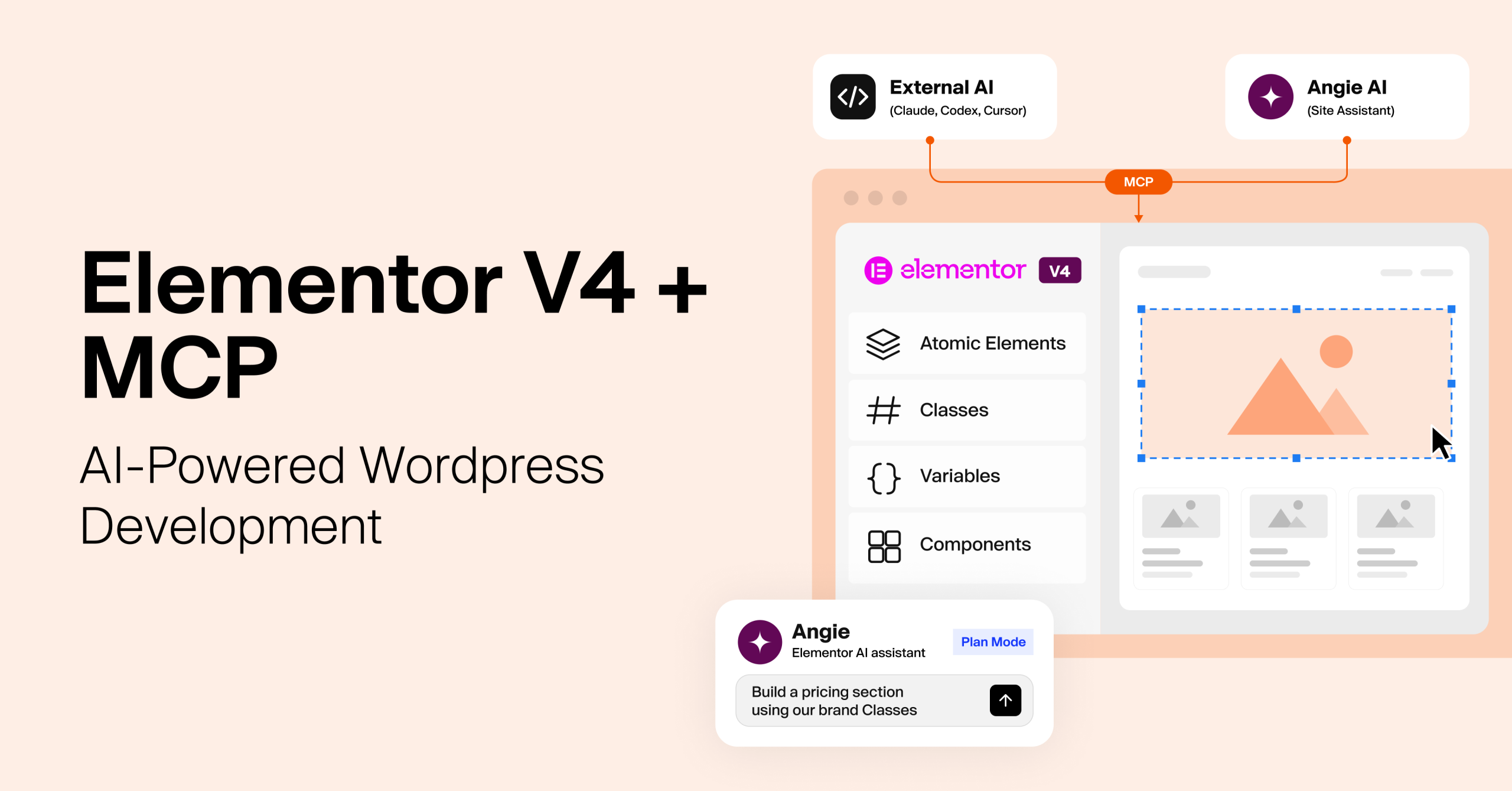
- Elementor MCP, built into Elementor 4.3 (September 2026), lets AI tools such as Claude Code, Claude Desktop, build and edit Elementor V4 pages, and saves every change as a draft.
- Elementor V4 replaces widget-by-widget styling with Atomic Elements, reusable Classes, Variables and Components, all stored as structured data that AI can read.
- The WordPress Abilities API defines what an AI agent is allowed to do, and the agent acts only with the connected admin’s permissions.
- For agencies, the gain is faster first drafts and design systems that stay consistent across clients, while your team keeps control of review and publishing. This guide comes from E2M, a white-label web development and AI delivery partner for web and digital agencies, whose Web AI team tested Elementor MCP hands-on.
Every agency knows this ticket: “Can we add a section to the homepage? Make it look like it belongs.”
It isn’t hard work. But across 20, 50 or 100 client sites, it eats hours your developers could spend on work clients actually pay a premium for.
If you run or manage delivery at a web or digital agency in the US, UK or Canada, and Elementor is part of your stack, that’s starting to change. Since Elementor 4.3 shipped on September 22, 2026, you can describe that section to an AI agent like Claude, codex. It builds the section from the client’s existing design system and leaves a draft for your team to review.
This article explains how that works: what changed in Elementor V4, how Elementor MCP connects AI agents to it, how to set it up safely, and where it fits in an agency’s delivery model. We tested it hands-on, so you’ll see what works today and what still needs a human.
Can You Build an Elementor Page Just by Describing It to AI?
What if you could build an Elementor page simply by describing what you want?
Imagine telling Claude:
“Create a responsive landing page with a hero section, three feature cards, and a call-to-action. Use the website’s existing brand colors, typography, and reusable classes.”
With Elementor V4 and the Model Context Protocol (MCP), this workflow is now real. Since Elementor 4.3 shipped on September 22, 2026, it has been built into the plugin (Elementor).
Elementor V4 introduces a different way to build WordPress websites. Instead of relying on traditional widgets with individual style settings, it uses Atomic Elements, reusable CSS Classes, Variables and Components. At the same time, Elementor MCP lets AI agents connect to Elementor and carry out supported development tasks directly.
Together, they open new ways to automate website creation, keep designs consistent and cut repetitive development work.
This article explains how that works: Elementor V4, what changed in Elementor V4 works, why its architecture suits AI-powered development, how Elementor MCP connects AI agents to it, how to set it up safely, and where it fits in an agency’s delivery model. We tested it hands-on, so you’ll see what works today and what still needs a human.
1. What Is the Difference Between Elementor V3 and V4?
Elementor V3 is built around widgets you style one at a time. Elementor V4 is built around Atomic Elements styled by reusable Classes and Variables, and saved as structured data.
Since April 2026, new Elementor sites run V4 by default, and existing sites can switch it on at Elementor > Editor > Settings > Atomic Editor (Elementor V4 FAQ).
In V3, developers create layouts with containers and widgets, then set content and styling through each widget’s controls. That works well for visual building, but it gets repetitive on larger websites.
Take a website with 30 service cards spread across several pages. If each card has its own padding, typography, colors and borders, keeping them consistent takes time.
Elementor V4 takes a more systematic approach. Instead of applying the same styles again and again, developers create reusable classes and variables:
- A class such as .service-card defines how every service card looks.
- A variable such as –brand-primary controls the primary brand color.
- Update the shared style once, and every connected element updates with it.
Key differences between V4 and V3
| Feature | Elementor V3 | Elementor V4 |
|---|---|---|
| Building approach | Widget-based | Atomic Elements |
| Styling | Mainly individual widget controls | Reusable Classes and Variables |
| Layout | Containers and widgets | Div Block, Flexbox, Grid |
| Reusability | Global colors, fonts, templates | Classes, Variables, Components |
| Responsive styling | Selected responsive controls | Any style property, per device |
| Element states | Widget-specific controls | Normal, Hover, Focus, Active on any class |
| Motion | Motion effects | Interactions, with more triggers |
| Page structure | Flat key-value widget data | Typed, structured Atomic data |
| AI agent access (Elementor MCP) | Not yet (“coming soon”) | Yes, since Elementor 4.3 |
Cleaner HTML output
Elementor V3 widgets add several wrapper layers. When our Web AI team placed a single button in both versions, the V3 button rendered six nested levels of HTML.
The Elementor V4 button rendered two: a flexbox div and the button itself. In V4, each Atomic Element outputs exactly one tag, and you choose which one.
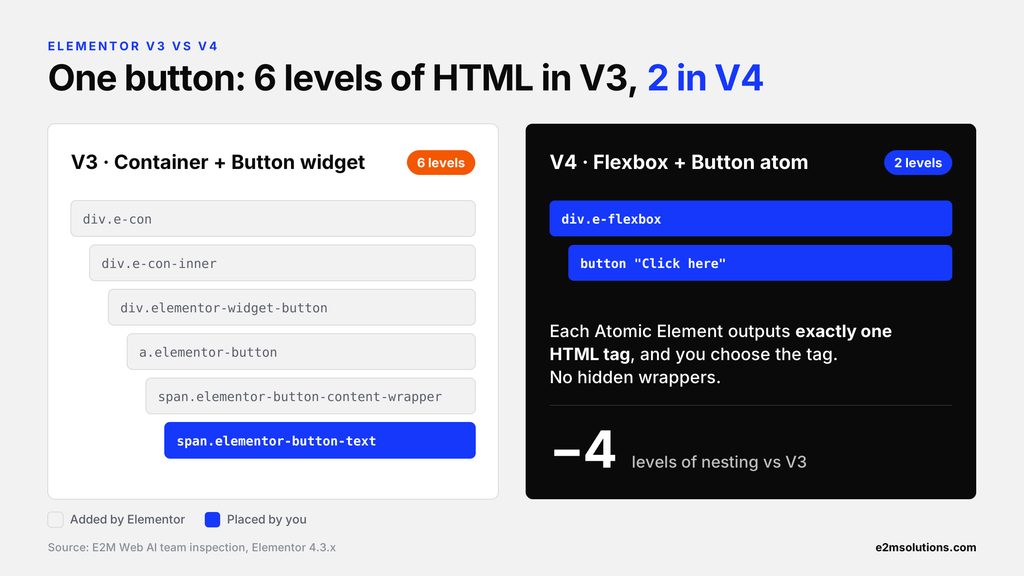
Cleaner markup means less DOM complexity. Real page speed still depends on scripts, images, hosting and other factors.
V3 and V4 elements can sit on the same page, so existing layouts don’t need to be rebuilt on day one. One catch: V4 Classes and Variables can’t be applied to V3 widgets.
Still choosing a builder for a new client build? Our comparison of the best website builders for agencies in 2027 shows where Elementor fits, and our guide to WordPress page builders for agencies goes deeper on the WordPress side.
2. What Are Atomic Elements in Elementor V4?
Atomic Elements are Elementor V4’s smallest building blocks. Each one does one job, outputs one HTML tag and uses the same style system as every other element. Developers combine them to build more complex layouts.
For example, instead of one widget that bundles an icon, heading and description, a developer builds a card from separate elements. They fall into three groups:
- Layout elements hold other elements.
- Content elements show something on the page.
- Composite elements combine several atoms in a fixed structure.
Common Atomic Elements and their uses in website build
| Element | Group | Purpose | Example use |
|---|---|---|---|
| Div Block | Layout | Groups elements | Cards, sections, wrappers |
| Flexbox | Layout | Arranges content in rows or columns | Hero sections, navigation |
| Grid | Layout | Controls rows and columns | Galleries, feature cards |
| Heading | Content | Displays headings | Page and section titles |
| Paragraph | Content | Displays text | Descriptions, body copy |
| Button | Content | Provides actions | Contact, purchase, sign-up |
| Image | Content | Displays images | Product photos, banners |
| SVG | Content | Displays vector graphics | Icons, illustrations |
| Tabs | Composite | Switchable content | Product details |
| Accordion | Composite | Expandable sections (new in 4.3) | FAQs |
| Loop (Pro) | Composite | Repeats dynamic content | Blog posts, product listings |
Flexbox vs Grid: when should you use each?
Flexbox works best when elements follow one direction. A hero section with text on the left and an image on the right is a good fit.
Grid is for layouts across rows and columns. A portfolio section showing six projects in three columns is a natural fit.
The choice matters for AI agents too. A clear request helps the agent pick the right layout instead of nesting containers it doesn’t need.
Example: building a feature card
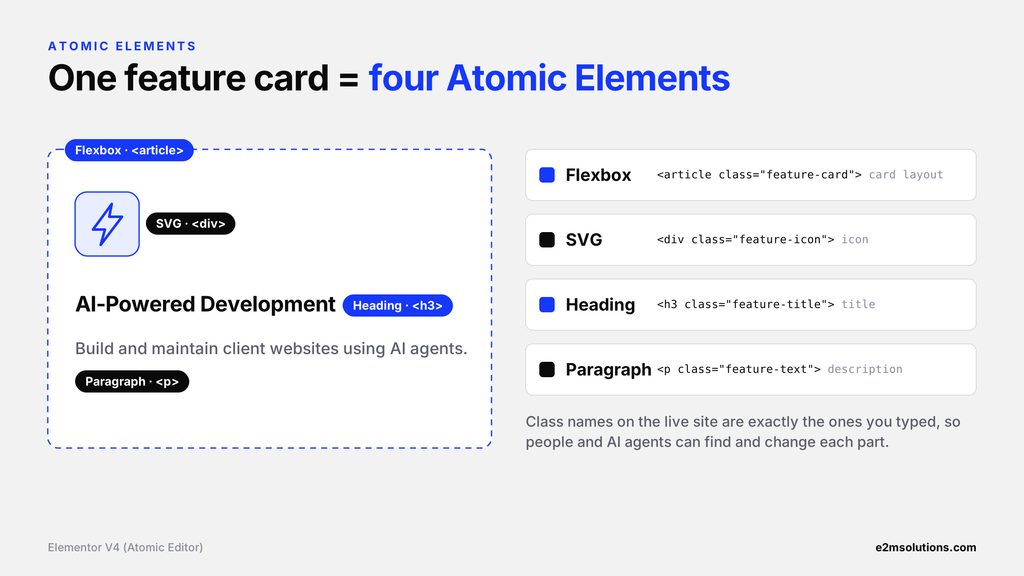
A feature card takes four Atomic Elements:
- Flexbox for the card structure
- SVG for the icon
- Heading for the title
- Paragraph for the description
The resulting HTML looks like this:
<article class="feature-card">
  <div class="feature-icon"><svg>...</svg></div>
  <h3 class="feature-title">AI-Powered Development</h3>
  <p class="feature-description">Build and maintain websites using AI agents.</p>
</article>
The class names on the live site are exactly the ones you typed. The card uses reusable classes for styling, while each element stays independently editable. That structure also makes it easier for AI tools to find and change specific parts of a page.
Planning your first V4 build for a client? Our white-label Elementor development team builds V4 sites with AI-assisted workflows, under your brand.
3. How Do Classes, Variables and Components Work in Elementor V4?
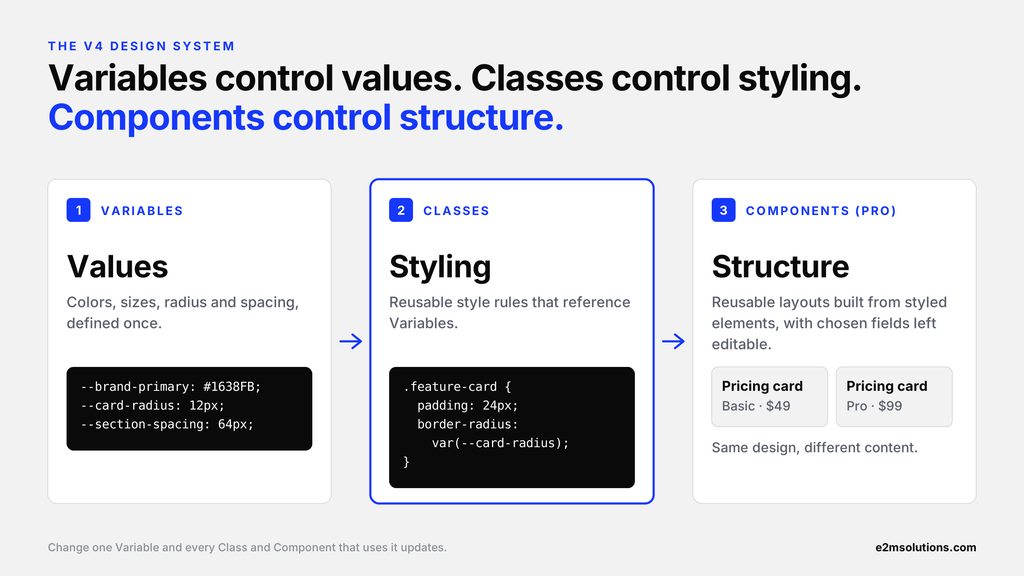
Variables control values, Classes control styling, and Components control reusable structures. Together, they turn a website into a design system that both developers and AI agents can build from.
Classes: reuse styling across elements
A CSS class defines a set of style rules. For example:
.feature-card {
  padding: 24px;
  border-radius: var(--card-radius);
  background: #ffffff;
  box-shadow: 0 4px 16px rgba(0,0,0,0.08);
}
Apply the same class to every feature card. If the padding changes from 24px to 32px, every card using that class updates. In Elementor V4, you manage classes visually in the editor rather than writing every rule by hand. The editor also shows how many places each class is used.
Variables: centralize design values
Variables store reusable design values such as colors, font sizes and spacing:
:root {
  --brand-primary: #2563eb;
  --card-radius: 12px;
  --section-spacing: 64px;
}
Classes reference these variables. If the brand color changes, updating one variable updates every connected style.
This matters most when an AI agent builds new sections. Instead of inventing new colors, the agent inspects the existing variables and reuses the site’s design system. V4 can also sync its Color Variables and Typography Classes with V3 Global Colors and Fonts (Elementor V4 FAQ).
Components: reuse complete layouts
Classes reuse styling, while Components reuse larger structures. A testimonial component, for example, might hold an image, customer name, review text and rating, and be reused across many pages.
You decide which content fields stay editable in each copy, while the shared design stays consistent. Creating Components requires Elementor Pro.
For AI-powered development, this means agents work with an established design system instead of building every element from scratch.
4. How Does Elementor V4 Store Page Data, and Why Does It Matter for AI?
Elementor V4 stores every Atomic Element as a typed, structured object, so an AI agent can read a page’s hierarchy and settings reliably before it changes anything. This is where V4 gets interesting for developers working with AI.
Elementor’s developer documentation describes each Atomic Element as an object with these properties (Elementor developer docs):
{
  "id": "abc12345",
  "version": "0.0",
  "elType": "e-div-block",
  "isInner": false,
  "interactions": [],
  "settings": [],
  "editor_settings": [],
  "styles": [],
  "elements": []
}| Property | Meaning |
|---|---|
| id | Unique identifier for the element |
| version | Element schema version, used for data migrations |
| elType | Type of Atomic Element (for example e-div-block, e-flexbox, e-grid) |
| isInner | Whether it is an inner element |
| interactions | Event-driven behaviors |
| settings | Content and configuration from the editor controls |
| editor_settings | Editor-only metadata, not rendered on the front end |
| styles | Local styles, including responsive and state variants |
| elements | Nested child elements |
The elements property matters most. It lets Atomic Elements contain other elements, creating a clear hierarchy:
Div Block
└── Grid
    ├── Flexbox
    │   ├── Heading
    │   └── Paragraph
    ├── Flexbox
    │   ├── Heading
    │   └── Paragraph
    └── Flexbox
        ├── Heading
        └── Paragraph
Values are typed too. V3 stored a color as a flat value like title_color: “#2563EB”. V4 stores {“$$type”:”color”,”value”:”#2563EB”}, and Classes and Variables are referenced by ID and validated on save. V4 also uses one template for both the editor and the live page, so what you see while editing matches what visitors get.
Why does structured data matter for AI?
In a traditional workflow, an AI generates HTML and CSS, and a developer then rebuilds it by hand in Elementor.
With Elementor’s abilities, an AI agent works on Elementor’s structure directly. It can identify each element’s type, understand its nesting, inspect settings and request changes through supported tools.
Suppose a developer asks:
“Change the background color of all feature cards to our secondary brand color.”
The agent can use the site’s existing classes and variables to make that change in one place.
Structured data doesn’t guarantee every AI-generated change is correct. It does give programmatic changes a far more predictable foundation. It is also why Elementor MCP works on V4 layouts today, while V3 support is still coming.
5. What Is MCP, and How Does It Connect AI Agents to Elementor?
The Model Context Protocol (MCP) is an open standard that lets AI applications use outside tools. Elementor MCP, built into Elementor 4.3, uses it to let AI clients discover and run Elementor actions on your WordPress site. Anthropic created MCP. In December 2025, it was donated to the Agentic AI Foundation under the Linux Foundation, which Anthropic co-founded with Block and OpenAI (MCP blog).
Without an authorized connection, an AI assistant can write Elementor-related code or instructions, but it can’t work on a WordPress site directly. MCP gives it a standard, permissioned way in.
Elementor lists Claude Code, Claude Desktop, Codex and Cursor as supported clients, and any other MCP-compatible tool can connect through “Other” (Elementor MCP). Note that GitHub also hosts several community-built Elementor MCP servers. This article covers the native one that ships inside Elementor.
How the architecture works
Developer → AI client (Claude) → Elementor MCP → WordPress MCP Adapter + Abilities API → Elementor → Draft page
- The developer gives a request, for example: “Create a three-column services section using our existing styles.”
- The AI interprets it and works out which supported operations it needs.
- Elementor MCP exposes the available tools. The WordPress MCP Adapter turns registered abilities into tools the AI client can call.
- WordPress validates permissions. It checks the Application Password and confirms the user is an administrator.
- Elementor runs the action and creates or updates the page structure.
- The result is saved as a draft. If someone edits the same page in the editor at the same time, Elementor flags the conflict.
- The developer reviews and publishes.
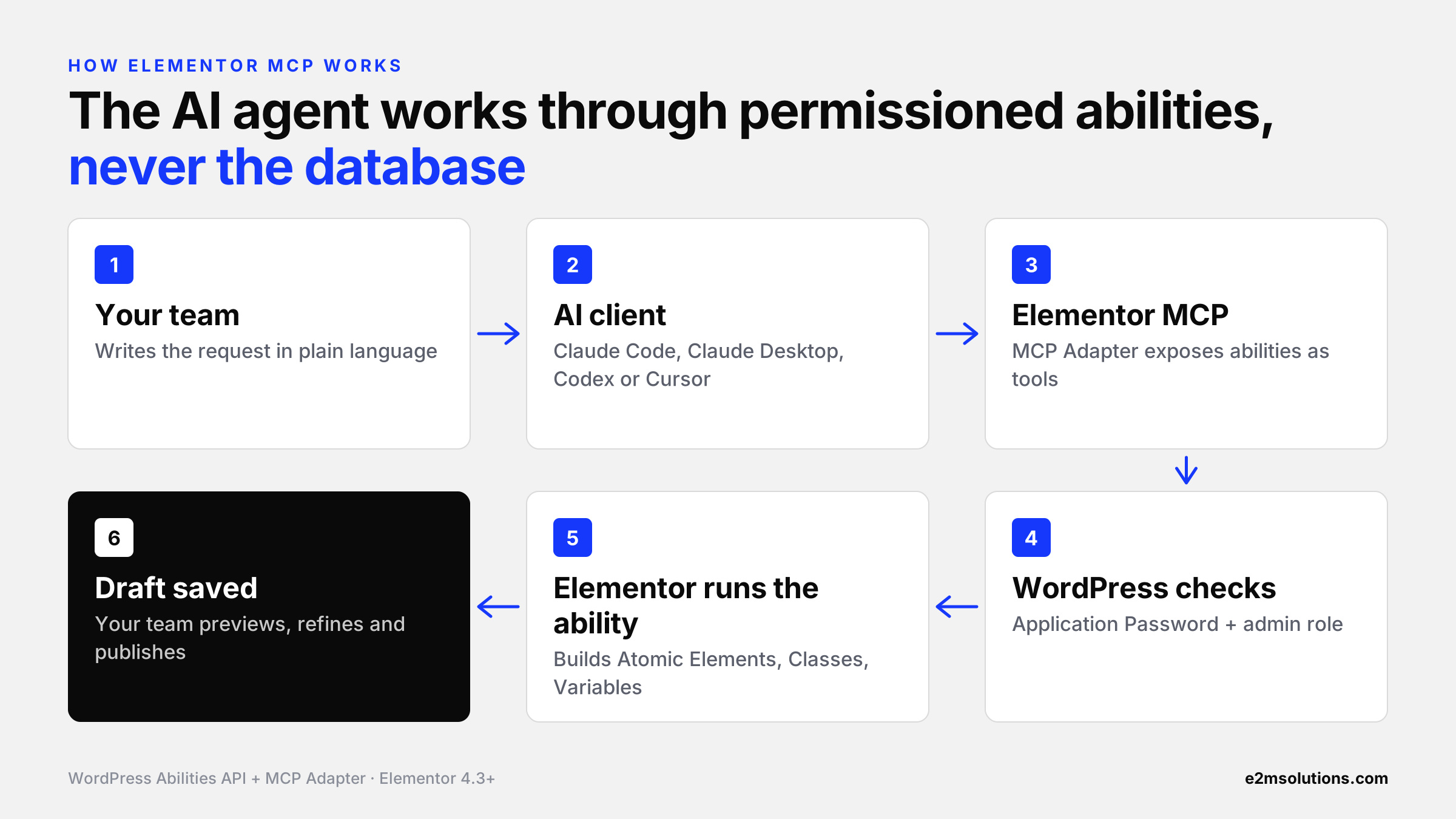
This changes AI’s role from a code suggestion tool to an assistant that carries out supported website operations.
6. What Is the WordPress Abilities API, and How Do AI Agents Use It?
The WordPress Abilities API, which shipped in WordPress 6.9, is a registry of named actions a site can perform. Each ability has a description, an input schema and a permission check, so an AI agent knows what it can call and whether it’s allowed to. The WordPress MCP Adapter then exposes those abilities as MCP tools (Make WordPress AI). We cover the full stack in our guide to WordPress Abilities API and MCP workflows.
An ability usually defines four things:
| Part | What it tells the AI | Example |
|---|---|---|
| Name | What to call | elementor-list-pages |
| Description | When to use it | Lists the site’s pages |
| Schema | How to call it, and what comes back | Page ID in, element structure out |
| Permission | Whether it’s allowed | Can this user edit the page? |
One ability might fetch information about an Elementor page. Another might create or update elements. Elementor also records changes made through the Abilities API in its Activity Log (Elementor on WordPress.org).
Practical example: updating a heading
Suppose a developer asks:
“Update the homepage heading to ‘Build Websites Faster with AI’.”
In our Web AI team’s test, the agent followed this sequence:
- Find the page with elementor-list-pages
- Find the heading with find-element
- Read the current settings with elementor-get-element-settings
- Update only the text with update-element
- Verify the result
The AI never touches the database directly. It uses supported operations with defined permissions, which makes controlled automation possible. Secure access, backups and developer review are still essential.
Ability names come from our Elementor 4.3.x test environment and may change between releases.
7. How Do You Build an Elementor V4 Page With Claude and MCP?
Connect Claude to the site, have it read the design system first, give it a structured page brief, then review the draft in Elementor before you publish. Here’s a practical example: a landing page for an AI automation service, with a hero section, a three-card features section and a call to action.
Step 1: Connect Claude to Elementor MCP
Set up an authorized MCP connection between Claude and the WordPress site (see section 8). Confirm it works by asking Claude to list the site’s pages and design information.
Step 2: Ask Claude to understand the design system
Before building anything, give it this instruction:
Review the existing Elementor classes, variables and page styles. Identify the primary colors, typography, spacing and reusable components. Use these existing styles when building the new page.
This stops the agent from creating inconsistent styles.
Step 3: Give the page-building prompt
Create a new Elementor V4 landing page for a building management system service.

Hero section
- Main heading: "Introducing rebel applied"
- Short supporting description
- Primary CTA button
- Two-column responsive layout

Features section
- Three feature cards
- SVG icon, heading and description in each card
- Use CSS Grid for the card layout
- Create and apply a reusable .feature-card class

Call-to-action section
- Heading and supporting description
- Contact button

Use existing design variables and classes wherever possible.
Build with supported Atomic Elements, set responsive layouts,
and save the page as a draft for review. Do not publish.
Starting from an AI-generated design in Claude, v0 or Lovable instead of a written brief? See how we convert AI-built websites into real WordPress sites.
Step 4: Let the AI build the page
The agent inspects the design system, creates any reusable styles it needs, and assembles the page. In our team’s test, 3 ability calls built a full features section, with 5 variables, 13 classes, and the layout, as a private draft.
In a live client demo, the agent also showed good judgment. When asked to match existing service cards, it reused the site’s card class instead of inventing a new one. When asked for a new look, it created new variables and classes and listed them for review. Read the full walkthrough in our Elementor MCP demo with Claude Code.
Step 5: Review the generated page
Open the page in Elementor and check:
- the Atomic Element structure
- reusable classes and where they’re used
- responsive behavior at desktop, tablet and mobile widths
- semantic HTML and accessibility
- visual consistency with the rest of the site
Step 6: Publish after validation
Once the page meets the brief, publish it through your normal approval workflow. The operations available depend on your Elementor version, your plan (Free or Pro), whether Angie is installed, and the connected user’s permissions.
Before a client page goes live, run it through your WordPress website launch checklist. AI-built pages still need the same QA as hand-built ones.
8. How Do You Set Up Elementor MCP?
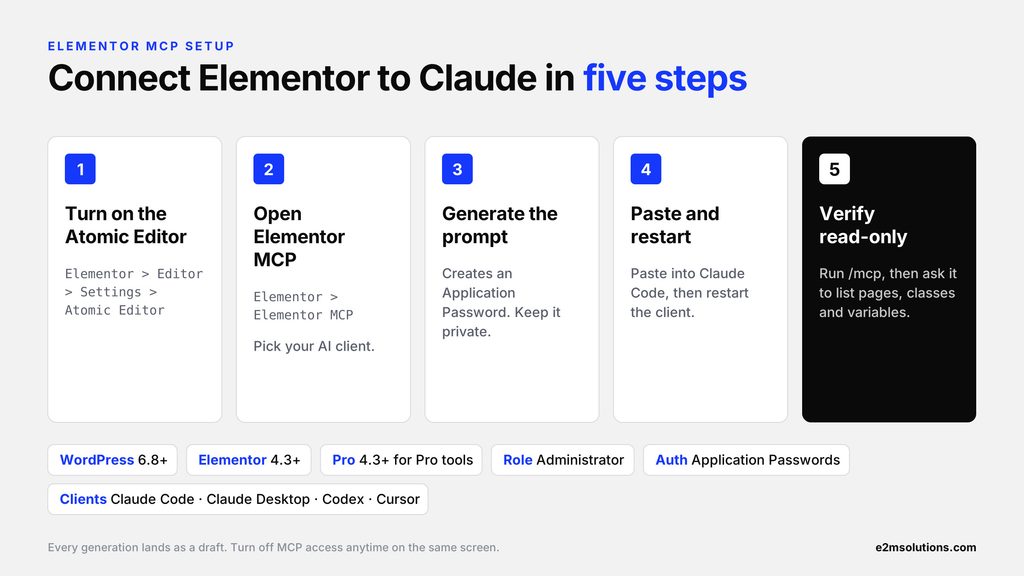
To set up Elementor MCP, turn on the Atomic Editor, open Elementor > Elementor MCP, generate a setup prompt for your AI client, paste it in, and restart. Elementor creates the Application Password for you, and the whole process takes about five minutes.
| Requirement | Detail |
|---|---|
| WordPress | 6.8 or higher (7.0 recommended) |
| Elementor | 4.3 or higher; Elementor Pro 4.3+ for Pro tools |
| Account | Administrator (only site admins can connect) |
| Atomic Editor | Turned on |
| Authentication | Application Passwords allowed (HTTPS or a local environment) |
| AI client | Claude Code, Claude Desktop, Codex, Cursor or any MCP-compatible tool |
Step 1: Enable the Atomic Editor
Go to Elementor > Editor > Settings > Atomic Editor and switch it on. Sites created since April 2026 have it on by default.
Step 2: Open the Elementor MCP screen
In the WordPress dashboard, go to Elementor > Elementor MCP and choose your AI client from the tabs.
Step 3: Generate the connection prompt
Tick the box confirming that a new Application Password will be created, then click Generate Prompt. The prompt includes your site’s MCP endpoint (/wp-json/elementor/mcp/), your username and the password. A manual configuration option is also available.
Keep the generated prompt private. It contains a working password.
Step 4: Connect the AI client
Paste the prompt into Claude Code, or into your chosen client. It adds the Elementor server to the client’s MCP configuration. Restart the client when prompted.
Step 5: Verify the connection
In Claude Code, check your MCP connections:
/mcpThe Elementor server should show as connected. In our setup, it exposed about 27 tools; counts vary by version and plan. Then try a read-only request:
“List the available Elementor pages, classes and variables.”
Once the connection works, start with a small task on a staging site. To disconnect, use Turn off MCP access on the same screen, or revoke the Application Password.
What it costs: connecting is free and basic elements are free. Pro elements need an Elementor Pro plan, and your AI tool bills you separately
Want Elementor V4 + MCP running on your client sites without training your team first? Our white-label WordPress development team handles V4 builds, migrations and AI-assisted maintenance under your brand.
9. What Is Angie AI, and How Is It Different From Elementor MCP?
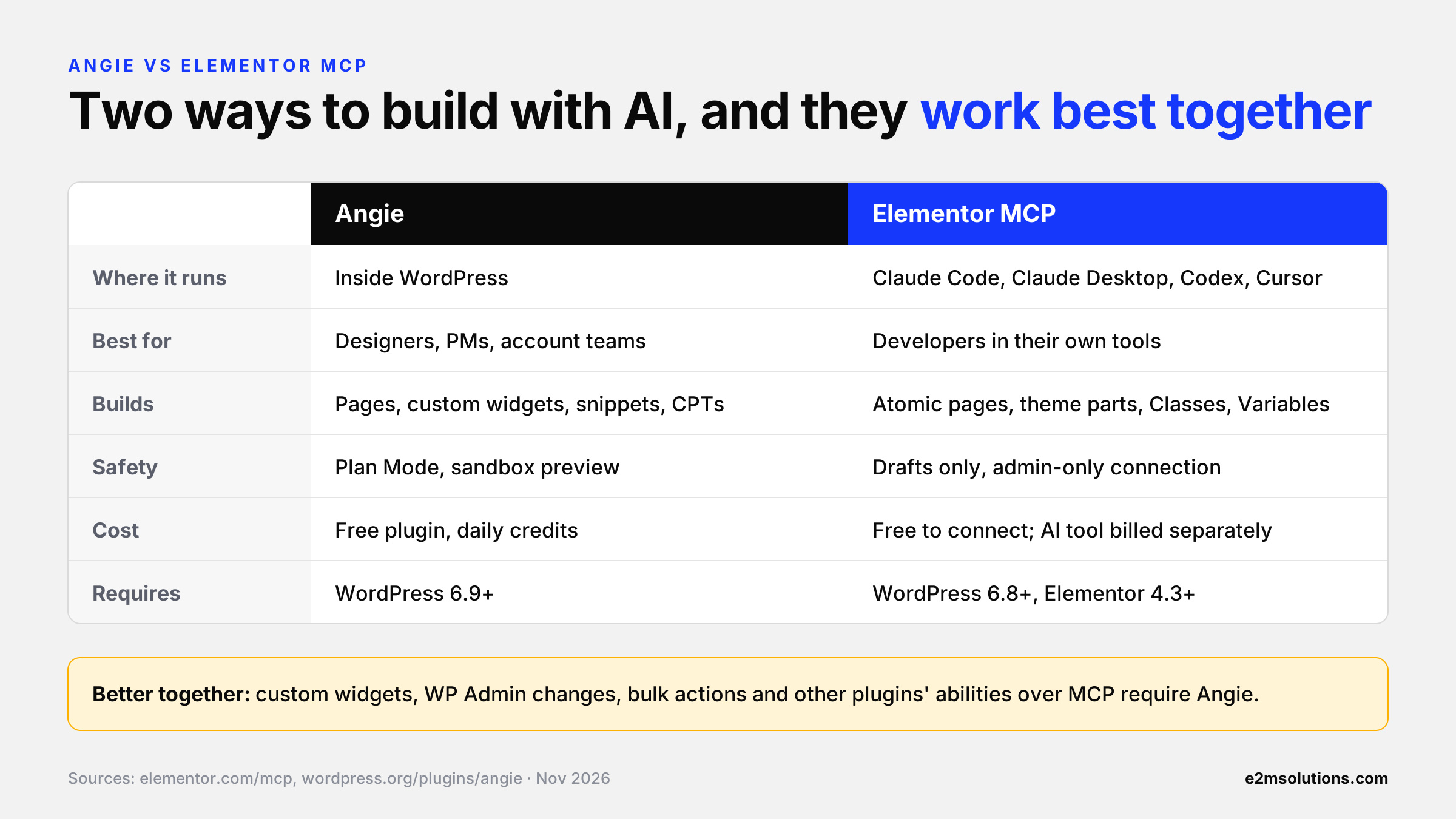
Angie is Elementor’s own AI agent that runs inside WordPress. Elementor MCP connects outside AI tools. They work together: several MCP capabilities, such as custom widgets, WP Admin changes, bulk actions, and other plugins’ abilities, require Angie to be installed. Angie is a free plugin with daily-renewing credits. It needs WordPress 6.9+ and has 100,000+ active installs (Angie on WordPress.org).
Angie lets teams create layouts, generate custom functionality and handle supported WordPress tasks in plain language, without leaving the dashboard.
It reads the site’s context, including themes, plugins, and Elementor structure, before it generates anything. It also discovers abilities that other plugins register with the WordPress Abilities API.
For example, a developer can give Angie this prompt:
Create a responsive landing page using Elementor V4 with a hero section, three service cards, testimonials and a call-to-action. Use the existing brand colors and typography, apply reusable CSS classes and make the layout responsive across devices.
The developer can then open the page in Elementor, review the Atomic Elements and refine the design visually.
Key capabilities of Elementor’s Angie (Agentic AI for WordPress)
- Page creation: generates pages and sections from natural-language prompts.
- Plan Mode: asks clarifying questions before it acts.
- Angie Code: builds custom Elementor widgets, Gutenberg blocks, snippets and mini apps in a preview environment, and pushes them live only after you approve.
- WordPress functionality: custom post types, fields and admin customization.
- Site management: bulk edits, debugging and SEO fixes through the opt-in Super Admin Mode.
- Cloud Library: saves widgets and snippets for reuse across sites.
Angie vs Elementor MCP
| Angie | Elementor MCP | |
|---|---|---|
| Where it runs | Inside WordPress | In external AI clients (Claude Code, Claude Desktop, Codex, Cursor) |
| Best for | Teams who prefer working in the dashboard | Developers working in their own tools |
| Builds | Pages, custom widgets, snippets, CPTs, admin changes | Atomic pages, sections, theme parts, Classes and Variables |
| Safety model | Plan Mode, sandboxed preview, opt-in Super Admin Mode | Drafts only; admin-only connection |
| Cost | Free plugin with daily credits | Free to connect; AI tool billed separately |
| Requires | WordPress 6.9+ | WordPress 6.8+, Elementor 4.3+ |
| How they connect | Extends the MCP with widgets, admin, bulk actions and other plugins’ abilities | Can call Angie’s extra capabilities when Angie is installed |
Sources: Elementor MCP, Elementor MCP beta announcement.
Why Angie (Agentic AI for WordPress) matters for agencies
Angie makes AI-assisted Elementor work accessible to team members who don’t configure external AI tools, such as designers, PMs and account managers. Elementor MCP serves developers who already work in Claude Code or Cursor.
Installing both gives you the widest coverage: the MCP for builds and design-system work, and Angie for the extras the MCP can’t reach on its own.
10. How Do Atomic Grid, Loop and Components Expand AI Development?
Grid, Loop and Components let AI agents build more than static sections: precise multi-column layouts, dynamic content listings and reusable branded blocks. Elementor MCP can place, fill and create Components, and connect dynamic content such as post fields, custom fields and taxonomies
Atomic Grid
Grid suits layouts that need precise control over rows and columns. For example, a portfolio page might show nine project cards in three columns. You can ask an AI agent to build a responsive Grid, reuse the existing card styles and adjust the layout for smaller screens. Since Elementor 4.3, Grid layout presets also run on Atomic Grid.
Atomic Loop (Pro)
Loop is built for repeated content. Instead of creating a card by hand for every blog post, a developer defines one reusable item layout and connects it to dynamic content. An Atomic Loop has three parts: a content query, a layout for the repeated items, and a reusable item design.
A blog archive, for example, can show every post in a consistent card without anyone building each card. Elementor 4.3 also added taxonomy filtering, alternating templates and custom empty states to Loop.
Reusable Components (Pro)
Components let developers create reusable layouts with controlled editing options. A pricing card component, for example, might hold a plan name, price, feature list and CTA. The design stays consistent while selected content fields change for each copy.
For agencies, this separates the shared design from the content that changes. For AI agents, it means proven structures to work with, instead of generating similar layouts again and again.
11. What Are the Benefits of Elementor V4 + MCP for WordPress Agencies?
Agencies get faster first drafts, more consistent client sites and developers who spend their time on review and custom work instead of repetitive assembly. It is one of the clearest examples of the shift in our agency AI delivery playbook: AI handles execution, and people own judgment.
Reduce repetitive development work
AI agents can handle supported tasks such as creating sections, adding content and applying styles. Developers can focus on custom functionality, architecture and quality assurance. Page building now joins the AI workflows agencies are already automating.
Agents get better when they know each client’s context. Pair them with an agentic intelligence layer for your agency, so brand rules and past decisions are available to every build.
Improve design consistency
Classes, Variables and Components create reusable design systems. AI agents inspect that design information and reuse it when they build new sections, so client sites stay on-brand as they grow.
Simplify maintenance
For supported operations, your team can describe content and style changes in plain language instead of clicking through every editor control.
Scale website production
Agencies can set reusable page patterns and development standards, then pair them with AI instructions to make repeat tasks faster. This pairs naturally with AI-assisted Figma to WordPress workflows.
Support gradual adoption
V3 content and V4 Atomic Elements can coexist on the same site, so agencies can introduce the Atomic Editor gradually instead of rebuilding every client site at once. Keep in mind that Elementor MCP only edits V4 layouts today, and some older third-party addons don’t support every Atomic feature yet. Test before you switch a live client site.
Planning V4 migrations across your client book? Here’s how white label services actually work for agencies when you split that work with a partner.
Use one connection across builders
Most agency portfolios span more than one builder. E2M’s Web AI team built Dev-Connect to give AI tools one connection across Elementor V3 and V4, Gutenberg, Bricks, Divi and ACF, with the Elementor V4 MCP abilities included. For simple V4 maintenance, Elementor’s MCP alone is enough. For full projects and mixed portfolios, one connection saves your team from learning a new setup for every builder.
The same applies to delivery capacity. Our white-label services cover Elementor theme development, Gutenberg development and other page builders, so every client site gets the same standard, whichever builder it runs on.
How to choose a white-label Elementor agency partner
If you’d rather hand V4 and AI-assisted builds to a partner than build the skills in-house, check five things:
- V4 experience: live Atomic Editor builds, not just V3 widget sites.
- A design-system habit: named Classes and Variables on every project, so AI agents and people both build on-brand.
- A safe AI workflow: staging first, drafts by default, human review before publishing.
- A V3 plan: a clear approach to mixed V3 and V4 sites and to migrations.
- White-label delivery: your brand, your client relationship, their team behind it.
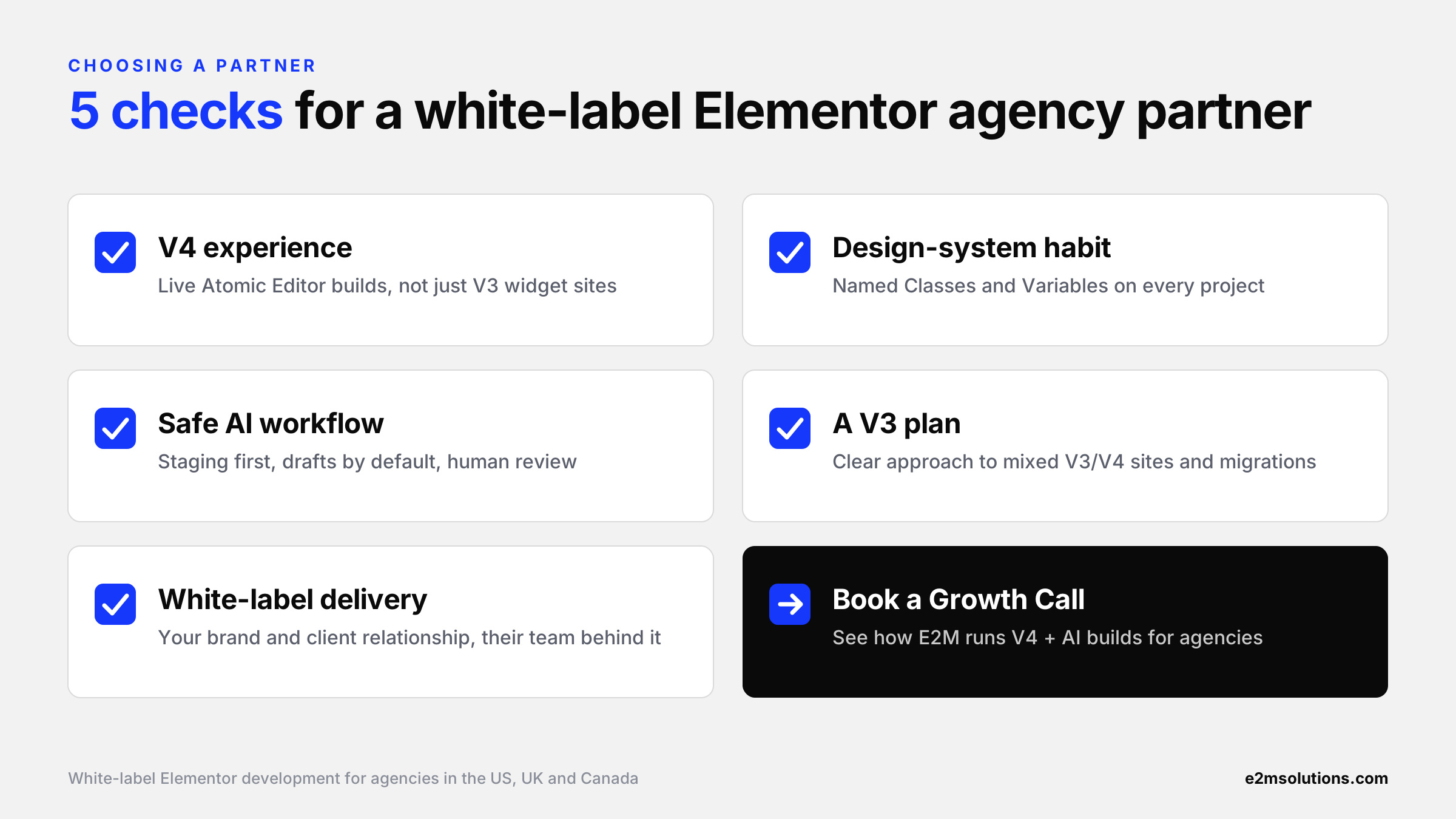
Our team works as a white-label Elementor web design agency for agencies in the US, UK and Canada, and is built around exactly these five checks.
“Moving forward, we are using Elementor V4 for all new projects. It is the version most compatible with AI, abilities and MCP.” — Ajay Koshti, Chief Delivery Officer, E2M
12. What Are the Limitations and Best Practices for Elementor V4 + MCP?
Elementor MCP automates assembly, not judgment. It works only on V4 Atomic layouts, Pro features need Pro, some capabilities need Angie, and every change still needs human review.
Current limitations (as of Elementor 4.3.6, November 2026)
- V4 only: the MCP can’t edit V3 widget layouts yet.
- Pro features need Pro: forms, popups, Loop, theme parts, dynamic content and creating Components.
- Some tasks need Angie: custom widgets, WP Admin changes, bulk actions and other plugins’ abilities.
- Admin-level access: the agent acts with the connected administrator’s permissions, so the credential is powerful.
- Still maturing: Elementor shipped four MCP-related patches (4.3.3 to 4.3.6) in the six weeks after launch (Elementor changelog).
Best practices with ELementor MCP
- Use staging environments. Do development and testing away from production whenever you can.
- Create the design system first. Set up reusable classes, variables and naming conventions before the agent builds.
- Give AI clear instructions. Define layout, content, styling, responsive behavior and what not to touch.
- Use existing components. Ask the agent to reuse what exists and to list anything new it creates.
- Validate the generated page. Review HTML structure, accessibility, responsiveness and functionality.
- Check compatibility. Some older Elementor addons may not support every Atomic Editor feature.
- Maintain secure access. Protect the Application Password, give each person or tool its own, and revoke it when a project ends.
- Keep developers in control. Review AI-generated changes before publishing. Drafts are the default for a reason.
The goal is to automate repetitive development execution, not to remove technical judgment.
13. What’s Next for Elementor Development With AI Agents?
Elementor V4 is becoming a structured, reusable platform built for programmatic work, and the abilities AI agents can use will keep growing. Elementor has already said MCP support for V3 layouts is coming, and Angie keeps adding abilities from plugins like WooCommerce, Yoast and ACF.
The pieces already fit together:
- Atomic Elements provide the building blocks.
- Classes and Variables define the design system.
- Components provide reusable structures.
- MCP and the Abilities API connect AI agents to supported Elementor capabilities.
Together, they enable workflows like this:
Design brief → AI agent → Elementor MCP → Atomic page creation → QA → Developer review → Publish
A developer describes a page, the agent builds the supported elements, and the developer focuses on reviewing the result. How well this works will still depend on the quality of the instructions, the tools available, how complex the site is and how good your testing process is.
More and more briefs start as clickable prototypes rather than documents. See how we use AI design tools and interactive prototypes to speed up the front of that workflow.
Elementor V4 Provides the Structure. Your Team Brings the Judgment.
Elementor V4 is changing how WordPress websites are structured, styled and maintained. Its Atomic Editor brings smaller building blocks, reusable CSS classes, central variables and components that keep sites consistent.
MCP adds another layer, letting AI assistants such as Claude work inside Elementor through supported, permissioned operations. The result is a new way of building websites, where AI agents help create layouts, apply design systems and update pages from plain-language instructions.
For WordPress agencies, this is a chance to cut repetitive work while keeping full control of quality and delivery. Elementor V4 provides the structure. MCP enables AI interaction. Your developers bring the expertise that turns automation into reliable client websites.
If you’d rather have that capacity without building it in-house, our white-label WordPress development team already delivers Elementor V4 sites with AI-assisted workflows for agencies across the US, UK and Canada, under your brand. Explore our white-label AI solutions for agencies, or see how other AI agents for digital agencies fit your stack.
Need Elementor specialists specifically? Our white-label Elementor developer services cover theme builds, V4 migrations and ongoing support. If you’re weighing an in-house hire instead, compare the cost of the top AI roles for agencies.
Ready to deliver Elementor V4 sites with AI, without adding headcount?
Frequently Asked Questions
Elementor MCP is a built-in connection, added in Elementor 4.3 (September 2026), that lets AI tools such as Claude Code, Claude Desktop, Codex and Cursor build and edit Elementor V4 pages. It uses the Model Context Protocol and the WordPress Abilities API, and it saves every change as a draft.
Yes, on Elementor V4. Once Elementor MCP is connected, Claude Code or Claude Desktop can read a site’s pages, Classes and Variables, and build or edit Atomic layouts as drafts. Your team reviews and publishes.
Connecting is free, and basic elements are free to generate. Pro elements such as forms, popups, Loop and theme parts need an Elementor Pro plan. Your AI tool (Claude, Cursor, Codex) bills you separately.
Not yet. Elementor MCP builds and edits Atomic (V4) layouts only, and Elementor says V3 support is coming. Because V3 and V4 elements can coexist, you can add V4 sections to an existing site.
V3 styles each widget individually. V4 uses Atomic Elements (one element, one HTML tag), styled by reusable Classes and Variables and saved as structured data. The result is cleaner HTML and a design system that both people and AI agents can work with.
Angie is Elementor’s AI agent inside the WordPress dashboard. Elementor MCP connects external AI tools. They work together: custom widgets, WP Admin changes, bulk actions and other plugins’ abilities over MCP require Angie.
You need WordPress 6.8+, Elementor 4.3+ (Pro 4.3+ for Pro tools), an administrator account, the Atomic Editor turned on, Application Passwords allowed and an MCP-compatible AI client.
It’s safe enough if you keep the defaults. Only admins can connect, the agent acts with that user’s permissions, every generation is a draft, and editing conflicts are flagged. Protect the Application Password, start on staging and review every change before you publish.
E2M, a white-label WordPress development and AI delivery partner for 400+ digital agencies, builds Elementor V4 sites with AI-assisted workflows under its partners’ brands. Our Web AI team uses Elementor MCP and our own Dev-Connect connection across Elementor, Gutenberg, Bricks, and Divi. Learn more about our white-label WordPress development services.