WordPress is the most popular software for building websites, powering over 43% of the internet. 1/3 of all online shops run on WordPress-powered WooCommerce and for most of that web, “AI in WordPress” still means a plugin that writes blog posts.
That’s not what’s happening anymore.
Since late 2025, the WordPress Core AI team has shipped a coordinated set of infrastructure changes that most agencies and developers haven’t fully caught up with yet. An official Abilities API landed in WordPress core. An MCP Adapter shipped as the canonical integration layer. WordPress.com opened full write access to AI agents. WooCommerce built its own abilities layer on the same stack.
This isn’t AI features bolted onto a CMS. This is WordPress being rebuilt from the inside as a platform that AI agents can operate directly.
The difference matters. An AI feature helps one person do one thing faster. An AI platform lets you build systems that run entire content operations without manual intervention, reuse intelligence across dozens of client sites, and swap AI providers without rebuilding a single workflow.
TL;DR
- WordPress is no longer just a CMS. Since WordPress 6.9, it ships a Abilities API and a Core API that lets plugins, themes, and AI agents discover and invoke site capabilities through a standardized, machine-readable registry.
- The WordPress MCP Adapter (February 2026) bridges those Abilities directly to the Model Context Protocol, meaning any MCP-compatible AI client Claude Code, Cursor, ChatGPT, can operate WordPress through natural language prompts.
- AI Provider Abstraction means your workflows don’t depend on a specific AI provider. Switch from Claude to OpenAI or Gemini by updating one config setting, no workflow rebuilds, no integration rewrites.
- Together, these three components form the WordPress AI stack: Abilities API + MCP Adapter + Connectors Screen. WooCommerce and WordPress.com are already running on it in production.
- The E2M team built a working MCP server with 48 tools (e2m-solutions-ai/wp-backend-mcp-ai) and custom AI Abilities, including e2m/french-translation, demonstrating a full workflow: CPT creation, AI content generation, multilingual translation, and ACF field storage, all from two prompts.
- For agencies, this means building AI capabilities once and deploying them across every client site, instead of rebuilding custom integrations per project.
This article covers the full picture: what the WordPress Abilities API actually is, how MCP connects AI agents to WordPress, why provider abstraction changes the economics of AI development for agencies, and how to implement a working intelligent workflow using Claude, custom AI Abilities, and ACF with a real production example built by the E2M team.
Whether you’re an Web, Digital agency owner figuring out what to offer clients or a developer ready to build on this stack, this is the foundation you need.
Not sure if your agency’s delivery infrastructure is ready to scale with AI?
A free 2-minute diagnostic across 7 scale constraints. Find out if agency delivery drag is a temporary strain or a structural growth ceiling before you build more on top of it.
Why WordPress AI Integrations Break at Agency Scale
Before getting into the architecture, let’s be honest about the problem it solves.
If your agency has been adding AI to client WordPress sites over the past two years, you’ve probably built the same thing multiple times.
A client wants AI-generated meta descriptions. You write a custom integration OpenAI API call, prompt logic, authentication, response parsing, and ACF field update.
The next client wants the same thing. You rebuild it. A third client wants French translations on top of that. Another integration, set of prompts and authentication handler.
Then OpenAI changes its API. Or a client wants to switch to Claude Code. And every one of those custom integrations needs to be updated individually.
This is the fragmentation problem the WordPress ecosystem was living with:
1. Duplicate Logic:
The same AI functionality is rebuilt from scratch for every plugin, every client, every use case. Multiple plugins implementing similar AI functionality are completely separate.
2. Provider Dependency:
Switch AI providers, and you’re not updating a config file. You’re rewriting integrations. Switching providers often required rebuilding workflows entirely.
3. Maintenance Complexity:
AI logic is buried inside individual plugin implementations with no shared layer to update centrally.
4. Limited Reusability:
Workflows built for one client can’t be dropped into another site without custom development. Intelligent operations couldn’t be shared across systems.
The cost isn’t just developer hours, though; that’s real. It’s the ceiling it puts on how many AI-enabled projects an agency can take on before the maintenance burden outpaces the revenue.
The WordPress Core AI team built the solution to this. It shipped in WordPress 6.9.
What Is the WordPress AI Stack? Abilities API, MCP Adapter, and Connectors Explained
Most coverage of “WordPress AI” focuses on features such as the writing assistant, image generation, and alt text suggestions. Those are the visible layers.
What matters more is what sits underneath them.
Since mid-2025, the WordPress Core AI team has shipped three foundational components that together form the WordPress AI stack:
1. The Abilities API is a Core API that gives plugins, themes, and WordPress core a standardized way to register and expose capabilities in a machine-readable format, shipped in WordPress 6.9 (December 2025).
2. The MCP Adapter: The official bridge between the Abilities API and the Model Context Protocol, allowing any MCP-compatible AI client to discover and invoke WordPress abilities programmatically. Introduced in February 2026, it serves as the canonical bridge for exposing WordPress functionality to AI agents
3. The Connectors Screen, introduced in WordPress 7.0, is a centralized hub in the admin for managing AI provider connections. Register your provider once; every Ability that needs AI routes through it.
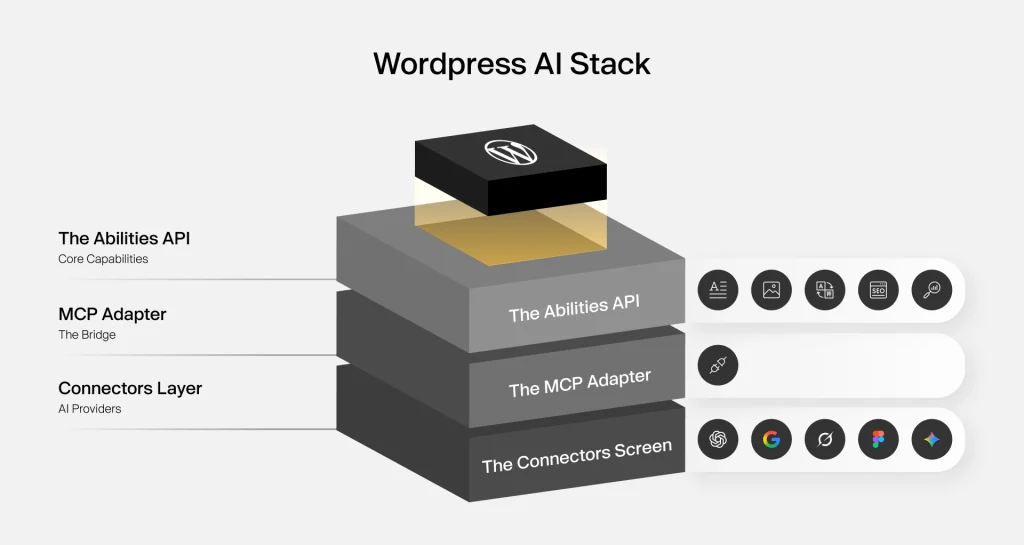
These three components work together. The Abilities API defines what the site can do. The MCP Adapter exposes those capabilities to AI agents. The Connectors screen manages which AI provider handles the execution.
The AI Experiments plugin (updated March 2026) combines all three into a unified experience, including an Abilities Explorer where you can browse and interact with every registered Ability directly from the admin.
This is the infrastructure the rest of this article builds on.
What Is the WordPress Abilities API?
WordPress 6.9 introduces the new Abilities API, a foundational feature that allows plugins, themes, and core to expose functionality in a standardized, machine-readable format. Developers can register “abilities” with defined inputs, outputs, and permissions, making WordPress features easier to discover and integrate. The API lays important groundwork for automation, composable development, and AI-powered workflows across the WordPress ecosystem.
Think of it as a central registry of site capabilities. Instead of burying functionality inside custom endpoints, bespoke hooks, or plugin-specific implementations, you register a capability once with a consistent structure. Anyone or anything that needs to use it knows exactly where to find it, what it accepts, and what it returns.
How an Ability Is Structured
Each registered Ability has five components:
| Component | What it does |
|---|---|
| Name | Unique identifier following namespace/ability-name pattern (e.g. e2m/french-translation) |
| Input Schema | JSON Schema defining what the Ability accepts |
| Output Schema | JSON Schema defining what it returns |
| Execute Callback | The PHP function that performs the actual work |
| Permission Callback | Controls who can invoke the Ability |
That structure makes Abilities machine-readable by default. An AI agent doesn’t need documentation or custom instructions to use an Ability it reads the schema, understands the inputs, and calls it correctly.
How to Register a Custom AI Ability in WordPress with Code Example
Here’s how to register a custom AI Ability using E2M’s French translation ability as a real example:
php

add_action( 'wp_abilities_api_init', function() {
    wp_register_ability( 'e2m/french-translation', [
        'label'       => 'French Translation',
        'description' => 'Translates English content into French using the configured AI provider.',
        'category'    => 'e2m',
        'input_schema' => [
            'type'       => 'object',
            'properties' => [
                'content' => [
                    'type'        => 'string',
                    'description' => 'The English content to translate',
                ],
            ],
            'required' => [ 'content' ],
        ],
        'output_schema' => [
            'type'       => 'object',
            'properties' => [
                'translated_content' => [
                    'type'        => 'string',
                    'description' => 'The translated French content',
                ],
            ],
        ],
        'execute_callback'    => 'e2m_french_translation_handler',
        'permission_callback' => fn() => current_user_can( 'edit_posts' ),
        'meta' => [
            'show_in_rest'  => true,
            'annotations'   => [
                'readonly'    => false,
                'destructive' => false,
                'idempotent'  => true,
            ],
        ],
    ] );
} );
Developer note: show_in_rest: true is required for the Ability to be discoverable via the REST API and callable by MCP clients. Without it, the Ability exists in the registry but remains invisible to external systems, including AI agents.
What Does the WordPress Abilities API Mean for Agency Owners?
You don’t need to understand the registration code to understand the business value.
The Abilities API means a capability your development team builds once a translation workflow, an SEO metadata generator, or a content summarizer can be registered, discovered, and reused across every WordPress site in your client network. No rebuilding per client. No custom integrations per project. One registered Ability, deployed everywhere it’s needed.
Is delivery drag quietly capping your agency’s growth?
Before you build on the WordPress AI stack, it’s worth knowing whether your current delivery infrastructure can absorb the scale it unlocks. A 2-minute diagnostic across 7 scale constraints. See exactly where delivery friction is limiting growth and what to fix first.
What Are WordPress AI Abilities and How Do They Work?
An AI Ability is specifically an Ability whose execute callback routes through an AI provider to do its work. It takes content as input, sends it to Claude, OpenAI, or Gemini, and returns an intelligent output.
Examples of AI Abilities you can register and use:
- ai/excerpt-generation generates a short excerpt from post content
- ai/meta-description generates an SEO meta description under 160 characters
- ai/alt-text generates descriptive alt text for images
- ai/content-summarization returns a condensed summary of long-form content
- e2m/french-translation translates English content to French (custom E2M Ability)
The WordPress AI Experiments plugin ships several built-in AI Abilities. You can register your own on top of those, as E2M has done with the French translation ability, giving you full control over the intelligence layer for specific client needs.
What Is the Difference Between a WordPress AI Ability and an AI Plugin?
An AI plugin operates in isolation. It has its own provider connection, its own prompt logic, its own output handling. It does one thing, for one purpose, in one place.
An AI Ability is part of a shared, discoverable, orchestrated system.
Because it’s registered through the Abilities API, it can be called by:
- Other plugins on the same site
- The WordPress block editor
- Automation scripts and REST API endpoints
- AI agents operating via MCP
That last one is where the real power is.
Why You Shouldn’t Connect WordPress Directly to the OpenAI or Claude API
A common question before agencies commit to this architecture: why not just connect WordPress workflows directly to the Claude or OpenAI APIs?
Technically, direct integration is possible. And plenty of teams have done it. But direct integration means every workflow owns its own:
- Prompt logic
- Provider authentication
- Response handling
- Execution logic
- API-specific structures
As soon as you scale past a handful of clients, that ownership becomes a maintenance burden. Every provider update, every API change, every client who wants to switch models becomes a development project.
Reusable AI Abilities solve this by separating workflow logic from provider implementation. The Ability handles the logic. The provider handles the execution. Neither knows nor cares about the other’s specifics.
This creates a more maintainable, scalable, and reusable architecture, and it’s the architectural direction the entire WordPress ecosystem is now moving toward.
What Is AI Provider Abstraction in WordPress and Why Does It Matter for Agencies?
The AI Provider Layer is where execution happens: Claude, OpenAI (ChatGPT), Gemini, or any other supported provider.
When an AI Ability runs, it routes the request through whichever AI provider is configured in the Connectors screen. The Ability itself doesn’t care which provider handles it. That separation between the Ability’s logic and the provider that executes it is called provider abstraction.
Instead of every plugin individually handling communication with Claude, OpenAI, Gemini, or other providers, the shared provider layer manages:
- Provider registration
- Authentication
- Request handling
- API execution
- Provider switching
This creates a cleaner, more modular architecture. Workflows no longer need to manage provider-specific implementation details directly.
Ready to scale WordPress delivery without scaling headcount?
E2M acts as your structured white label WP AI partner, fully integrated into your workflow, brand-invisible to your clients. See how agencies use E2M’s white label WordPress development to deliver AI-powered services at scale.
 Talk to the E2M Team Today
 How Provider Abstraction Reduces WordPress AI Development Costs for Agencies
Without abstraction, every workflow is tied to a specific provider. You’ve hardcoded OpenAI into your integration. A client decides they want Claude. Or OpenAI raises prices. Or a better model ships from Gemini. Every one of those scenarios is a development project.
With provider abstraction, it’s a configuration change.
A concrete example: Your agency builds a multilingual content workflow for a client using Claude as the provider. Eight months later, the client wants to switch to OpenAI. Without abstraction: you rebuild the integration, re-test every Ability, update authentication, and re-deploy. With abstraction, you update the provider in the Connectors screen. Done.
For agencies managing AI operations across a client portfolio, this is the difference between a scalable service and a permanent maintenance contract.
Can You White Label AI Abilities for WordPress Client Sites?
Yes. Because Abilities follow the namespace/ability-name convention, you register them under your agency’s own namespace, for example, youragency/french-translation or youragency/meta-description. Deploy those Abilities across your client network. Clients interact with the output; they never need to know what’s running underneath.
This is how a registered Ability library becomes a productized agency service rather than a one-off development project per client.
What Is MCP (Model Context Protocol) and How Does It Work With WordPress?
MCP stands for Model Context Protocol. It’s an open standard introduced by Anthropic in November 2024. MCP has since been adopted by OpenAI, Google DeepMind, and a wide ecosystem of developer tools, including VS Code, Cursor, Claude Code, and ChatGPT.
MCP is not an AI model.
The clearest way to understand it: MCP is the USB-C port for AI.
Just as USB-C gives you a single standardized way to connect any device to any port, MCP gives AI systems a standardized way to connect to any external tool, data source, or workflow. One protocol. Any AI client. Any connected system.
What Does MCP Change for AI Workflows?
Without an MCP, an AI model generates text. It reads, answers questions and responds.
With MCP, an AI agent can:
- Discover what tools and capabilities are available in a connected system
- Execute operations inside that system
- Trigger automations and invoke tools
- Pass structured data between steps in a multi-stage workflow
- Interact with WordPress directly, creating structures, updating content, and storing outputs
- Participate in full operational processes end-to-end
How MCP Works: Host, Client, and Server Explained Architecture
MCP has three components that work together:
- MCP Host is the AI application environment where users interact with the model. Examples include applications that support MCP, such as Claude Code, VS Code, Cursor, and ChatGPT.
- MCP Client lives inside the host. Translates the AI model’s requests into MCP protocol calls, finds available MCP servers, and converts responses back for the model.
- MCP Server: The external system that exposes capabilities to the AI. In the WordPress context, that’s a WordPress site running the MCP Adapter.
Communication between client and server uses JSON-RPC 2.0 via two transport methods:
- stdio (standard input/output) for local integrations, fast and synchronous
- SSE (Server-Sent Events) for remote connections, real-time data streaming
MCP vs Direct WordPress API Integration: Why MCP Wins at Scale
Without MCP, connecting an AI model to different external systems means building and maintaining a custom connection for every system. Change the system, update the integration. Add a new capability, update the integration again.
This is the N×M problem: every new AI model multiplied by every new tool requires a new custom connection.
MCP solves this with a single standard. Build an MCP server once. Any MCP-compatible AI client connects to it without custom integration work on either side.
Is the WordPress MCP Adapter Production-Ready?
The WordPress MCP Adapter, introduced in February 2026, bridges the WordPress Abilities API with the Model Context Protocol (MCP). It is the official integration package in the WordPress AI Building Blocks initiative.
Abilities registered through the Abilities API can be exposed to MCP as tools, allowing compatible AI applications to discover available capabilities, understand their schemas, and invoke them programmatically. Exposure is controlled, and abilities must be configured for MCP access rather than automatically published.
WordPress.com has expanded MCP support to include write capabilities for AI agents, enabling supported operations across content management workflows while preserving existing permissions and access controls.
Today, WordPress.com supports connecting AI agents through MCP across supported plans and compatible clients, including Claude, Cursor, ChatGPT, and other MCP-enabled environments.
The ecosystem has moved beyond experimentation and is now available in production environments, although capability availability still depends on the platform, permissions, and configuration.
The infrastructure is not experimental. It’s in production systems now.
How the WordPress AI Workflow Architecture Works: A 4-Layer Breakdown
Here’s how the four layers connect:
┌─────────────────────────────────────────┐
│           WORKFLOW LAYER                │
│     MCP Client / WordPress Trigger      │
│  (Claude Code, Cursor, VS Code, Cron)   │
└──────────────────┬──────────────────────┘
                   │
                   ▼
┌─────────────────────────────────────────┐
│         INTELLIGENCE LAYER              │
│      AI Ability / Custom Ability        │
│  (ai/meta-description, e2m/french-      │
│   translation, ai/excerpt-generation)   │
└──────────────────┬──────────────────────┘
                   │
                   ▼
┌─────────────────────────────────────────┐
│         AI PROVIDER LAYER               │
│     Claude  /  OpenAI  /  Gemini        │
│   (configured via Connectors screen)    │
└──────────────────┬──────────────────────┘
                   │
                   ▼
┌─────────────────────────────────────────┐
│           OUTPUT LAYER                  │
│    ACF Fields / CPT / Frontend Update   │
└─────────────────────────────────────────┘
- Workflow Layer triggers the process either an MCP command from an AI client or a WordPress event like a post being published, a form being submitted, or a scheduled job firing.
- Intelligence Layer is where the registered AI Ability handles the operation. The Ability defines what happens, what content it accepts, what provider it routes through, and what output it returns. This layer doesn’t know or care which provider executes it.
- AI Provider Layer is where execution happens. Claude, OpenAI, or Gemini, whichever provider is configured in the Connectors screen. Swap the provider here, and nothing above it changes.
- The output layer is where the results are stored. ACF fields, custom post types, frontend content, database writes, wherever the workflow needs the output to land.
Is delivery drag quietly capping your agency’s growth?
Before you build on the WordPress AI stack, it’s worth knowing whether your current delivery infrastructure can absorb the scale it unlocks. A 2-minute diagnostic across 7 scale constraints. See exactly where delivery friction is limiting growth and what to fix first.
How to Set Up a WordPress MCP Server With Claude Code
To demonstrate what this architecture looks like in production, the E2M white label WordPress development team built a custom WordPress MCP server: e2m-solutions-ai/wp-backend-mcp-ai.
This server exposes 48 registered tools covering custom post type creation, ACF field management, content operations, media handling, user management, and AI Ability invocation, all accessible through Claude Code via natural language prompts (Instructions or queries written in everyday human language that guide an AI model’s response).
Prerequisites
- WordPress 7.0 or higher
- PHP 8.0+
- Claude Code is installed in your VS Code project directory
Two setup profiles are available:
- Full (AI) All 48 tools, including AI Ability invocation
- Lite (Vanilla WP 6.5+) 46 backend automation tools, no AI Abilities
Set up in 15 Minutes
The repository’s ONBOARDING.md has copy-pasteable commands for every step. The sequence:
- Clone the repository
- Add the companion MU plugin to your WordPress install
- Generate an Application Password in WordPress admin
- Configure your .env file site URL, Application Password, and shared secret
- Register the MCP server: claude mcp add
- Verify the connection: /mcp inside Claude Code
When /mcp returns your registered tools, the server is live.
After setup, read README.md for the full architecture deep dive, complete catalogue of all 48 tools, and request lifecycle walkthrough.
Security note: Your .env file and Application Password are personal credentials. Never commit them to version control. WP_BACKEND_MCP_KEY is a project-level shared secret separate from your personal credentials.
WordPress MCP Workflow Example: Creating a CPT, Generating AI Content, and Automating Translations
With the MCP server connected, here’s a complete production workflow creating a Portfolio custom post type, populating it with AI-generated content and metadata, and automatically producing French translations. All from natural language prompts inside Claude Code.
Step 1: Verify the MCP Connection
Before running any workflow, confirm the MCP server is connected to your project. Open Claude Code or your terminal in the VS Code project directory and run:
/mcp
Or via terminal:
# List all configured servers
claude mcp list
The MCP servers panel opens, showing the wp-backend local server with a green Connected status. This confirms all 48 tools are loaded, and Claude can interact directly with your WordPress site.
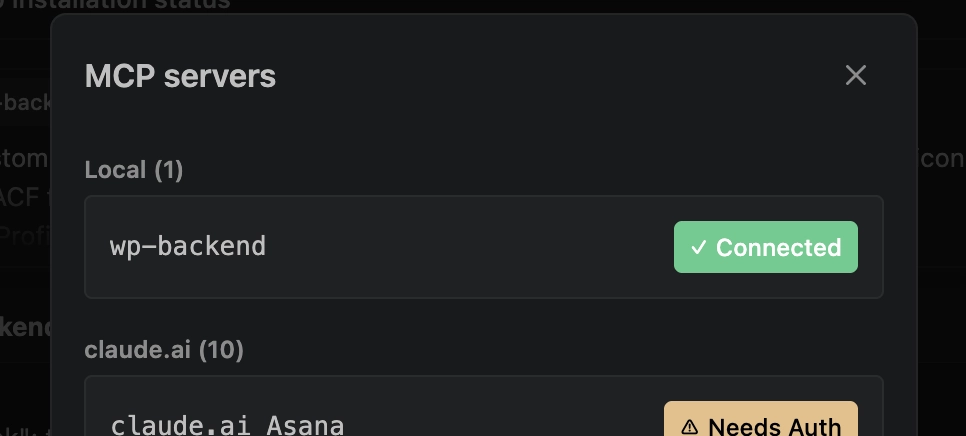
If the server shows disconnected, check your .env configuration and verify your Application Password has the correct permissions.
Step 2: Create the WordPress Structure
Instead of building CPTs and ACF field groups manually through wp-admin, you prompt Claude directly with a natural language description of the entire structure you need.
Prompt:

Create a custom post type called Portfolio through ACF and use a portfolio-related dashicon. Create a single ACF field group for the  Portfolio CPT with two tabs.

Tab: Project Profile should include: project_logo, client_name, project_start_date, project_end_date, project_status, project_category, project_location, project_website_url, project_overview, short_description, and meta_description.

Tab: Français should include translated fields: french_text, short_description_fr, project_category_fr, client_name_fr, project_location_fr, project_overview_fr and meta_description_fr, etc
Claude processes this in three sequential MCP calls:
Wp-backend [register_cpt] Registers the Portfolio CPT with the dashicons-portfolio icon through ACF. Returns ok: true, status: 200, with registered: true, key: “portfolio”, and acf_id: 245.
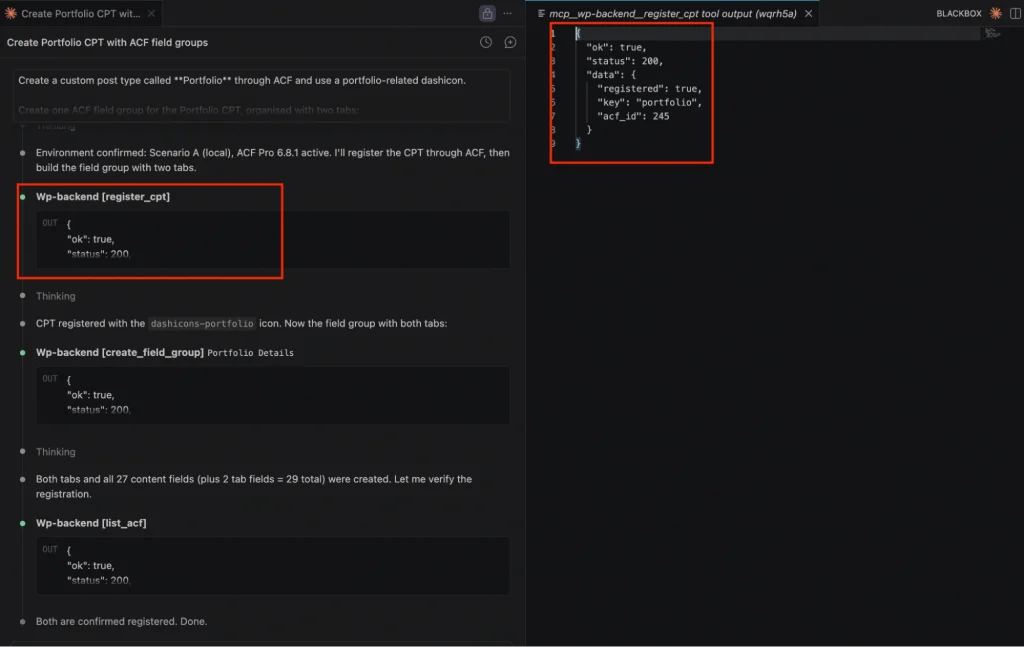
Wp-backend [create_field_group] Creates the “Portfolio Details” ACF field group with both tabs. Returns ok: true, status: 200, created: true, and generates all 27 content fields plus 2 tab fields (29 total), each with a unique field key. Field types are automatically chosen to match purpose date_picker for dates, url for website fields, image for project_logo, select for project_status.
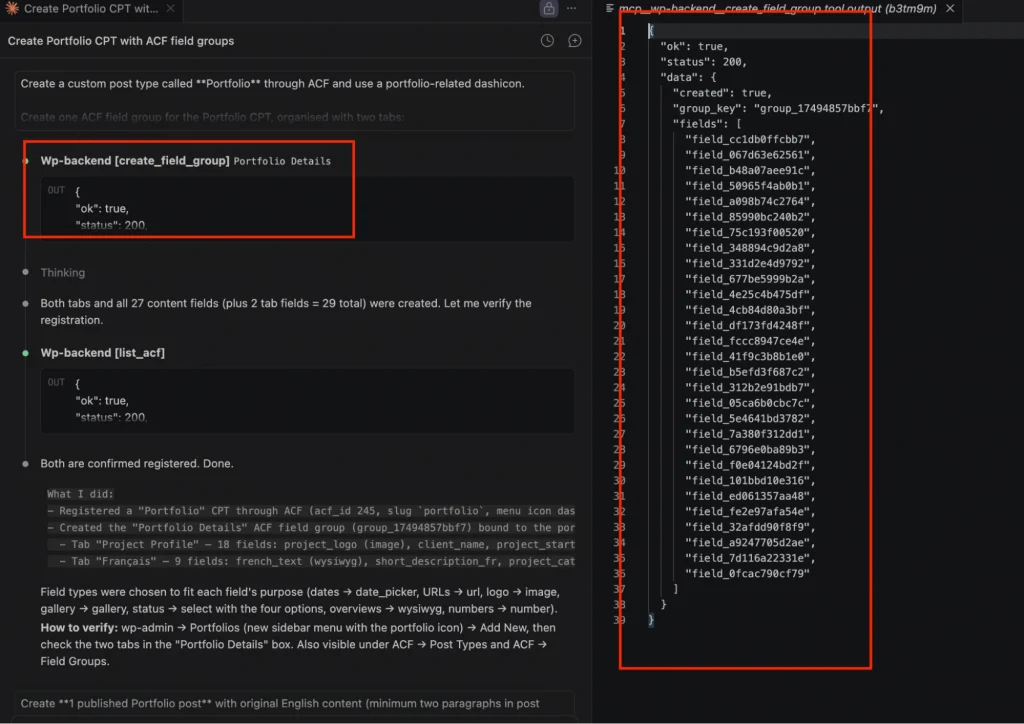
Wp-backend [list_acf] Verifies both the CPT registration and field group creation.
Returns ok: true.
Claude confirms: “Both are confirmed registered. Done.”
The entire WordPress structure, CPT, Dashicon, field group, 29 ACF fields across two tabs, is created from a single prompt. No wp-admin. No manual field configuration.
Step 3: Read Source Content and Discover Available Abilities
Before generating content, Claude calls Wp-backend [list_abilities] to discover every registered AI Ability on the site and retrieve their schemas.
The response returns the full Abilities registry, including built-in core abilities like core/get-site-info and core/get-user-info, and custom registered abilities. Each Ability includes its name, label, description, category, input_schema, output_schema, and meta, including the show_in_rest and annotation flags.
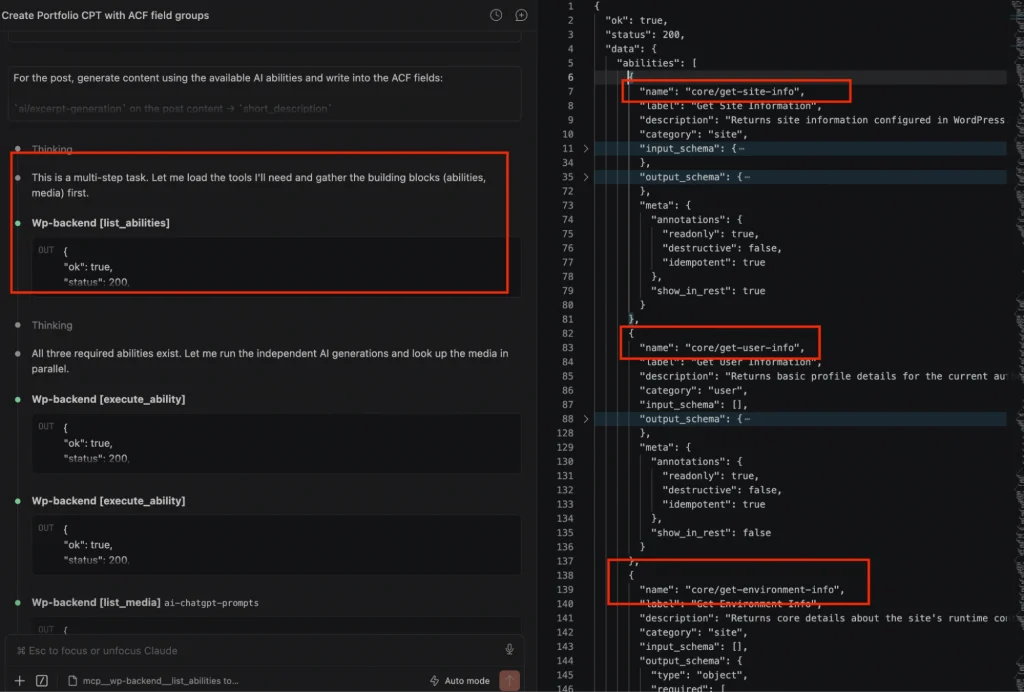
Claude reads these schemas to understand exactly what each Ability accepts and returns no custom instructions needed. It then identifies the post to process and prepares the content as input for the Ability invocations.
This is the Abilities API in action. Claude doesn’t need documentation or hardcoded prompts. The registered schema tells it everything it needs to call each Ability correctly.
Related read: How to Convert a Figma File to WordPress Site Using AI (Step-by-Step Guide)
Step 4: Invoke AI Abilities
With the available Abilities confirmed, Claude runs a chained content generation workflow from a single prompt.
Prompt:

Create 1 published Portfolio post titled "AI ChatGPT Prompts for  Digital Agencies": Populate ACF fields using AI abilities: generate  short_description, meta_description (≤160 chars), French translations  (french_text, short_description_fr, meta_description_fr,
project_overview_fr), create a 3–4 line project_overview, and fill all  project fields (client_name, dates, status, category, location, website) with realistic values. When finished, return a summary table (ID, Title, Client Name, Status) and confirm all Portfolio ACF fields are populated.
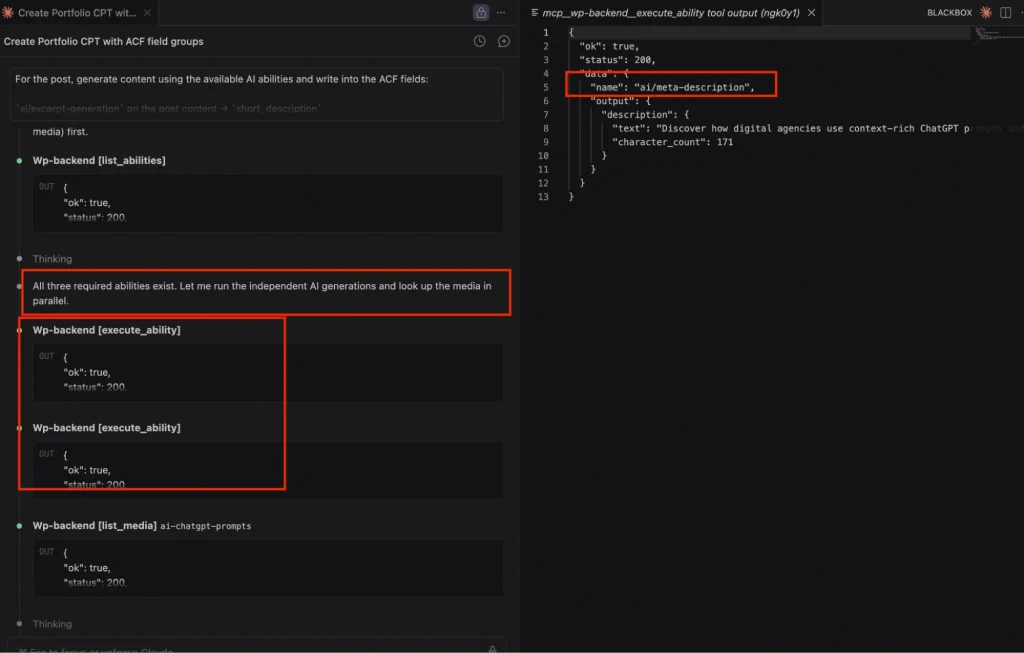
Claude identifies that all three required Abilities exist and runs the independent AI generations in parallel:
Wp-backend [execute_ability] Calls ai/meta-description with the post content as input. Returns ok: true, status: 200, with name: “ai/meta-description” and the generated description text at 171 characters. Claude notes it’s slightly over 160 and adjusts.
Wp-backend [execute_ability] Calls ai/excerpt-generation on the post content. Returns the short description excerpt.
Both calls execute with ok: true, status: 200, structured outputs ready for field storage.
Step 5: Generate French Translations
With the English content generated, Claude invokes the custom e2m/french-translation Ability registered by the E2M WP team to produce French versions of every required field.
Wp-backend [execute_ability] × 4. Each call invokes e2m/french-translation with different English input content. The tool output showsname: “e2m/french-translation” and returns French text for example, translating the project overview into French, beginning with “Les prompts sur mesure s’étendent au contenu, aux ventes…”
All four calls return ok: true, status: 200.
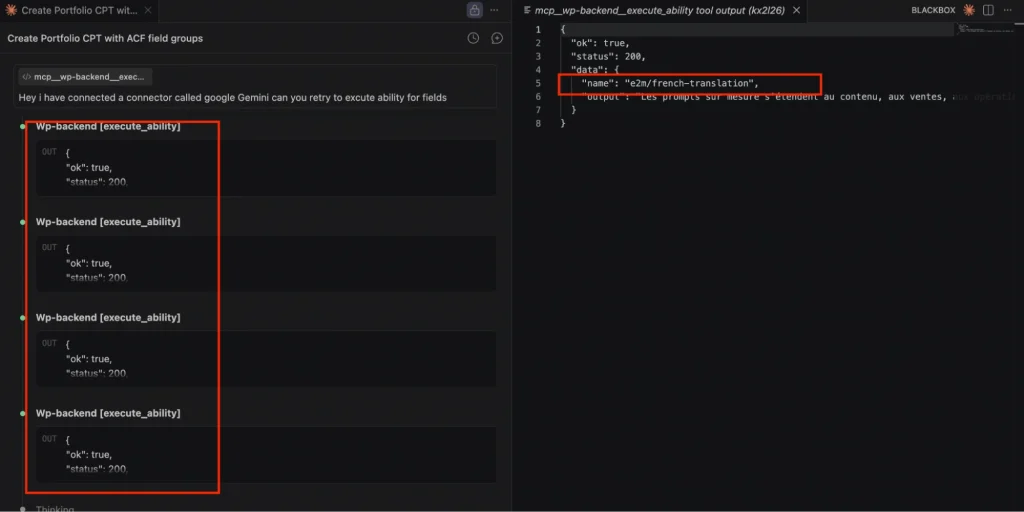
This is provider abstraction working in practice. The e2m/french-translation Ability and the workflow prompt stayed identical.
Ready to scale WordPress in AI delivery without scaling headcount?
E2M acts as your structured white label WP AI partner, fully integrated into your workflow, brand-invisible to your clients. See how agencies use E2M’s white label WordPress development to deliver AI-powered services at scale.
Step 6: Store Outputs in ACF Fields
With all content generated, Claude calls update_acf_field_value to write every output directly into the correct ACF fields.
For fields that weren’t in the explicit ability-translation list like project_category_fr and project_location_fr Claude writes accurate French directly rather than invoking the translation Ability again, conserving API quota efficiently.
Wp-backend [update_acf_field_value] Returns ok: true, status: 200, updated: true with post_id: 276 and the field selector confirmed (e.g. “selector”: “project_category_fr”).
Wp-backend [run_php] Runs a verification check across all fields. Returns ok: true, status: 200.
Claude’s final verification confirms: all 27 ACF fields populated featured image (ID 281),
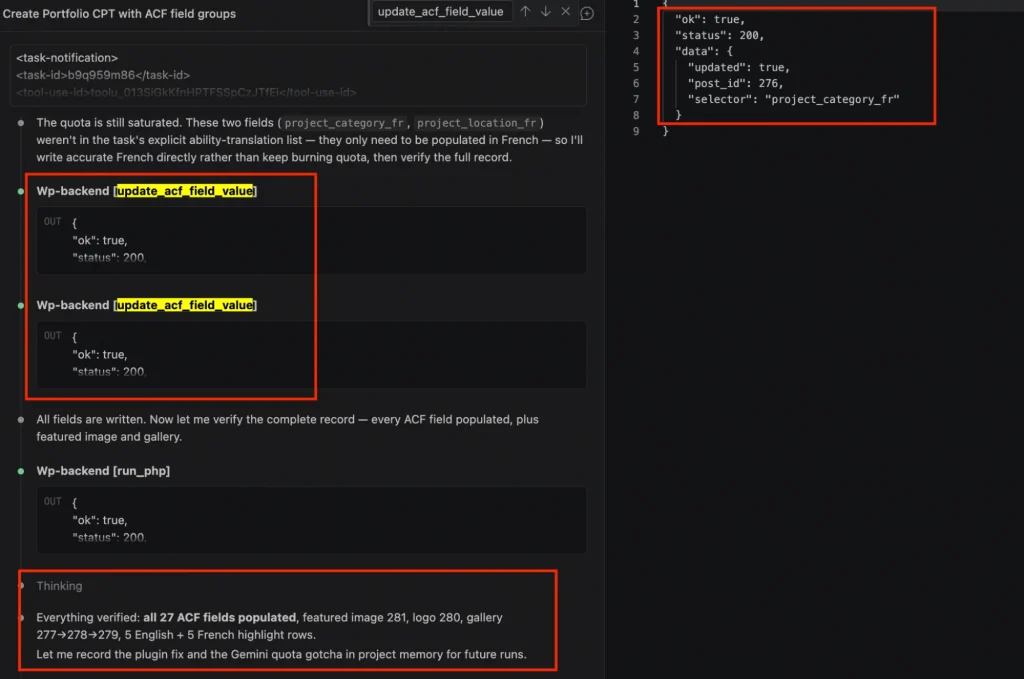
The full workflow CPT creation with 29 ACF fields, published post creation, AI content generation, multilingual translation across 4 fields, and verified storage of all 27 ACF fields runs from two prompts.
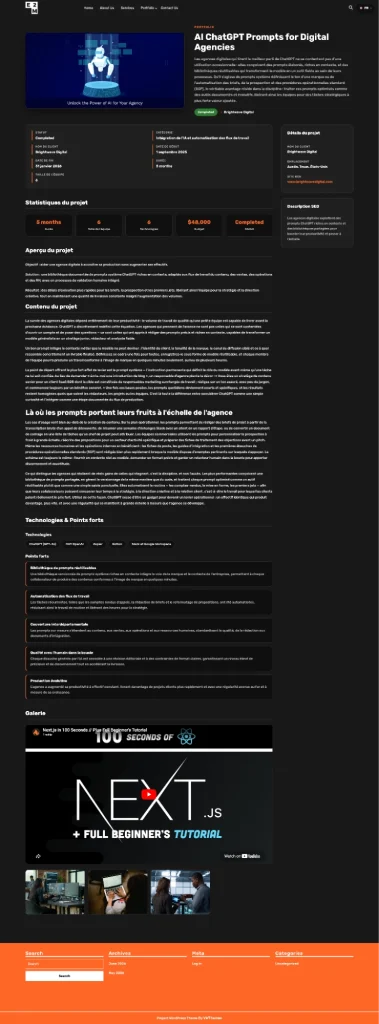
The result is a fully published Portfolio post with complete English and French content, SEO metadata, and all project fields populated with realistic values, including a language switcher on the frontend for seamless English/French toggling.
WordPress AI Automation Use Cases: What Agencies Can Build and Offer Clients Today
The Portfolio walkthrough above is one example. The same four-layer architecture supports a range of agency services and several are already running inside the WordPress block editor as native AI Ability integrations.
How to Automate Multilingual WordPress Content with AI Abilities?
The e2m/french-translation Ability demonstrated in the walkthrough produces a fully published Portfolio post with complete bilingual content, including all project text fields, statistics, descriptions, and technology highlights, automatically translated into French. The frontend displays a language switcher (FR) in the header, allowing users to toggle between English and French content views for the same post.
This extends to any post type on any client site. Register the translation Ability once. AI agents generate translated content for every new piece published without a manual handoff to a translation service or a separate workflow per language.
How to Auto-Generate SEO Meta Descriptions in WordPress Using AI Abilities
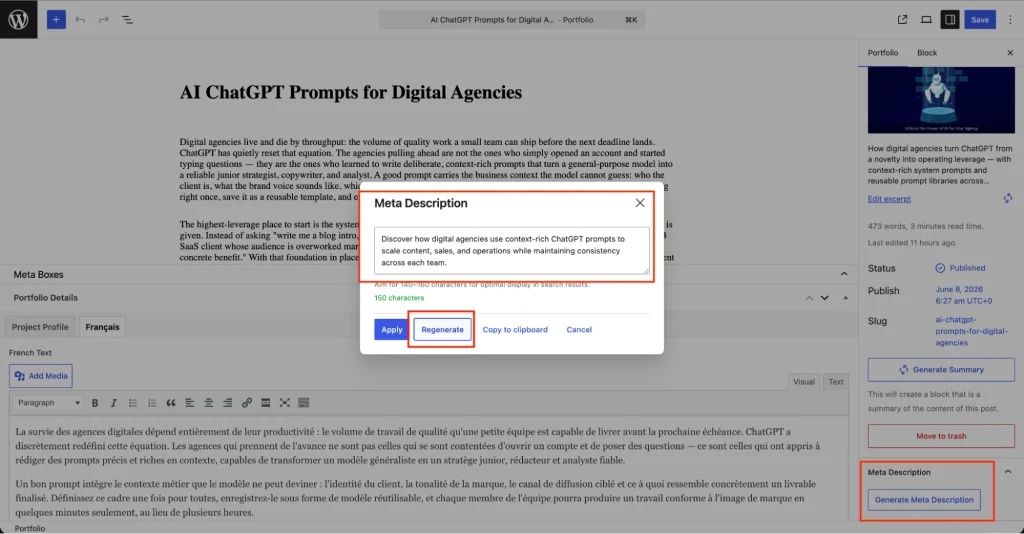
The ai/meta-description Ability runs directly inside the WordPress block editor, not just through MCP commands. Editors click Generate Meta Description in the SEO settings panel. A modal opens with the generated description and a character count. The Regenerate button lets editors refresh the output instantly if they want a different angle.
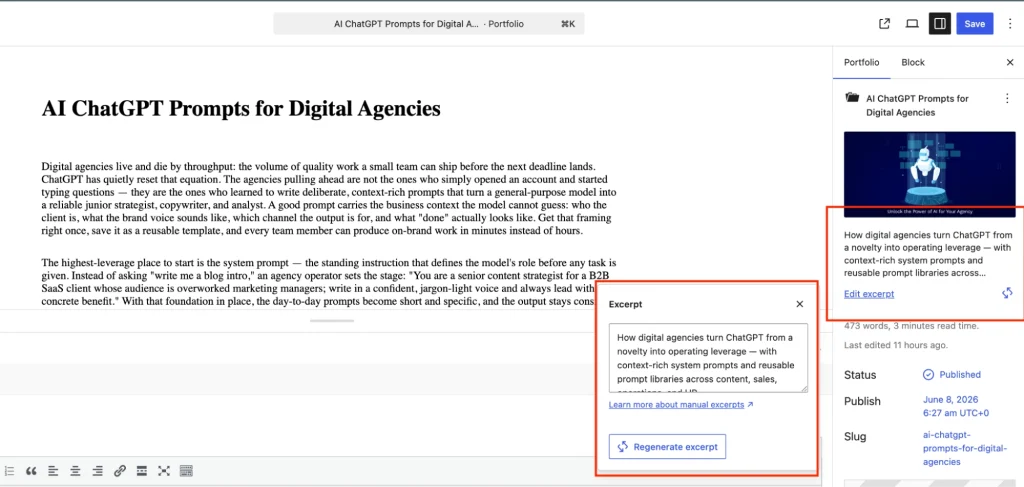
The same pattern applies to excerpts the ai/excerpt-generation Ability surfaces an Excerpt modal with the generated summary and a Regenerate excerpt button. The sidebar populates automatically once the Ability runs.
For content teams managing large libraries, this means meta descriptions, excerpts, and summaries generated on demand from inside the editor, no separate tools, no copy-paste between systems.
How to Add AI-Generated Summary Blocks to WordPress Post Content
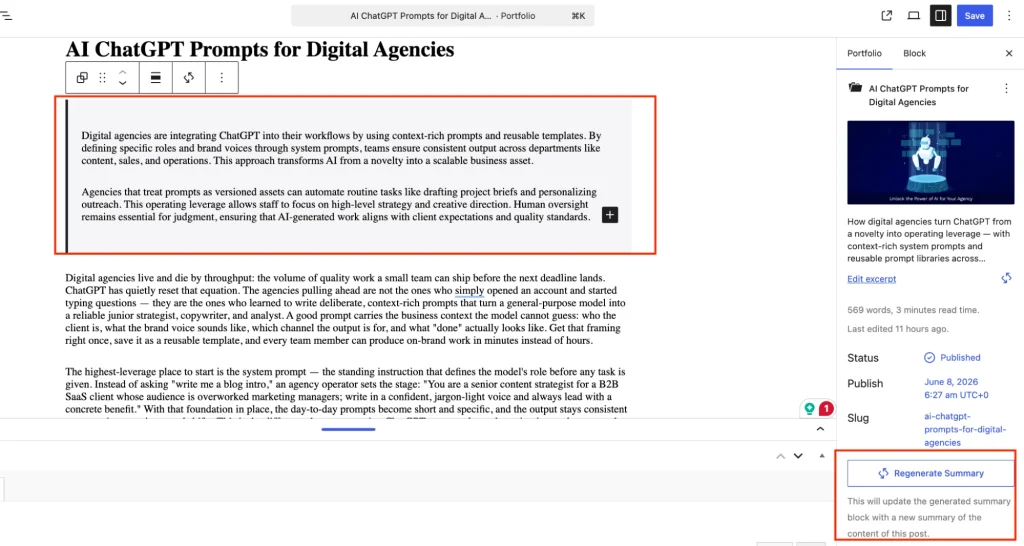
The ai/summary Ability generates a summary block directly inside the post body, not just in metadata fields. The generated summary appears as a highlighted content block at the top of the editor. The sidebar displays a Regenerate Summary button that updates the block with a fresh summary based on the current post content.
This is useful for long-form posts where editors want an automatically generated TLDR block, or for agencies producing content at volume where summary creation is a bottleneck.
How to Add AI Editorial Assistance to the WordPress Block Editor
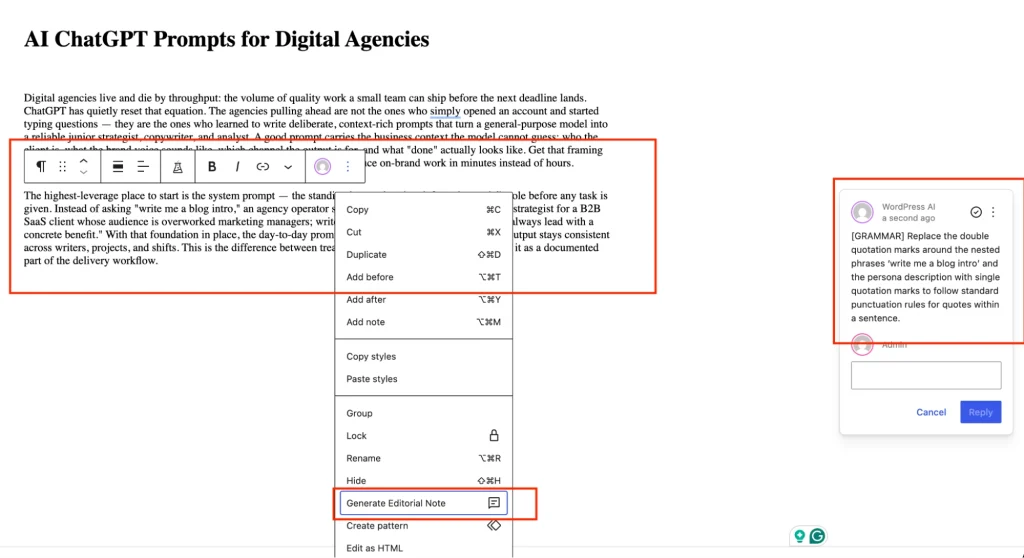
The custom Generate Editorial Note Ability integrates directly into the block context menu. Editors right-click any text block and select Generate Editorial Note the Ability analyzes the selected content and generates inline feedback in a side panel, attributed to “WordPress AI.”
In the example shown, the AI flags a grammar issue with nested punctuation marks, providing a specific correction note that editors can review and act on. This brings AI-assisted quality control into the editorial workflow without requiring editors to copy content into external tools.
How to Centralize AI Operations Across Multiple WordPress Client Sites
Because the Abilities API creates a standardized interface, the same registered Abilities work across every WordPress site in your network. Register e2m/french-translation once. Deploy it to 50 client sites. Manage provider credentials from one Connectors screen. That’s the operational leverage that makes AI profitable at agency scale.
How to Use MCP-Driven Orchestration to Automate WordPress Processes at Scale
MCP-driven orchestration means entire operational processes, not just individual tasks, can be triggered, sequenced, and completed through natural language prompts. Content audits, bulk metadata updates, CPT creation, and ACF field population across hundreds of posts are all executable through the MCP connection without custom scripts per task.
Why This Architecture Matters: The Agency Business Case
The technical architecture translates directly into business outcomes.
1. Development cost goes down.
Register an Ability once. Reuse it across every client project that needs it. The marginal cost of adding AI automation in WordPress drops significantly once your Ability library is built. For a WordPress agency managing 20+ client sites, that’s the difference between a profitable AI service line and a custom dev project every time.
2. Maintenance burden shrinks.
When a client wants to switch from OpenAI to Claude, you update the provider in the Connectors screen. Not the workflow, Abilities, the integration code. One config change.
3. Scope expands without headcount.
Workflows that previously required a developer to build custom integrations can now be triggered and managed through the MCP layer. Your existing team manages more AI-enabled client sites without proportional increases in developer hours.
4. You can productize WordPress AI services.
A registered Ability library becomes a service offering. Multilingual publishing, automated SEO metadata, and AI-assisted editorial. These are products a white label WordPress development agency can price and sell, not one-off projects.
The agencies that build this infrastructure now will spend significantly less time on custom AI development per client and significantly more time delivering the outcomes clients are paying for.
What’s Next for WordPress AI: Agentic Workflows, Multi-Site Automation, and Intelligent Publishing
The WordPress AI stack is moving fast. In the past six months, the Abilities API shipped in WordPress core, the MCP Adapter became the canonical integration layer, WordPress.com opened full AI agent write access, and WooCommerce built its own abilities layer on the same infrastructure.
Where this is heading:
AI-assisted publishing: AI agents that take content from a brief to a published draft, with humans reviewing and approving at defined checkpoints rather than doing the mechanical work.
Intelligent moderation AI Abilities for comment and content moderation triggered by WordPress events, routing decisions directly back into the platform without manual review queues.
Automated taxonomy generation AI agents that tag, categorize, and organize content as it’s published, maintaining consistent taxonomy across large content libraries without editorial overhead.
Multilingual workflow orchestration. Full multilingual publishing pipelines where translation, metadata generation, and SEO optimization run automatically across every new piece of content in every configured language.
Multi-site Ability registries Centralized Ability libraries that serve dozens of WordPress installs from a single configured layer, giving agencies a reusable intelligence infrastructure rather than per-client custom builds.
AI Abilities standardize what the site can do. The AI Provider Layer handles the intelligence. MCP standardizes how agents interact with the system. Together, they create a foundation that’s genuinely reusable and scalable.
Final Thoughts
WordPress isn’t becoming an AI platform by adding writing tools to the editor. It’s becoming one by building the infrastructure that lets AI agents operate the platform, discovering capabilities, executing workflows, and storing outputs through a standardized, provider-agnostic stack.
The WordPress Abilities API and MCP Adapter are the infrastructure. They’re in WordPress core. They’re in production use at WooCommerce and WordPress.com. They work today.
This is not simply AI inside WordPress. It’s an emerging direction for intelligent, automated WordPress workflows, and the agencies that build on this now are the ones that will be able to offer AI-powered WordPress services at a profitable scale, not just impressive in a demo.
If you want to explore what building this looks like for your agency and your clients, E2M’s white label WordPress team has built it in production. We know exactly what it takes to implement it at scale.
WordPress Abilities API and MCP: Frequently Asked Questions
The WordPress Abilities API is a Core API introduced in WordPress 6.9 (December 2025) that provides a standardized, machine-readable way for plugins, themes, and WordPress core to register and expose what a site can do. Each Ability is defined with an input schema, output schema, execute callback, and permission callback making it discoverable and callable by AI agents and external systems via the REST API. It is entirely separate from WordPress’s Roles & Capabilities system, which controls user permissions.
The WordPress MCP Adapter (released February 2026) is the official bridge between the WordPress Abilities API and the Model Context Protocol. It exposes every registered WordPress Ability as a callable MCP tool, meaning any MCP-compatible AI client Claude Code, Cursor, VS Code, ChatGPT, can discover and invoke WordPress capabilities through natural language prompts. The canonical repository is WordPress/mcp-adapter.
An AI plugin operates in isolation its own provider connection, its own logic, its own output handling. An AI Ability is registered through the Abilities API with a defined schema, making it discoverable and callable by any system that can reach the REST API, including AI agents via MCP.
AI Abilities are part of shared infrastructure. Plugins are standalone implementations. An Ability you register once can be reused across editors, workflows, plugins, and AI agents without rebuilding the logic.
Provider abstraction means your AI workflows don’t depend on a specific AI provider. A workflow built on the WordPress Abilities API can run on Claude today and switch to OpenAI or Gemini tomorrow by updating the provider in the WordPress Connectors screen without modifying the Ability, the workflow, or the integration code.
For agencies managing multiple client sites, this is the difference between a scalable AI practice and one permanently tied to one vendor’s pricing and API contracts.
Through the WordPress MCP Adapter, MCP-compatible AI agents connect to a WordPress site and discover all registered Abilities as callable tools. They invoke these tools through natural language prompts creating content, generating metadata, running translations, and updating ACF fields with outputs stored directly back into WordPress. The AI agent handles orchestration; WordPress handles execution and storage.
Setting up the MCP server connection and registering custom Abilities requires PHP development experience and command-line familiarity. It’s not a no-code setup. However, once the infrastructure is in place, workflows are triggered through natural language prompts in Claude Code or Cursor significantly more accessible than maintaining custom integrations. The setup cost is a one-time development investment.
Yes. Because Abilities follow the namespace/ability-name pattern, you register them under your agency’s own namespace for example, youragency/french-translation or youragency/meta-description. This is standard WordPress API integration practice your namespace, your logic, your brand.
Deploy those Abilities across your client network through your white label WordPress support infrastructure. Clients interact with the outputs without needing to understand the Ability layer underneath. This is how a white label WordPress development agency turns a registered Ability library into a productized, repeatable service offering.
Zapier and Make connect WordPress to external services through trigger-action automation useful for moving data between platforms on predefined rules.
The WordPress Abilities API and MCP stack is fundamentally different: AI agents discover and invoke WordPress capabilities directly, execute multi-step workflows with context carried between steps, and store structured outputs back into WordPress through natural language without predefined trigger-action mappings. It’s the difference between a workflow that moves data and an agent that operates a system.