A practical look at how E2M turns AI-generated websites into editable, maintainable WordPress builds without throwing away the frontend that already works.
TL;DR:
- Converting a Claude, v0, or Lovable site into WordPress means preserving the frontend that already works and building a real, editable WordPress backend underneath it, not redrawing the page from a screenshot.
- This guide walks through E2M’s five-phase AI-to-WordPress workflow: connect, read and plan, build, deploy to staging, verify, using a real project, Vistara AI Event 2026, as proof. The independent fingerprint audit came back with a 1.0000 geometry score and a PASS.
- The result is a site your client can edit without touching code, and your agency can and your agency can hand off under its own brand
- The process to convert in WordPress site below applies whether the source is Claude, v0, Lovable, Bolt, ChatGPT, Cursor, or Replit.
Looking for the best white-label WordPress development service to turn AI-generated websites into production-ready WordPress sites?
E2M helps digital agencies convert projects built with Claude, v0, Lovable, Bolt, ChatGPT, Cursor, and Replit into fully functional, editable WordPress websites without adding development work to your agency’s plate.
Our AI-powered white label WordPress development team handles the entire conversion process: connect, plan, build, deploy, and verify. Everything is delivered under your agency’s brand, so you can provide clients with a professional, scalable, and easy-to-manage WordPress website without handling the technical conversion yourself.
Your AI-generated website. Our WordPress expertise. Your brand.
1. AI Website Builders Are Fast. Handoff Is Where the Real Work Starts.
Claude, v0, Lovable, Bolt, and similar AI tools have changed how quickly an agency can get from an idea to a working website. You can describe the experience you want, iterate through prompts, and end up with a responsive frontend in hours instead of days.
Whatever the source is called- a Claude design, a Claude HTML export, Claude Artifacts, Claude Code output, a v0.dev component set, a ChatGPT website, a Bolt.new scaffold, a Cursor website, or a Replit project- the handoff problem is the same: a working frontend is not the same thing as a website a client can run without a developer on call.
But a convincing frontend is not automatically a client-ready website. Under the hood, the project may be static HTML, React, Next.js, Tailwind, JavaScript arrays, or an app-oriented codebase. Headlines may be hardcoded. Repeated sections may live inside components. There may be no CMS, no reusable WordPress content model, and no practical way for a client to update the site without going back into code.
Agencies searching for a fix describe it differently depending on who’s asking:
- A WordPress backend for an AI website
- A WordPress CMS for an AI-built site
- A vibe coded site’s WordPress backend
- Simply how to make an AI-generated website editable in WordPress
Turning an multiple AI design prototype and build a WordPress site, or getting an AI prototype to production WordPress, is the same job whether you call it vibe coding to WordPress, a Lovable-to-WordPress migration, a Bolt-to-WordPress migration, or a straight conversion. We use “conversion” throughout this expert guide because migration implies moving data between two databases, and this is about giving an existing, working frontend a WordPress backend it never had.
That is the gap our AI-to-WordPress workflow is designed to close. Instead of treating the AI-generated site as a disposable prototype, we treat it as valuable source material: preserve what already works, decide what should become editable, build the right WordPress architecture, and verify the converted site against the original.
This guide goes deeper into the technical workflow behind E2M’s vibe-coded website-to-WordPress development service. The screenshots below come from a real project run through the pipeline: Vistara AI Event 2026.
This approach also aligns with E2M’s production model: the final WordPress implementation can use ACF, Gutenberg, Elementor, a custom theme, or a hybrid/headless architecture depending on what the project actually needs.
2. Why E2M Solutions Doesn’t Just Rebuild Your AI-Generated Frontend
The frontend created in Claude, v0, or Lovable may already have the right layout, spacing, typography, interactions, and responsive behavior. Rebuilding that experience from a screenshot or visual reference, in Elementor, Gutenberg, or any other page builder, introduces a new interpretation layer, and that is where design drift starts.
Our WordPress conversion workflow therefore follows two core rules:
- Preserve the frontend wherever practical. The original markup, styles, assets, and behavior become the reference implementation. We replace hardcoded content with WordPress-driven data instead of redrawing the page from scratch.
- Verify the result instead of assuming it is correct. The WordPress version is checked for both editability and visual fidelity across desktop, tablet, and mobile.
This matters because a conversion can fail in two very different ways. It can look different from the original, or it can look identical while still being hardcoded and impossible for the client to manage. A production-ready conversion has to solve both.
3. E2M’s AI-to-WordPress Conversion Process: Connect, Plan, Build, Deploy, Verify
At a high level, the workflow has five phases: connect, read and plan, build, deploy to staging, and verify.
A human approval gate sits between planning and implementation.
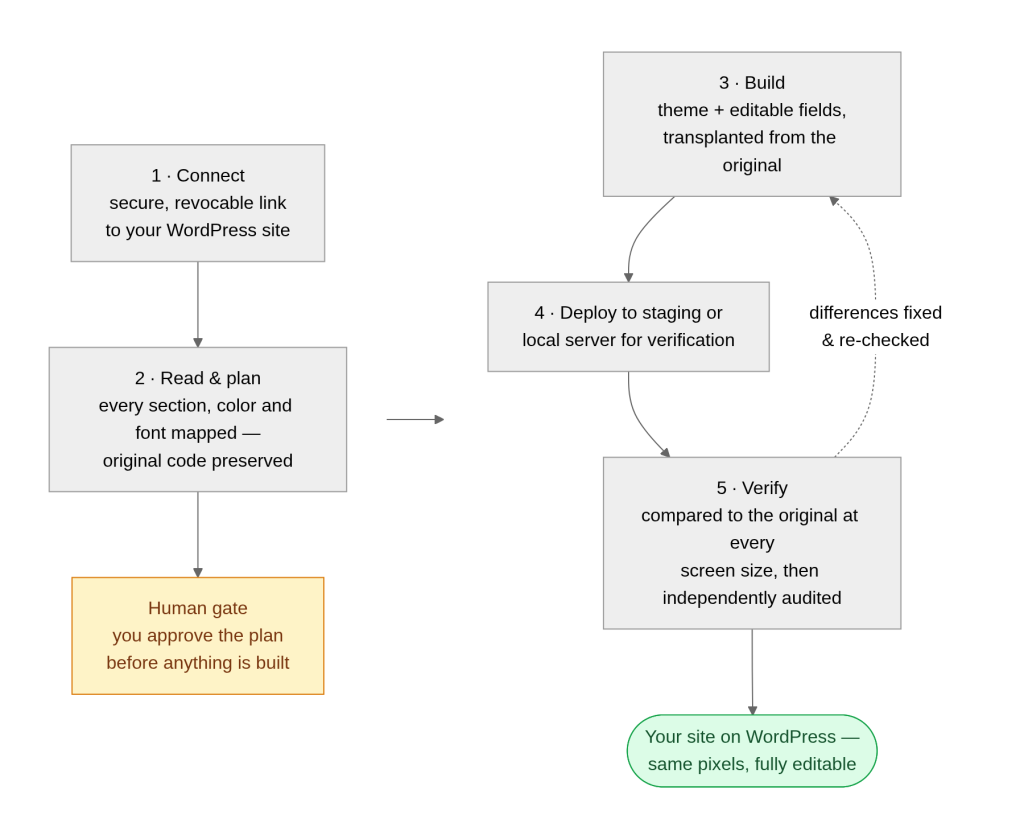
3.1 How Do You Connect WordPress Securely with AI Workflow?
The workflow begins by creating a controlled connection to WordPress. The DEV Connect plugin establishes the bridge using a scoped WordPress Application Password and checks what the connected site allows the AI workflow to do. Work is performed on staging or a local environment first; publishing remains a human decision.
Why this matters: AI-assisted WordPress development should not mean giving an autonomous system unrestricted access to a production website. The connection is scoped, revocable, and used within a defined workflow.
3.2 How Do You Read the Project Before Converting Anything?
Different AI builders produce different kinds of website projects. v0 commonly produces React-oriented output; Lovable may produce something closer to a full-stack application; Claude can produce static HTML, components, or application code depending on the prompt and workflow. So the first technical step is not conversion. It is inspection.
The extractor inventories the project: pages, sections, design tokens, fonts, colors, assets, components, and content patterns. Its findings are checkpointed instead of guessed. The parser then turns that inventory into a structured blueprint while preserving the original markup as the reference for implementation and QA.

The next decision is what each visible design piece should become in WordPress. A heading can become a text field and an image can become an image field. But repeated content requires architectural judgment. Six service cards should not automatically become six fixed groups of fields. If the client will add, reorder, reuse, or query those services later, they may be better represented as repeatable fields, reusable blocks, or a post type.
The goal is not merely to make today’s page editable.
The goal is to create a CMS structure that still makes sense when the site grows.
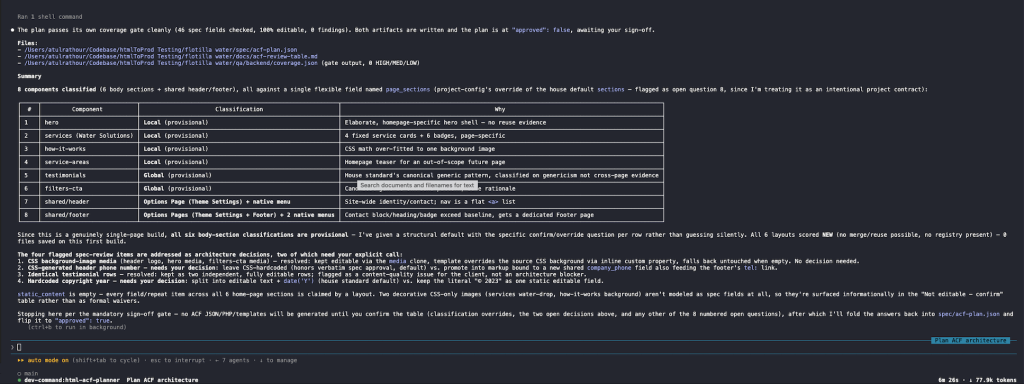
The plan is then reviewed by a expert WordPress AI developer. The approval of placeholder content, dead links, unusual structures, or ambiguous conversion decisions are surfaced at the approval gate rather than silently changed.

Agents used during planning:
- html-project-extractor: maps pages, sections, design tokens, assets, and project structure.
- html-parser: converts the source project into a structured blueprint while preserving the original markup.
- html-acf-planner: determines what should become editable and prepares the proposed WordPress content architecture for approval.
4. How Do You Build the WordPress Theme and Editing Layer with Vibe-coding?
Once the WordPress website architecture is approved, the build AI agents turn the blueprint into WordPress.
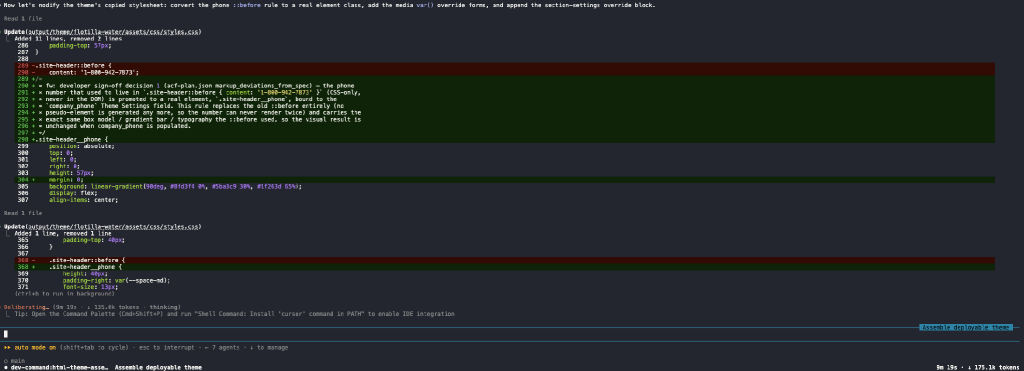
The key principle is translation rather than redesign: the original frontend is carried forward, while hardcoded data sources are replaced with ACF fields, content types, global settings, and reusable structures.
The existing content is migrated as part of the process, so the WordPress site does not arrive as an empty CMS. In the Vistara AI Event 2026 run, the resulting editing model included page-level fields, speaker content, payment-related settings, and site-wide options.
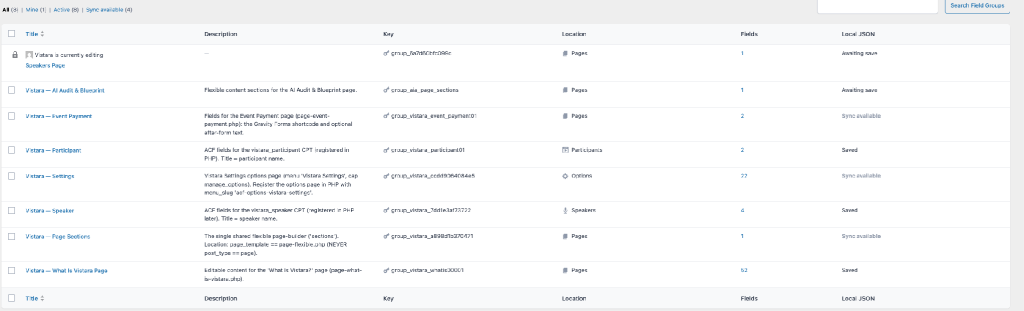
Agents used during the build:
- html-acf-builder: creates the approved ACF editing structure without making new architecture decisions.
- html-php-writer: replaces the original hardcoded data sources with WordPress-driven values while preserving the frontend.
- html-theme-assembler: packages templates, field groups, styles, scripts, assets, and seed content into a maintainable WordPress theme.
The handoffs are explicit: one agent completes and validates its responsibility before the next continues from the approved plan. This reduces the chance of later agents improvising architecture.

The final output is structured like a WordPress project a developer can maintain, not generated markup dumped into a single template. Decisions made at the approval gate can also be carried into the implementation record so the code reflects why a specific change was made.
5. Why Deploy to Staging WordPress site, Not Directly to Production?
The WP theme, media, pages, and content are deployed to a staging or local WordPress environment in a fail-safe, resumable sequence.
The purpose of this stage is verification, the same reason we run every converted build through a version of our own WordPress launch checklist before anything goes live. The AI workflow can create, populate, and test the converted site, but production publishing stays under human control.

Agent used for deployment:
- html-deployer: transfers the theme, media, pages, and content to staging in a controlled, resumable order.
6. How Do You Verify Both Editability and Visual Fidelity?
This is where the AI workflow goes beyond a typical visual conversion. QA first checks that visible content is actually connected to WordPress. A section that looks perfect but remains hardcoded is treated as a failure.
After the editability gate passes, the system compares the WordPress rendering against the original across screen sizes. Confirmed differences are routed to targeted fixes, and QA runs again. The loop is intentionally bounded: if the agents cannot resolve an issue reliably, it is escalated to a developer rather than retried indefinitely.
Agents used during QA:
- html-qa: validates editability first, then runs the visual comparison and routes confirmed differences to targeted fixes.
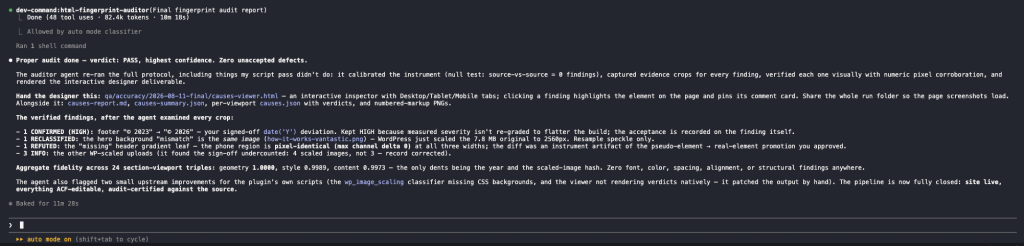
- html-fingerprint-auditor: runs independently at the end, measures the final result, and does not modify the build.
The Vistara Website Fingerprint Audit: A Real Claude-to-WordPress Conversion, Verified
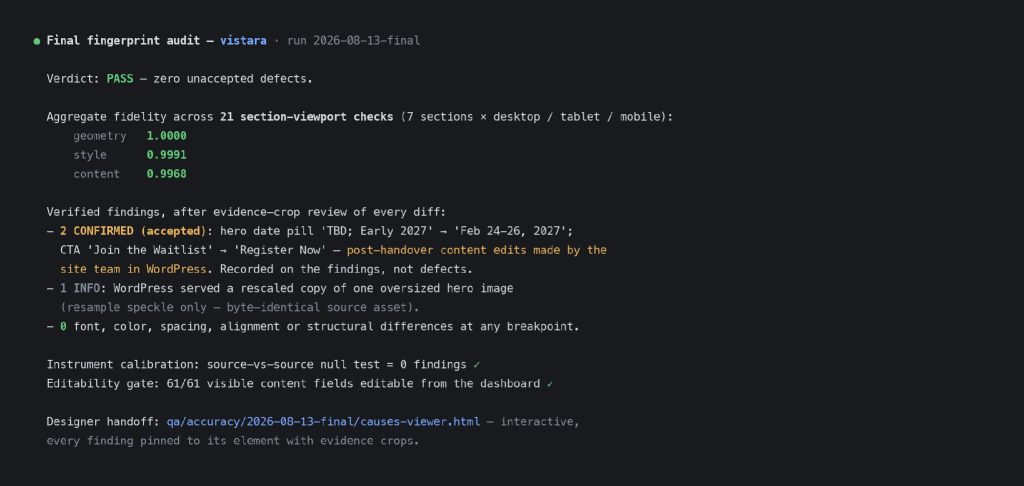
For the Vistara AI Event 2026 project, the independent fingerprint audit returned a PASS. Across 21 checks, the reported scores were Geometry 1.0000, Style 0.9991, and Content 0.9968. The confirmed differences were post-handover content edits made in WordPress, including the event date and a button, rather than unexplained conversion drift.
The Website AI audit is not limited to a summary score. Findings can be reviewed in an interactive viewer, filtered by screen size, and tied back to the exact element on the page.
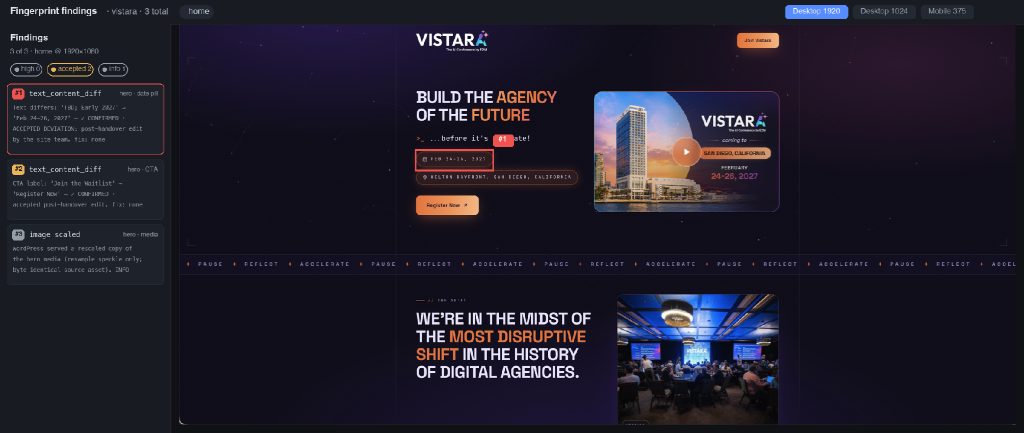
Opening a finding highlights the affected element and shows the evidence, explanation, and verdict. This makes “pixel-perfect” a measurable QA outcome rather than a subjective claim.
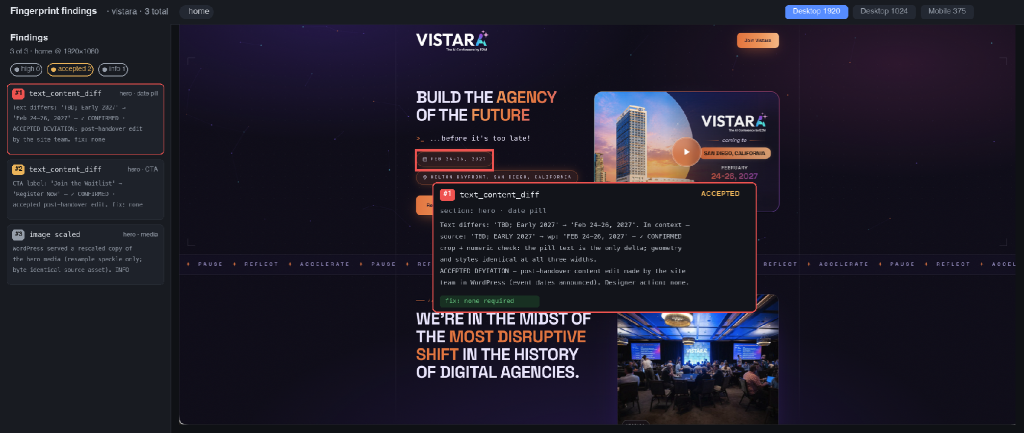
The Evidence: Vistara Website Before and After the WordPress AI Conversion
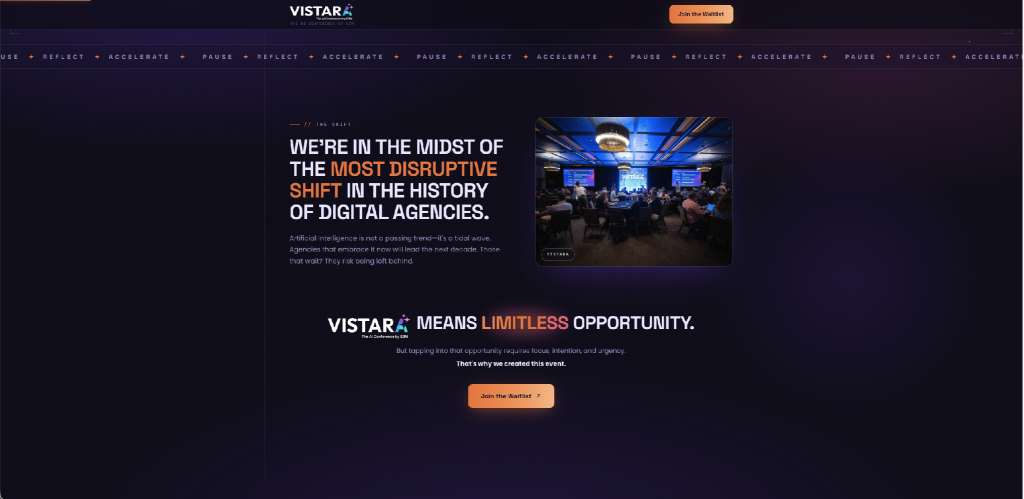
The strongest proof is the rendered result. Below is the same Vistara AI Event 2026 section before and after conversion.
And here is the same section served by WordPress:
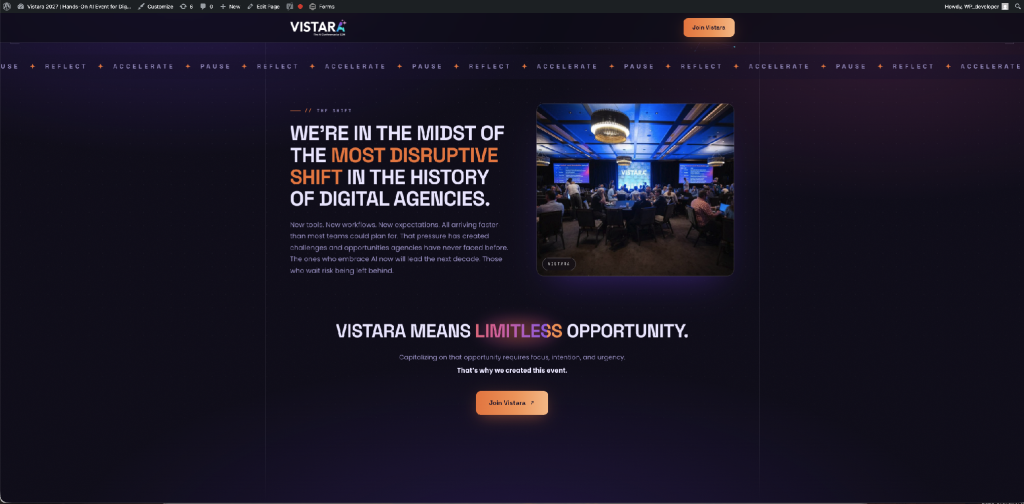
The layout, typography, imagery, ticker treatment, and overall atmosphere are preserved. Where the screenshots differ, those differences represent edits made after handoff through WordPress, which demonstrates the point of the conversion: the site can now change without editing source code.
What the Client Can Edit After E2M’s WordPress Handoff
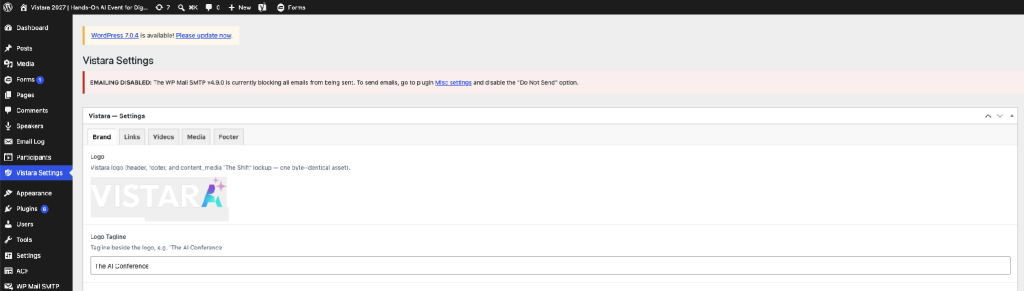
Once the frontend is connected to WordPress, the client is no longer dependent on the original AI tool or a developer for routine content updates. Each section can expose clearly labeled fields for the content that should be managed.
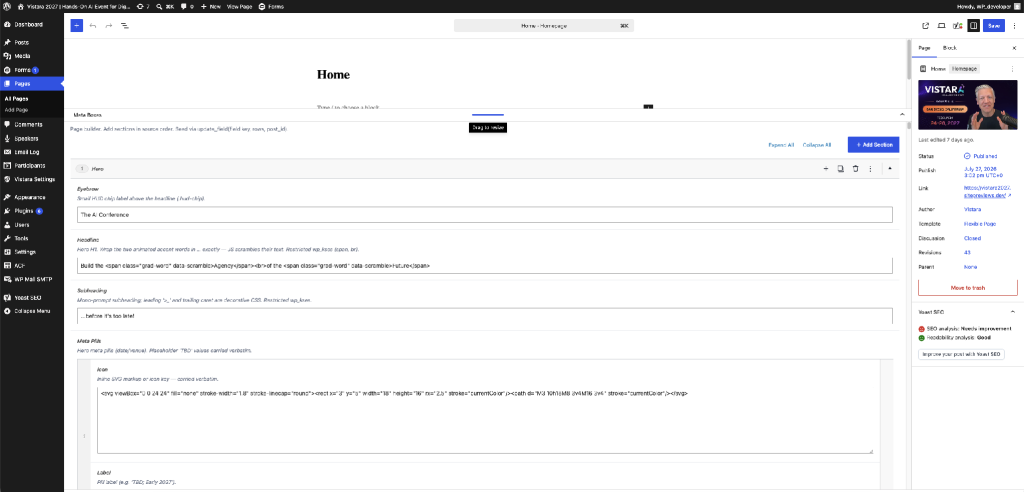
Site-wide elements such as logos, taglines, navigation-related content, and footer information can live in global settings. Change a shared value once and the update can flow everywhere it is used.
Where Humans Stay in Charge in an AI-to-WordPress Workflow
AI agents handle much of the repetitive translation work, but they don’t own the architectural decisions that can affect the long-term site. A person approves the proposed editing model, resolves flagged questions, reviews the implementation, and controls the production launch. It’s the same reason agencies are rethinking which roles actually need to be human as AI takes on more of the workload.
There is also an important technical boundary. Some projects generated in Lovable, Claude, v0, or similar tools are not really marketing websites. They are applications with authentication, dashboards, payments, complex state, or backend workflows. In those cases, forcing the entire product into traditional WordPress may be the wrong answer.
The technical review determines whether the project should become native WordPress, use WordPress as a headless CMS behind the existing React/Next.js frontend, use a hybrid architecture, or remain an application with WordPress only where it adds value.
What E2M Can Convert to WordPress: Claude, v0, Lovable, Bolt, ChatGPT, Cursor, and Replit
You do not need to start from Figma. The source can be an AI-generated project from Claude, v0, Lovable, Bolt, ChatGPT, Cursor, Replit, or another AI agent your team already uses, including HTML, React, Next.js, a GitHub repository, or a project ZIP.
It does not matter whether the source is described as an AI-generated website, AI-generated HTML, an AI-generated design, an AI mockup, or just “HTML to WordPress AI”: if it renders in a browser, we can review it.
From there, we review the code and recommend the WordPress implementation that fits the project: ACF, Gutenberg, Elementor, a custom theme, WooCommerce, headless WordPress, or a hybrid setup. The objective is not to force every AI-generated site through one converter to a WordPress theme. It is to turn the working prototype into a production website your agency can confidently hand to a client.
This is what an AI-powered, white-label WordPress development service for agencies looks like end to end: an AI web development partner your agency can outsource AI WordPress development to entirely, without losing quality control or brand ownership. If your starting point is a Figma file instead of an AI tool, the same white-label Figma to WordPress AI process applies.
Frequently Asked Questions About How to Converting AI-Generated Websites to WordPress
Yes. Claude Artifacts are typically self-contained static builds, and Claude Code output tends to be a more conventional codebase; both get inventoried and mapped the same way as any other AI-generated project.
Yes. v0.dev produces React/Next.js components, Bolt.new and Lovable tend to be fuller full-stack scaffolds, ChatGPT usually produces static HTML, and Cursor or Replit projects can be anything a developer built with them. The source tool changes the shape of the inventory step, not whether a conversion is possible.
Both. The workflow described in this guide is what runs under E2M’s white-label vibe-coded website to WordPress service, so agencies can send projects over and have them come back production-ready, under their own brand.
Yes. Agencies use this as a standing delivery lane rather than a one-off request: send the AI-generated project, get back a converted, verified, white-label WordPress build. See E2M’s AI solutions for agencies for the full range of what can be outsourced this way.
That is covered too. The same team and a closely related workflow handle white-label Figma to WordPress AI conversions when there is no AI-generated frontend to start from, just a design file.
A real CMS. The verification stage specifically checks that visible content is connected to editable WordPress fields, not just rendered to look that way. A section that looks right but is still hardcoded counts as a failed conversion in this workflow.
An automated converter optimizes for speed: markup in, WordPress theme out. This workflow adds the steps that make the result maintainable: a human-approved content architecture, migrated content instead of placeholders, and an independent fingerprint audit before anything is called done.
Neither, exactly. A migration implies moving data between two systems that already have one; a rebuild implies starting over. This is a conversion: the original frontend is preserved as the reference implementation, and a WordPress backend is built underneath it.
You Already Built the Hard Part
If Claude, v0, or Lovable has already helped you create a website your client likes, starting over is usually the wrong goal. The design, responsiveness, interactions, and much of the content already represent completed work.
The next step is to give that frontend the CMS, architecture, QA, and maintainability a real client website needs.
Bring our WordPress team the AI-generated site, even if there is no original Figma file. We can review the code, recommend the right WordPress architecture, convert it into an editable build, verify it against the original, and deliver a production-ready WordPress site under your agency’s brand.
For agencies that want the service overview, implementation options, and white-label delivery model, see E2M’s White Label Vibe-Coded Website to WordPress Development page.