WordPress 7.0, codenamed “Armstrong” was officially released on May 20, 2026, introducing a refreshed admin experience, workflow improvements, collaboration enhancements, and early AI infrastructure designed to support the future of the platform.
While the release brings several useful improvements for content teams, developers, and agencies, major WordPress updates should always be approached carefully, especially for websites running custom functionality, WooCommerce, page builders, or older plugin stacks.
In this guide, we’ll cover:
- What’s new in WordPress 7.0
- What agencies and website owners should test before upgrading
- Plugin, theme, and PHP compatibility considerations
- A recommended upgrade process to minimize risk
Quick Facts About WordPress 7.0 “Armstrong”
| Item | Detail |
|---|---|
| Release Date | May 20, 2026 |
| Codename | Armstrong (after Louis Armstrong) |
| Minimum PHP | 7.4 (PHP 7.2 and 7.3 are no longer supported) |
| Recommended PHP | 8.3 or higher |
| AI Providers Supported | OpenAI, Anthropic, Google |
| Real-Time Collaboration | Removed from final release; postponed to a future version |
| Official Source | wordpress.org/news/2026/05/armstrong |
Agency leaders: Email this article to your operations or development team.
What’s New in WordPress 7.0 “Armstrong”
1. A Refreshed Admin Experience
WordPress 7.0 introduces a cleaner, more modern wp-admin interface with improved typography, better spacing, smoother transitions between screens, and overall usability enhancements throughout the admin area.
The changes are subtle but help improve day-to-day workflows for content editors and site administrators.
2. Command Palette Across the Admin
One of the most practical additions is the new Command Palette, accessible via Ctrl+K (Windows) or Cmd+K (Mac). It allows fast access to posts, pages, plugin settings, templates, and configuration screens from anywhere in WP-Admin.
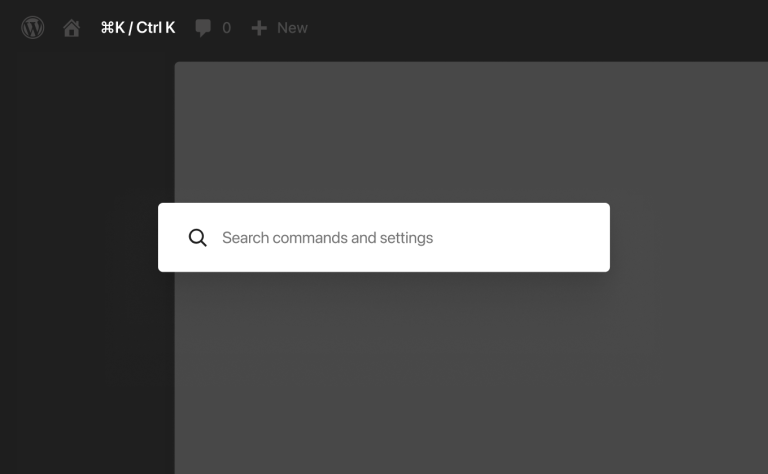
For teams managing large or content-heavy websites, this can significantly improve daily efficiency.
3. Native AI Infrastructure
WordPress 7.0 introduces foundational AI connector infrastructure built directly into the core, with initial provider support for:
- OpenAI
- Anthropic
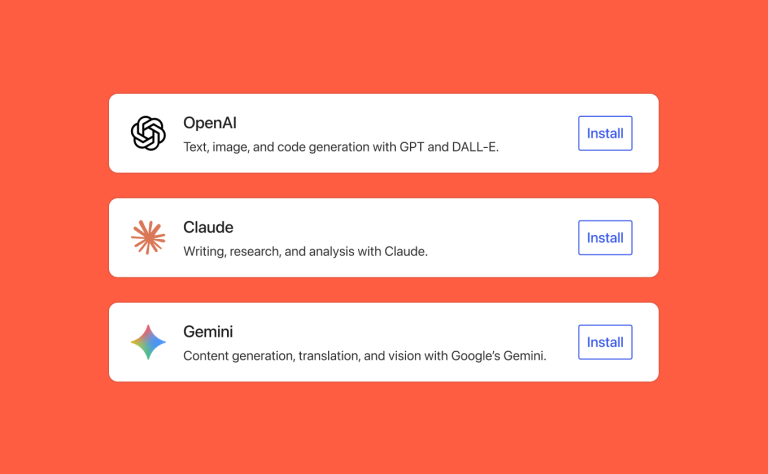
It’s important to note that AI functionality is not enabled automatically after upgrading. This release establishes the framework that future plugins and workflows will build on. For agencies and developers, this signals where the WordPress ecosystem is heading over the next 6–12 months.
4. Improved Collaboration Features
The editor now includes several collaboration-focused improvements:
- Block-level notes
- Inline comments
- Suggestions mode
- @mentions support
- Visual revisions with color-coded diffs
Real-time collaborative editing was originally planned for this release, but has been postponed to a future version.
The asynchronous tools that did ship are especially useful for editorial teams, multi-author publishers, and agency-client review workflows.
Complete WordPress Website Launch Checklist
5. New Blocks and Editor Improvements
WordPress 7.0 also adds several new native blocks and editor enhancements:
- Breadcrumbs block
- Icon block
- Improved Heading block with easier level switching
- Gallery block with built-in lightbox
- Better typography controls
These additions reduce reliance on lightweight helper plugins and improve the overall block editor experience.
What May Be Affected After Upgrading WordPress to 7.0
Most websites will upgrade smoothly, but a few areas deserve closer attention when moving from WordPress 6.x to 7.0:
- Custom HTML blocks may need to be reviewed and re-saved
- Mobile navigation styling could shift on some themes
- Custom admin CSS may require adjustments
- Older revision-comparison or admin customization plugins may need updates
- Custom JavaScript referencing the global document object will need review (the editor now runs inside an iframe)
Websites with custom functionality or older plugin stacks should be tested carefully on staging before updating production.
PHP Requirements Have Changed in WP 7.0
WordPress 7.0 now requires:
- Minimum: PHP 7.4
- Recommended: PHP 8.3 or higher
Support for PHP 7.2 and PHP 7.3 has been removed. Sites running those older versions will not be offered the WordPress 7.0 update at all. Auto-updates and manual updates are both blocked until PHP is upgraded first.
We strongly recommend verifying the active PHP version under Tools → Site Health before planning any upgrade. If your website is running below PHP 8.1, consider scheduling a PHP upgrade before or alongside your WordPress update process.
A safer sequence is to upgrade PHP on staging first, test the full site, push the PHP upgrade to production, wait one week, and then upgrade WordPress core.
Bundling a PHP upgrade and a WordPress major version into the same maintenance window is the most common cause of unexpected post-upgrade issues.
WordPress Plugin Compatibility Considerations
Most actively maintained plugins continue to work normally with WordPress 7.0. The following categories should be tested carefully on staging before updating production.
SEO Plugins (Yoast, Rank Math)
Verify that meta boxes render correctly inside the editor, that SEO fields save as expected, and that schema settings remain intact.
WP Page Builders (Elementor, Divi, Beaver Builder)
Open existing pages in the builder, confirm layouts render correctly, test responsive behavior, and re-save a test page to confirm the editor still writes correctly. The biggest compatibility risk usually lives in third-party page-builder addons, especially animation, scroll-effect, and parallax libraries, rather than in the builders themselves.
Caching & Performance Plugins (WP Rocket, W3 Total Cache, LiteSpeed)
Clear all caches after updating, re-test page-load behavior, and verify optimization settings remain active.
Form Plugins (Gravity Forms, WPForms, Contact Form 7)
Submit a full test entry end-to-end, including email notifications, payment integrations, and any CRM connections.
WooCommerce and E-commerce Plugins
WooCommerce 10.6.2+ includes admin-style fixes specifically for WordPress 7.0. Test the full checkout flow (cart → payment → confirmation email → admin order view), product page rendering, the order management screen, and any custom reports. For high-revenue stores, wait at least 7–14 days after release before updating production.
Custom Plugins and Functionality
Websites using custom-built plugins or older integrations need extra attention, particularly if they rely on internal WordPress APIs, the old WP_List_Table class, legacy admin interfaces, or custom editor modifications. Plugins that previously implemented their own commenting or collaboration systems may also overlap with the new core Notes functionality.
Theme Compatibility Considerations
Both classic themes and block themes are supported in WordPress 7.0. Themes worth reviewing carefully include:
- Themes with custom admin dashboard styling
- Older themes with hard-coded mobile navigation markup
- Themes using functions that were deprecated in WordPress 6.x releases
- Heavily customized child themes
Testing responsive layouts after upgrading is strongly recommended, especially on mobile.
Recommended WordPress 7.0 Upgrade Process
To minimize risk, we recommend the following process for any client site:
- Take a complete website backup (files + database, stored off-server, with a tested restore process).
- Verify PHP and database versions. Anything below PHP 8.1 should be upgraded separately, before the WordPress update.
- Create or refresh a staging environment that mirrors production.
- Update plugins and themes first, then update WordPress core. Updating the core before plugins is the most common cause of post-upgrade issues.
- Test on staging: admin, frontend, forms, checkout, responsive layouts, caching, and email notifications.
- Clear all caches after upgrading.
- Schedule production updates during low-traffic hours with a tested rollback path ready.
For WooCommerce, membership, and LMS websites, perform end-to-end testing, including payment gateways and user role flows, before pushing updates live.
Should You Update WordPress 7.0 Immediately?
For most standard marketing websites, updating after basic staging tests should be relatively safe.
For higher-risk websites, including WooCommerce stores, membership platforms, LMS websites, large publishing sites, and custom-built WordPress environments, we recommend briefly waiting for ecosystem-wide compatibility updates and thoroughly testing before deploying to production.
A reasonable sequencing approach is:
- Week 1: Audit PHP versions and plugins. Identify high-risk sites. Don’t push core yet.
- Week 2: Upgrade low-risk sites (marketing sites, blogs, brochure sites).
- Week 3: Upgrade medium-risk sites (membership sites, multi-author publishers).
- Week 4+: Upgrade high-risk sites (WooCommerce, LMS, custom builds) after the ecosystem has settled.
How E2M Helps Agencies With WordPress 7.0 Rollouts
E2M is a white-label web development and digital marketing partner that works exclusively with agencies. Our 150-person WordPress development team supports 1100+ agency partners worldwide across White Label WordPress, Elementor, Beaver Builder, and custom build services.
For the WordPress 7.0 rollout specifically, we help with:
- PHP and hosting audits across the client portfolio
- Plugin and theme compatibility testing
- Custom block, plugin, and theme updates for the new iframed editor and DataViews admin
- WooCommerce upgrade support and checkout validation
- Page builder testing across Elementor, Divi, and Beaver Builder
- Staging environment setup and rollback planning
- Ongoing WordPress maintenance plans
Whether you need a one-time audit, the next era of WordPress automation with MCP or a long-term maintenance partner, we’ll meet you where you are.
Final Thoughts
WordPress 7.0 is an important release that improves usability, editorial workflows, and future AI-readiness across the platform.
As with any major WordPress update, careful testing remains the safest approach, particularly for websites with custom functionality, page builders, WooCommerce, or advanced plugin ecosystems.
If you would like help reviewing compatibility, planning upgrades, testing staging environments, or managing ongoing WordPress maintenance workflows for the client’s WordPress Website, the team at E2M would be happy to help.
Frequently Asked Questions
WordPress 7.0 was officially released on May 20, 2026. The release was originally scheduled for April 9, but was deferred after real-time collaboration was removed from the release for stability reasons.
WordPress 7.0 requires PHP 7.4 minimum, with PHP 8.3 or higher recommended. Support for PHP 7.2 and 7.3 has been removed.
No. Real-time collaboration was removed from the final release and deferred to a future version. WordPress 7.0 ships asynchronous collaboration tools instead, block-level Notes, Suggestions mode, @mentions, and Visual Revisions.
WordPress 7.0 includes preset connectors for OpenAI, Anthropic, and Google. AI features are not enabled automatically; site administrators add their own API keys in the new Connectors screen.
Yes. All major page builders and WooCommerce shipped compatibility updates before the May 20 release. The risk is concentrated in third-party addons and older custom code, not the core plugins themselves.
No. The recommended approach is a staged rollout over 2–4 weeks, with low-risk sites first, high-risk WooCommerce and LMS sites last, after the plugin ecosystem has settled.
Sources
- WordPress 7.0 “Armstrong” Official Announcement WordPress.org
- WordPress 7.0 Documentation WordPress.org
- Dropping support for PHP 7.2 and 7.3: Make WordPress Core
- E2M’s earlier coverage: WordPress 7.0 Beta 1 Practical Guide