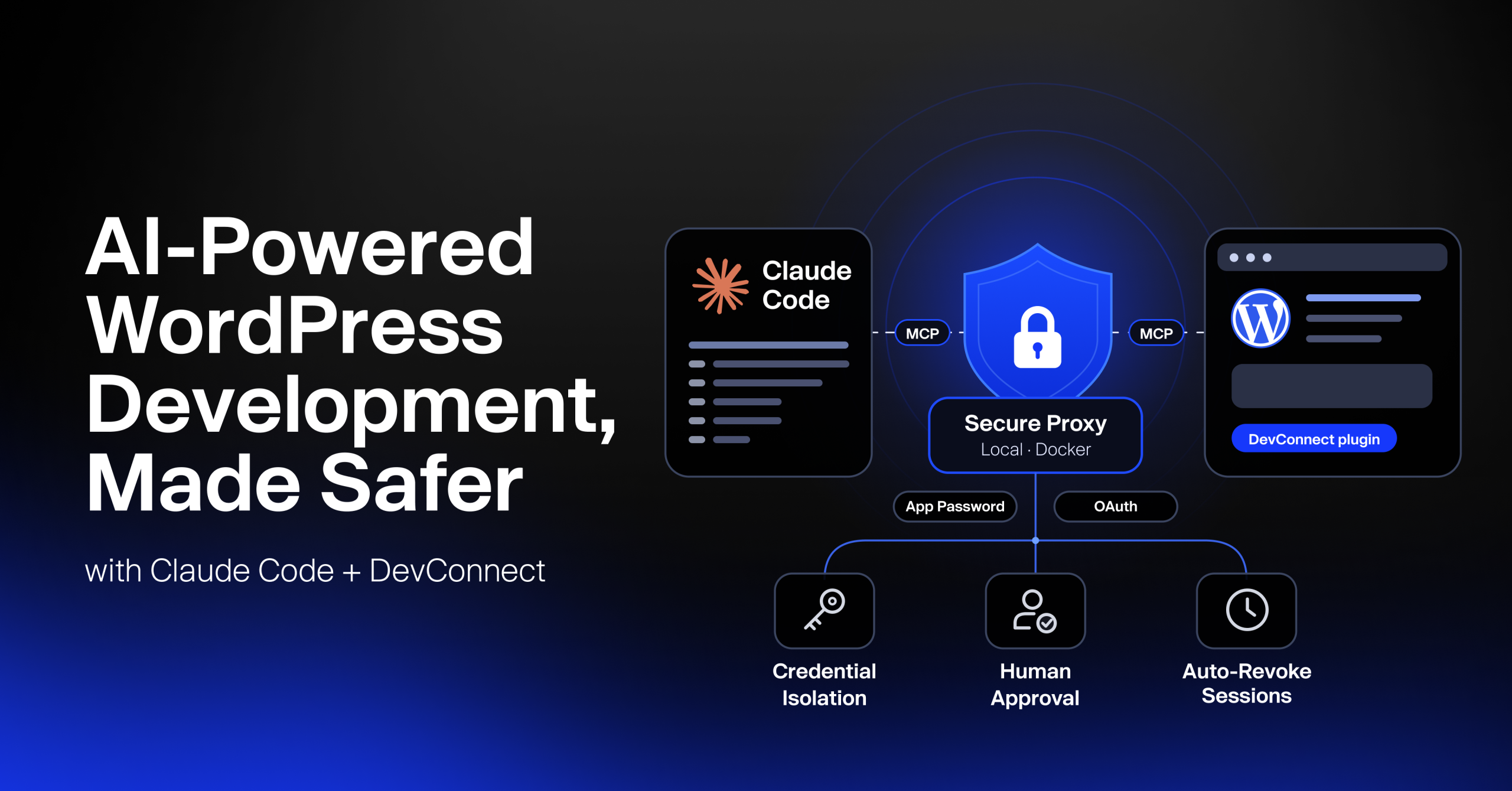
AI agents like Claude Code can now build and edit WordPress pages in minutes.
For agencies managing client websites, however, speed is only part of the equation.
The bigger question is trust: “Who controls access to client credentials, and what prevents an AI agent from making unauthorized or destructive changes?”
The answer is to introduce a controlled layer between the AI agent and the WordPress website. Rather than giving an AI coding agent direct access to the site’s credentials and capabilities, a proxy can manage authentication, evaluate requested actions, enforce permissions, and require human approval before certain high-risk operations.
TL;DR
- E2M’s Web AI engineering team introduced a local proxy between Claude Code and the DevConnect WordPress plugin, keeping the WordPress login, an Application Password or an OAuth token, out of the AI agent’s direct access.
- The proxy evaluates requested actions using safety flags declared by DevConnect, deciding whether to allow the request, block it, or require human approval.
- High-risk and destructive actions require developer approval through a terminal confirmation before the proxy forwards them to WordPress.
- E2M’s successful local test completed an Elementor editing task through Claude Code and DEV Command, with zero WordPress credentials exposed to Claude and zero additional files added to the website.
- Agencies can use the practical checklist in this article to evaluate access controls, permissions, credential handling, and safeguards in their own AI-powered WordPress development workflows.
E2M’s Web AI team explored and tested this approach using E2M’s DEV Command and DevConnect. Together, these tools connect Claude Code’s AI-powered development workflow with WordPress capabilities, while a local proxy adds another layer of control over credentials and actions.
In this article, we’ll explain the security challenges of AI-powered WordPress development, how the proxy architecture works, and what E2M learned while testing the approach. We’ll also explore practical security considerations agencies should evaluate before introducing AI agents into their WordPress development workflows.
Scaling WordPress delivery with AI? See how E2M’s white label WordPress development services keep client sites secure while your team moves faster.
1. Why AI Needs Guardrails on Client WordPress Sites
AI agents can accelerate white label WordPress development, but giving them direct access to client websites without appropriate safeguards introduces security and operational risks. The level of access an AI agent receives depends on the credentials and permissions it uses. Without controls around those permissions, a mistake or misunderstood instruction could affect important parts of a client’s website.
The risks of giving AI direct access to a WordPress site
When an AI agent connects directly to WordPress, it needs a way to authenticate and perform actions through the permissions granted to it. If that access isn’t carefully controlled, agencies face four key risks:
- Credential exposure: Poorly managed credentials can appear in prompts, logs, configuration files, or other places accessible to an AI agent.
- Unintended destructive changes: A misunderstood instruction or incorrect action could delete a page, overwrite a layout, or modify important website content.
- Unnecessary changes to the client environment: Some integration approaches may require additional server access, such as SFTP, or temporary helper files on the website. These additions can increase implementation and maintenance complexity.
- Limited accountability: Without clear approval steps and activity records, it can be difficult to determine which actions were performed, what triggered them, and whether a developer approved them.
What agencies need before trusting AI with client WordPress projects
As a white label AI Powered WordPress development partner to agencies, E2M knows that protecting client websites is essential to maintaining trust. Before introducing AI agents into client WordPress workflows, agencies should consider four fundamental requirements:
- Credential isolation: The AI agent should not need direct access to the client’s WordPress application password or other sensitive credentials.
- Human approval for risky actions: High-risk or destructive operations should require explicit developer approval before execution.
- Minimal changes to the client website: The integration should avoid adding unnecessary files, scripts, or code to the client’s production environment.
- Backup and audit controls: Website changes should be supported by appropriate backup, logging, and recovery mechanisms.
These are also the right questions to ask when choosing a white label WordPress development partner for AI-assisted work.
E2M used these principles to guide the design of its local proxy layer, integrating Claude Code with DEV Command and the DevConnect WordPress plugin.
Instead of giving Claude direct access to WordPress credentials, the proxy manages authentication and evaluates requested actions before forwarding them to DevConnect.
This approach also builds on DevConnect’s existing backup and audit-log capabilities.
2. Why AI-Powered WordPress Development Needs a Secure Proxy Layer
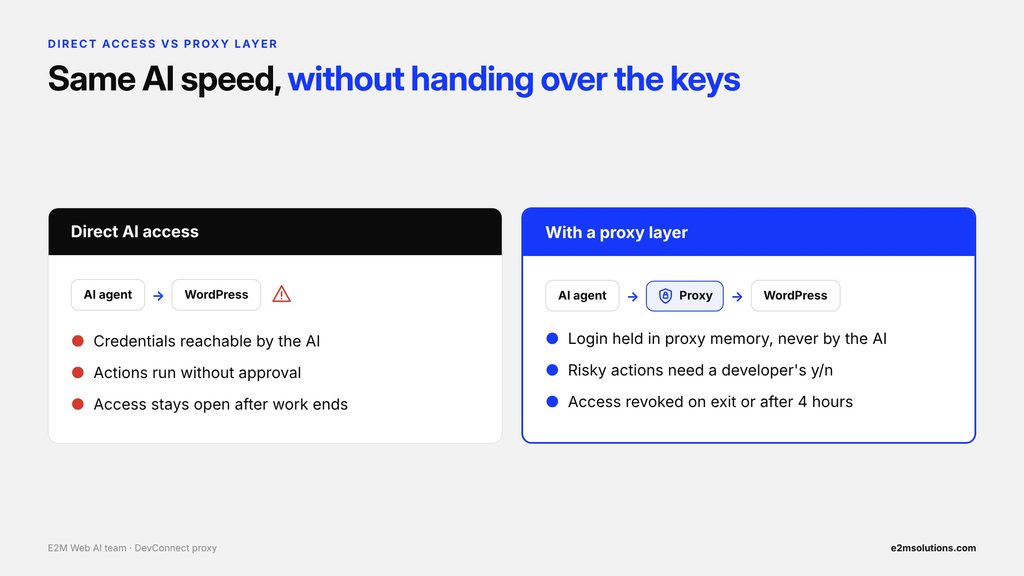
A proxy layer acts as a controlled checkpoint between an AI agent and a WordPress website. Instead of connecting directly to WordPress, the AI sends its requests through the proxy, which evaluates the requested actions before forwarding them to the website.
This creates an additional layer of control over authentication, permissions, and potentially risky operations. For agencies, it offers a way to use AI for WordPress development without giving the AI agent direct access to sensitive website credentials.
Direct AI access vs. a proxy layer
| Question | Direct AI access | With a proxy layer |
|---|---|---|
| Who handles the credentials? | Credentials may be accessible to the AI integration, depending on how access is configured. | The proxy holds the site login (an application password or OAuth token) in memory. The AI receives only a local key. |
| What can the AI do? | Actions depend on the permissions granted to its WordPress credentials. | The proxy evaluates requests against the session’s permissions and DevConnect’s ability safety flags. |
| What happens to risky actions? | Without additional safeguards, actions may execute without a separate approval step. | Destructive abilities require developer confirmation before execution. |
| What is added to the client site? | Some integration approaches may require additional server access or helper files. | E2M’s tested approach required no additional files on the WordPress site. |
| What happens when the session ends? | Access may remain active until credentials or permissions are revoked. | E2M’s proxy deletes the application password or revokes the OAuth tokens on exit or after four hours. |
Three security principles a proxy layer puts into practice
- Least privilege: Give an AI agent only the permissions required for its task. For example, a read-only session can prevent write operations during a website audit.
- Human-in-the-loop control: Let AI handle permitted development tasks while requiring a developer to approve destructive or otherwise flagged operations.
- Credential isolation: Keep sensitive WordPress credentials within the proxy rather than passing them directly to the AI agent. In E2M’s implementation, the application password or OAuth token stays in proxy memory while Claude Code uses only a local key.
A simple way to think about it
Think of a proxy layer like a valet key for a car. It gives someone access to perform a specific task without automatically granting access to everything the car contains.
Similarly, a proxy can give an AI agent controlled access to WordPress capabilities while keeping credentials isolated and applying permission checks before requests reach the website.
The proxy doesn’t eliminate every security risk, but it creates a checkpoint where access can be evaluated and risky actions can require human approval. For a wider view of rolling AI into client work, see E2M’s agency AI delivery playbook.
With that foundation, let’s look at how E2M’s engineering team applied these principles to its AI-powered WordPress development tools: DEV Command and DevConnect.
3. How E2M Connects Claude Code to WordPress with DEV Command and DevConnect
E2M’s approach to safer AI-powered WordPress development brings together three components: Claude Code with E2M’s DEV Command plugin, the DevConnect WordPress plugin, and a local proxy layer built by E2M’s engineering team.
Each component has a distinct role:
- Claude Code + DEV Command: Provides the AI-powered development environment. DEV Command supplies the agents, skills, and tools Claude Code uses to perform WordPress development tasks.
- E2M’s DevConnect: A WordPress plugin that exposes WordPress capabilities through its bridge and WordPress Abilities, enabling tasks such as building pages, editing Elementor widgets, and uploading media. It lets site owners choose how the proxy logs in: an Application Password, an OAuth token, or both.
- Local proxy layer: Sits between Claude Code and DevConnect. It manages WordPress authentication, evaluates requested actions, and applies approval checks before forwarding requests.
Importantly, the proxy is an additional security layer in front of E2M’s existing DevConnect integration, not a replacement for it. The existing DEV Command agents and skills remain unchanged. The main difference for developers is how Claude Code connects to the DevConnect bridge: through the local proxy rather than directly.
Architecture of E2M’s DevConnect Proxy Layer
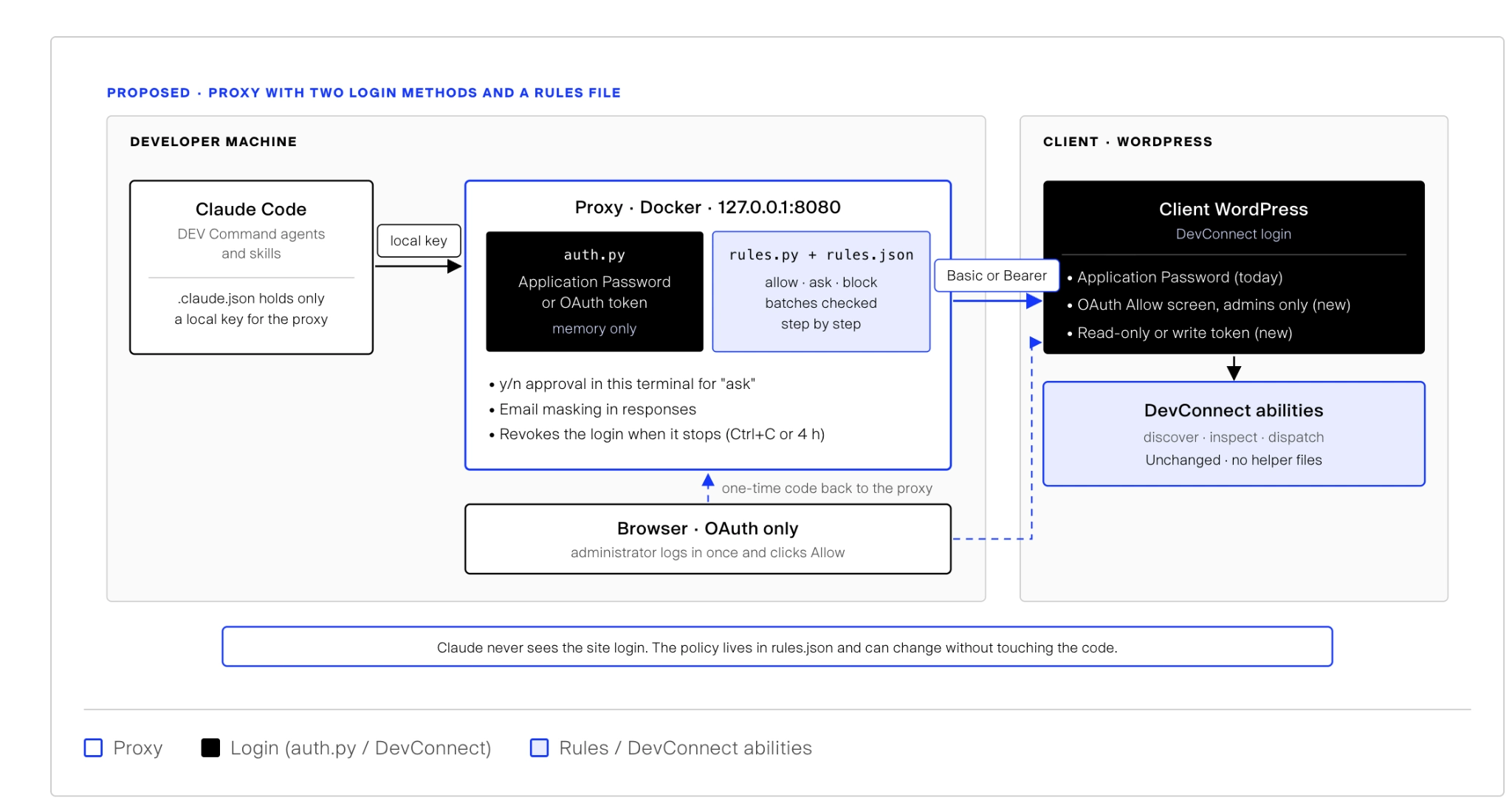
In this architecture, Claude Code does not connect directly to the WordPress website. DEV Command sends requests to the local proxy using only a local key. Inside the proxy, two parts do the work:
- auth.py holds the site login in memory: either an Application Password or an OAuth token that a logged-in WordPress administrator approved once in the browser.
- rules.py + rules.json decide whether each request is allowed, needs a y/n from the developer, or is blocked. Batches are checked step by step.
Only then does the proxy forward the request to DevConnect, using Basic auth for an Application Password or a Bearer token for OAuth.
This keeps the site login, whichever method is chosen, within the proxy while allowing Claude Code to work with the WordPress capabilities exposed by DevConnect.
Claude Code + DEV Command: The AI and Its Agents
DEV Command is E2M’s Claude Code plugin, distributed through a private marketplace. It extends Claude Code with purpose-built agents, skills, and tools for WordPress development tasks.
These capabilities support workflows such as Figma design extraction and visual quality assurance (QA), the same foundation behind E2M’s AI-powered Figma to WordPress development. DEV Command runs on the developer’s machine and handles the AI-side workflow, including planning tasks and requesting WordPress operations through its connected tools.
DevConnect: The WordPress Plugin That Executes the Work
E2M’s DevConnect is a WordPress plugin installed on the target WordPress environment. It acts as the bridge between the AI-powered development workflow and WordPress functionality.
Through WordPress Abilities, DevConnect exposes capabilities for tasks such as building pages, editing Elementor widgets, and uploading media. It also provides existing safeguards, including backups before write operations, audit logging, rollback capabilities, and protected-post controls.
This means the AI workflow can use WordPress-specific capabilities instead of relying only on generic REST API requests or custom code to modify website content.
DevConnect also controls how the proxy is allowed to log in. Both login methods are available when connecting through the proxy’s Docker setup, and a site can accept an Application Password, OAuth, or both. With OAuth, DevConnect shows an Allow screen to administrators only, issues read-only or write tokens, and lists connected sessions with a revoke button.
Also read: How to Build Intelligent & Automated WordPress Workflows with AI Abilities & MCP
The Proxy Layer: A New Security Checkpoint
The proxy is a lightweight Python application that runs locally in a Docker container on the developer’s machine. It sits between Claude Code and DevConnect, adding an additional layer of authentication and permission control.
Its main responsibilities include:
- Two login methods: Logs in to the site with an Application Password or an OAuth token, holds it in memory only, and gives Claude Code just a local key.
- Session validation: Checks the local key on every incoming request.
- Rules-based security checks: Applies the policy in rules.json, together with each DevConnect ability’s declared safety flags, to decide allow, ask or block.
- Human approval: Requires developer confirmation in the terminal for anything the rules mark as “ask”.
- Local access: Listens on 127.0.0.1:8080, keeping the proxy endpoint bound to the developer’s local machine rather than exposing it as a public internet endpoint.
- Session cleanup: Deletes the application password or revokes the OAuth tokens when the session ends or reaches its four-hour time limit.
The proxy is four Python files using only the standard library, a Dockerfile and a run script. Its Docker build runs built-in self-tests, and the container runs as a non-root user.
What Stays the Same and What’s New?
The proxy adds security controls without requiring changes to E2M’s existing DEV Command agents or skills.
| Component | Developed by | Status | Primary responsibility |
|---|---|---|---|
| DEV Command (Claude Code plugin) | E2M | Existing | Provides AI agents, skills, and tools that plan and request WordPress changes |
| DevConnect (WordPress plugin) | E2M | Existing | Executes WordPress operations through its Abilities, with existing backup and audit capabilities, and controls Application Password or OAuth login |
| Local proxy layer | E2M engineering team | New | Manages credentials, validates sessions, evaluates ability safety flags, and requires approval for destructive actions |
One important implementation detail makes this integration possible: the proxy retains the existing dev-command MCP server name while changing the connection endpoint to the local proxy. As a result, E2M’s existing DEV Command agents and skills continue to work through the new security layer without requiring modifications.
The result is an additional security checkpoint around E2M’s existing AI-powered WordPress development workflow, rather than an entirely new development system.
4. How Claude Code Sends WordPress Requests Through E2M’s DevConnect Proxy
Every request from Claude Code passes through E2M’s local proxy before reaching DevConnect. The proxy validates the session, checks the requested WordPress Ability’s safety flags, and determines whether the operation can proceed, must be blocked, or requires developer approval.
Let’s walk through this process using a practical example: adding a testimonial widget to an Elementor page.
Step-by-Step Example of Claude Code Sends WP Request: Adding an Elementor Testimonial Widget
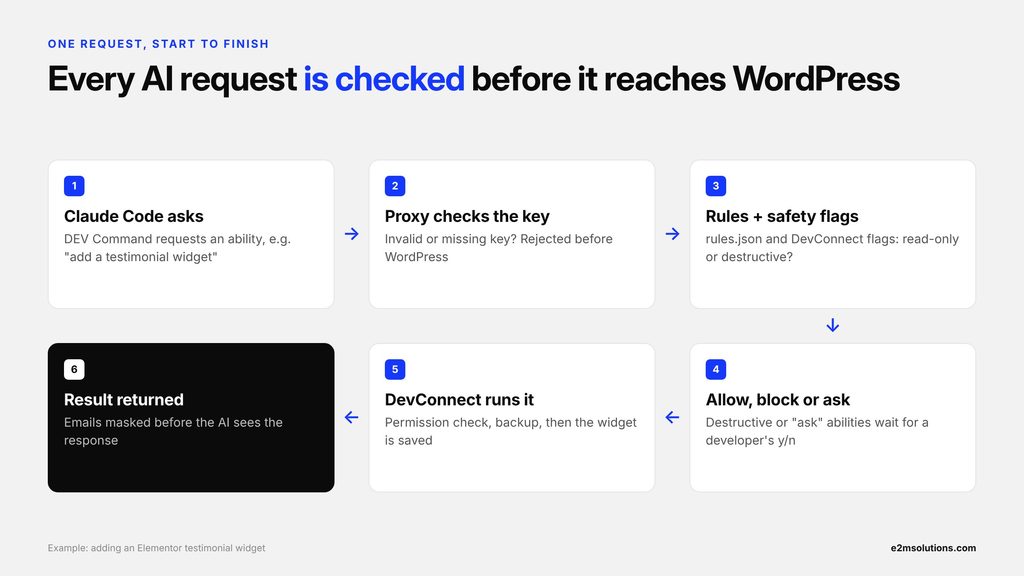
Here’s what happens when a developer asks Claude Code to add a testimonial widget to a WordPress page with DevConnect Proxy.
- Claude Code sends the request through DEV Command. A DEV Command agent identifies the required WordPress operation and calls DevConnect’s dispatch-tool, passing the ability name, its parameters, and the proxy’s local key.
- The proxy validates the session token. Before processing the request, the proxy checks the supplied session token. If the token is invalid, the request is rejected before it reaches DevConnect.
- The proxy checks the ability’s safety flags. The proxy uses DevConnect’s inspect-tool to retrieve the requested ability’s safety information, including whether it is read-only or destructive. This information is retrieved the first time an ability is encountered and then cached for the rest of the session.
- The proxy makes an access decision. Based on the rules in rules.json, the ability flags and the session’s permissions, the proxy chooses one of three outcomes: allow, block, or ask for approval. For example, adding an Elementor testimonial widget is a write operation, but it isn’t classified as destructive. Therefore, the proxy allows it when the developer has started a write-enabled session.
- The developer approves the operation if required. If DevConnect marks an ability as destructive, the proxy pauses and displays an Approve? [y/N] prompt in the developer’s terminal. The request proceeds only if the developer confirms with y. Unknown or unreadable safety flags also trigger a human approval prompt.
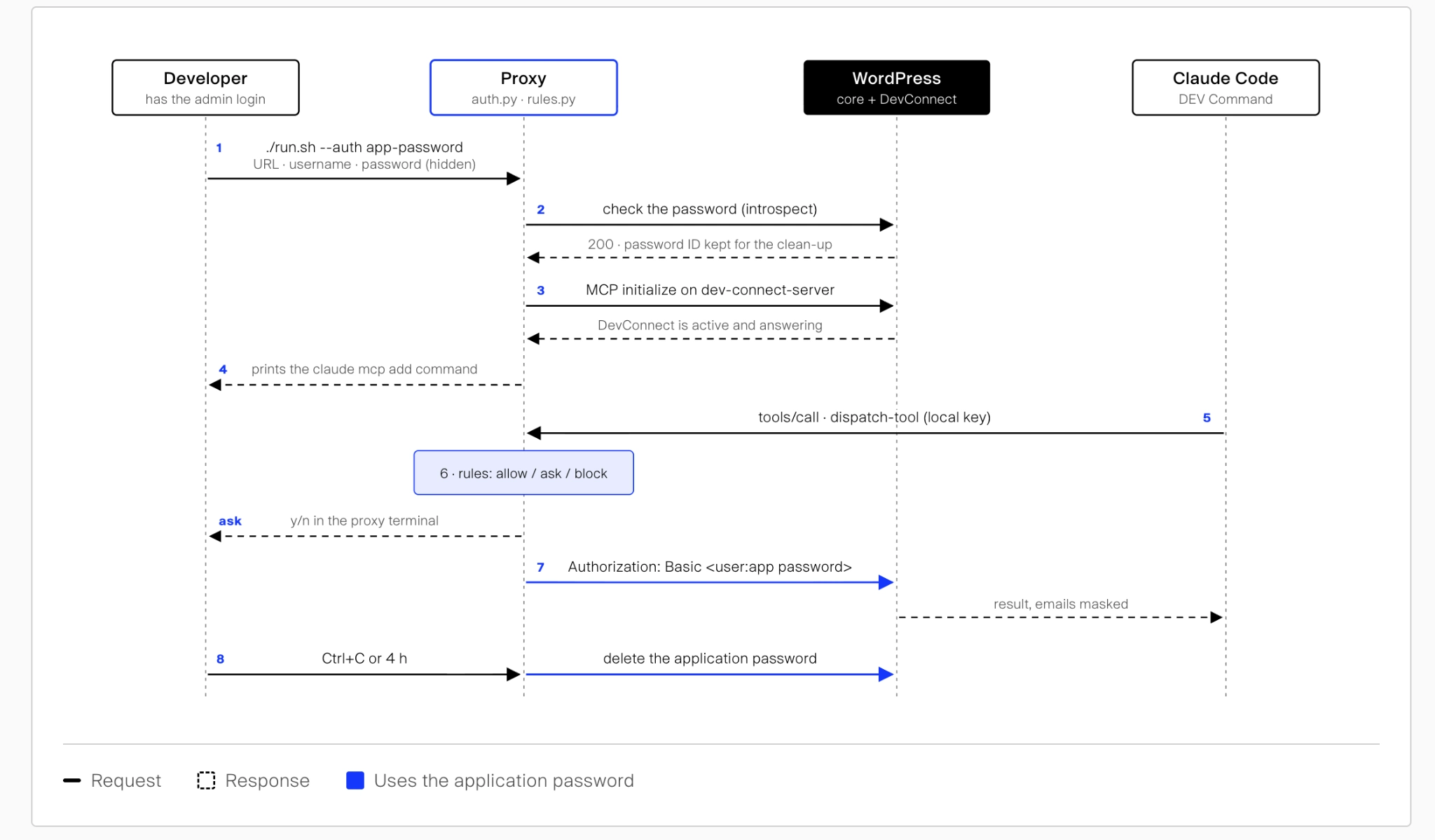
- The proxy forwards the request to DevConnect. Once the request passes the security checks, the proxy forwards the original MCP call to DevConnect. It authenticates with the site login held in memory: Basic auth with an application password, or a Bearer header with an OAuth access token. Claude Code never receives either.
- DevConnect executes the WordPress operation. DevConnect performs its own permission checks, creates a backup, and executes the requested ability. In this example, the testimonial widget is saved to the Elementor page and the page’s CSS is regenerated.
- The proxy cleans the response before returning it. DevConnect returns the operation result to the proxy, including relevant execution details. Before passing the result back to Claude Code, the proxy masks email addresses in the response.
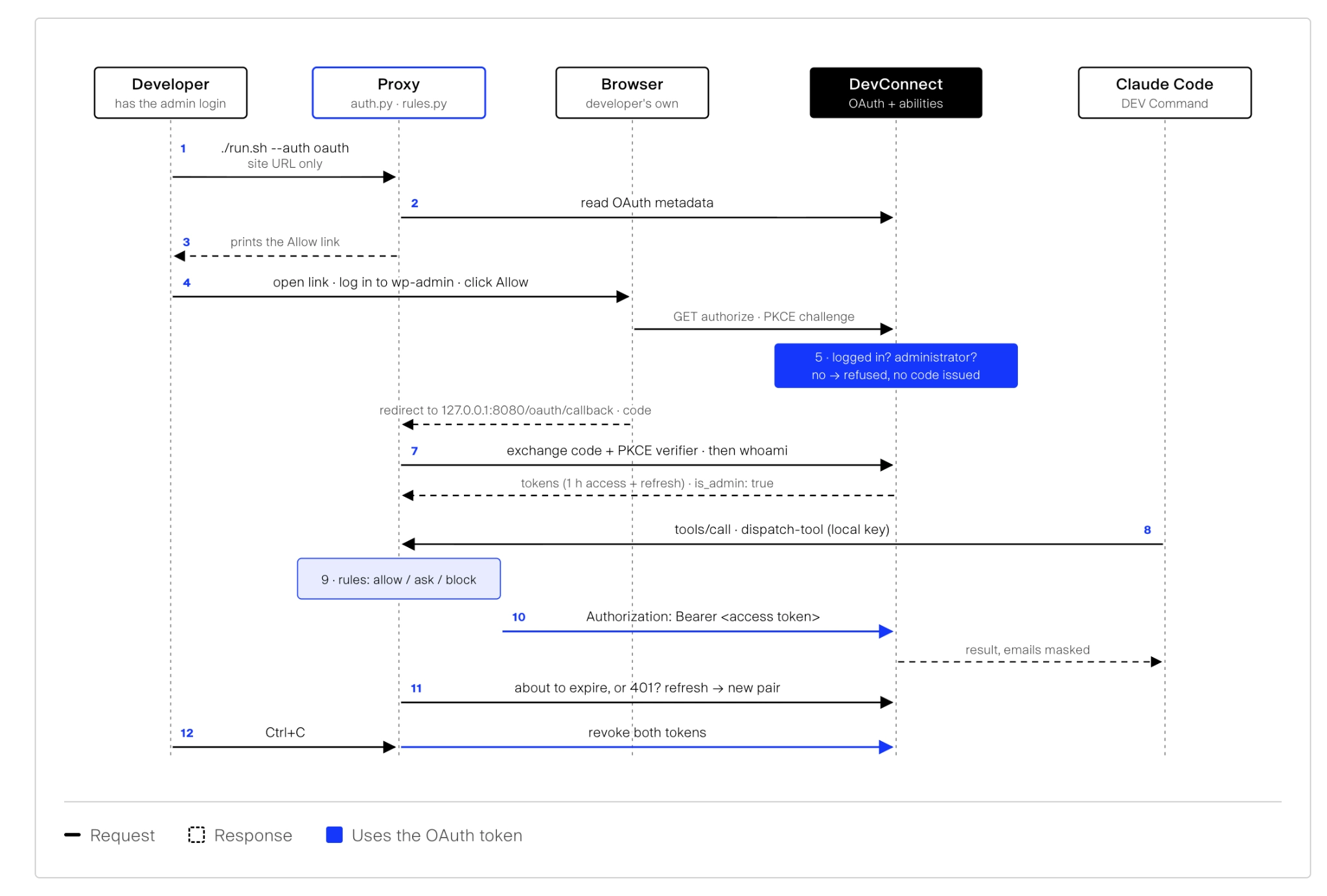
The request path above is the same for both login methods. What differs is how the proxy logs in at the start of a session and how it closes the session at the end.
Application Password Session Lifecycle
The developer types the application password once into the proxy terminal. It is held in memory only and deleted from the site when the proxy stops. This is the flow E2M’s Web AI team has tested on Elementor and Gutenberg tasks, now with the rules file in the middle.
OAuth Session Lifecycle
With OAuth, the developer enters only the site URL. The proxy prints an Allow link, a logged-in WordPress administrator approves access in the browser, and the proxy exchanges a one-time code for tokens using OAuth 2.1 with PKCE. Anyone who isn’t an administrator is refused, and no code is issued.
The access token lasts one hour and is refreshed before it expires. When the proxy stops, both the access and refresh tokens are revoked.
How OAuth and Application Passwords Secure AI-Powered WordPress Development
Both methods end in the same place: the proxy serves Claude Code, and Claude Code never sees the credential. The developer picks the method when starting the proxy.
| Step | Application Password | OAuth |
|---|---|---|
| Developer enters | Site URL, WordPress username, application password (hidden) | Site URL only |
| Approval | None; the password is the approval | An administrator logs in to wp-admin and clicks Allow |
| Who can approve | Whoever has the password | Only a logged-in administrator; anyone else is refused |
| Check before connecting | WordPress confirms the password | Code exchanged with PKCE, then the site confirms the token belongs to an administrator |
| Header sent to DevConnect | Basic auth | Bearer token, refreshed before it expires |
| Read-only session | Enforced by the proxy rules | Enforced by the proxy rules and by the token’s scope on the site |
| When the proxy stops | Application password deleted | Access and refresh tokens revoked |
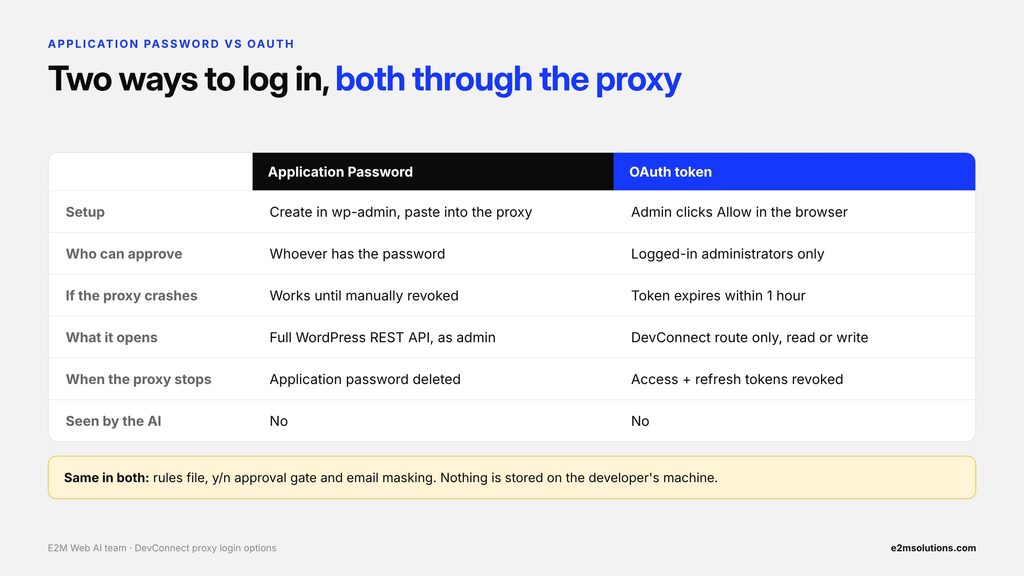
What Matters to Agencies: Application Password vs. OAuth
| Agency consideration | Application Password | OAuth | Advantage |
|---|---|---|---|
| Setup | Create an application password in wp-admin and enter it into the proxy | Enter the site URL and approve access in the browser | OAuth |
| If the proxy crashes | The application password may remain valid until it is revoked or otherwise expires | The access token remains valid until it expires; refresh-token behavior depends on the site’s revocation policy | Depends on token lifecycle |
| Access scope | Inherits the WordPress user’s capabilities across supported REST API endpoints | Can be restricted to the DevConnect MCP route and its permitted operations | OAuth, if scope restrictions are enforced |
| Client visibility | Appears as an application password in the WordPress user’s profile | Active sessions can be listed in DevConnect, with a revoke option | OAuth |
| Credential storage | Held in proxy memory during the session | Tokens held in proxy memory during the session | Same |
| Credential visibility to AI | Claude Code does not receive the application password | Claude Code does not receive the OAuth credentials | Same |
| Proxy rules and approval controls | Supported | Supported | Same |
Both authentication methods are available through the proxy’s Docker setup. The developer selects the preferred method when starting a session.
What Happens When a Request Is Blocked or Declined?
The proxy also handles requests that don’t meet the session’s permission requirements. For example:
- Read-only session: If Claude Code requests a write operation, the proxy blocks it.
- Developer declines approval: If a destructive ability triggers an approval prompt and the developer responds with n or presses Enter, the proxy rejects the request.
- Unknown safety flags: If the proxy cannot retrieve an ability’s safety flags, it asks for human approval rather than automatically allowing the operation.
In these cases, the proxy returns an error response to Claude Code. The blocked or declined request is not forwarded to WordPress, so the requested operation does not execute.
This request-level control allows Claude Code to work with WordPress through DevConnect while keeping permission checks and developer approval between the AI agent and the website.
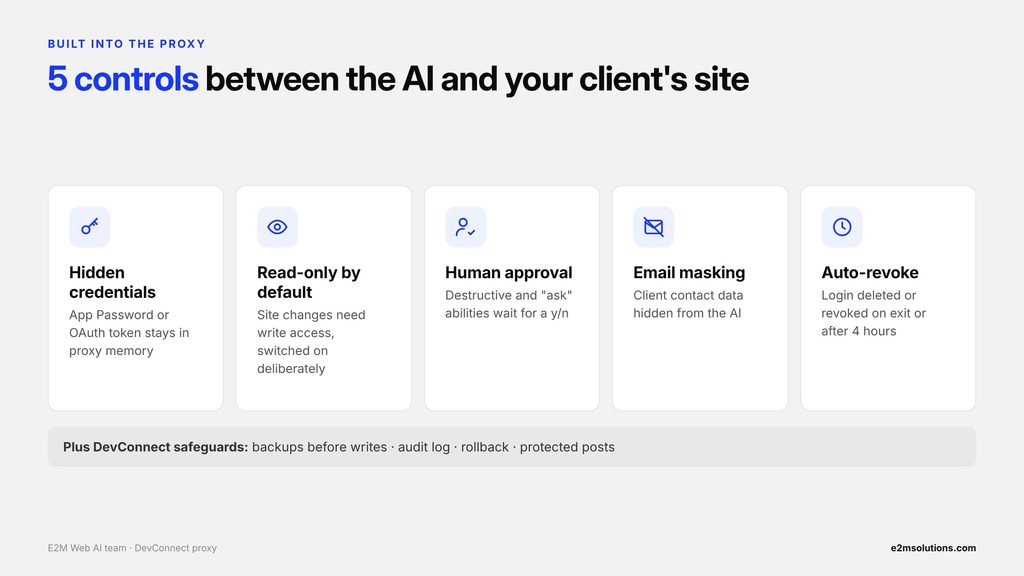
5. 5 Security Controls That Make E2M’s AI-Powered WordPress Development Safer
E2M’s engineering team built five core security controls into its local proxy to manage how Claude Code interacts with WordPress. These controls cover credential isolation, write permissions, developer approval, response filtering, and automatic session cleanup.
Together, they add an extra layer of protection around E2M’s existing DEV Command and DevConnect workflow.
5.1 Keeping WordPress Credentials Hidden from the AI
When a developer starts the proxy, they choose a login method. With an Application Password, they enter the site URL, username, and application password through hidden terminal prompts. With OAuth, they enter only the site URL, and a logged-in WordPress administrator approves access once in the browser.
The proxy keeps these credentials in memory during the session. They are not written to disk or passed through command-line arguments or environment variables. Instead of receiving the application password or OAuth token, Claude Code authenticates with the proxy using a separate session bearer token.
This credential isolation means Claude Code can send authorized WordPress requests without directly handling the website’s application password.
5.2 Starting with Read-Only Access and Enabling Writes Deliberately
The proxy starts in read-only mode by default. Developers must explicitly enable write access when starting a session by using the –write option.
In a read-only session, the proxy allows read-only WordPress Abilities but blocks operations that modify the website. This allows developers to use Claude Code for tasks such as inspecting pages or reviewing Elementor structures without enabling content changes.
When write access is enabled, permitted editing operations can proceed, while destructive abilities remain subject to additional approval checks.
5.3 Requiring Developer Approval for Destructive Actions
Not every WordPress operation carries the same level of risk. Adding a widget, updating an element, and deleting a page have different consequences.
To account for this, the proxy reads the safety flags declared by DevConnect for each WordPress Ability.
If an ability is marked as destructive, the proxy pauses the request and displays an Approve? [y/N] prompt in the developer’s terminal. The operation proceeds only when the developer confirms with y.
If the developer declines, the proxy returns an error response to Claude Code without forwarding the request to WordPress. If an ability’s safety flags cannot be retrieved, the proxy also requests human approval rather than automatically allowing it.
5.4 Masking Email Addresses in AI Responses
Security also matters when information travels back from WordPress to an AI agent.
Before returning tool results to Claude Code, the proxy masks email addresses found in the response. This adds a layer of protection for client and user contact information that might otherwise enter the AI agent’s context.
This response-filtering step complements credential isolation by addressing the information returned during WordPress development tasks.
5.5 Automatically Revoking Access When a Session Ends
The proxy is designed for short-lived development sessions rather than permanent access.
When a developer presses Ctrl+C to stop the proxy, it deletes the session’s application password or revokes both OAuth tokens. OAuth access tokens also expire within an hour, so even a crashed proxy can’t leave working access behind for long. The session also has a four-hour time-to-live (TTL), after which access is automatically revoked.
The proxy runs inside a temporary Docker container configured with automatic removal. When the process exits, the container is removed and its in-memory session state is no longer available.
How These Controls Work with DevConnect’s Existing Safeguards
The proxy does not replace DevConnect’s existing WordPress protections. It adds controls before requests reach the plugin, while DevConnect continues to handle its own permission checks and existing safeguards.
These include:
- Backups before write operations: Provides a recovery point before supported changes are executed.
- Audit logging: Maintains records of operations performed through DevConnect.
- Rollback capabilities: Supports restoring previous states for supported operations.
- Protected posts: Helps prevent changes to designated protected content.
Together, the proxy’s access controls and DevConnect’s existing safeguards create multiple checkpoints in E2M’s AI-powered WordPress development workflow. Agencies should still pair them with a broader WordPress disaster recovery plan for every client site.
Planning to bring AI agents into your clients’ WordPress sites?
E2M’s white-label WordPress team already delivers AI-assisted builds with credential isolation, approval controls and backups built in, so your agency gets the speed without the risk.
6. How E2M’s WordPress Proxy Evaluates AI Requests: Allow, Block, or Ask
E2M’s proxy evaluates incoming requests using the safety flags already declared by DevConnect for its WordPress Abilities. Together with a team-editable rules file, the proxy retrieves the relevant safety information from DevConnect and uses it to decide whether a request can proceed, must be blocked, or requires developer approval.
6.1 Using DevConnect’s Existing Safety Flags
Each DevConnect ability declares two important properties: whether it is read-only and whether it is destructive.
When Claude Code requests an ability for the first time, the proxy uses DevConnect’s inspect-tool to retrieve these safety flags. It then caches the information for the remainder of the session, avoiding repeated lookups for the same ability.
This approach keeps the proxy aligned with the safety information exposed by DevConnect. The rules file only needs to list exceptions; most decisions come straight from DevConnect’s flags.
6.2 How the Proxy’s Allow, Block, or Ask Logic Works
The proxy evaluates two factors before forwarding a request:
- Session permissions: Was the proxy started in read-only mode or with write access enabled?
- Ability safety flags: Is the requested ability read-only, a non-destructive write, or destructive?
The combination determines the outcome:
| Type of ability | Read-only session | Write-enabled session | Example |
|---|---|---|---|
| Read-only | Allow | Allow | List pages, read Elementor layout |
| Write, not destructive | Block | Allow | Add a widget, update an element, upload media |
| Destructive | Block | Ask (y/n) | Delete content, roll back a change |
| Unknown (flags unavailable) | Ask (y/n) | Ask (y/n) | Human approval required |
| Catalogue lookups | Allow | Allow | List available abilities and their inputs |
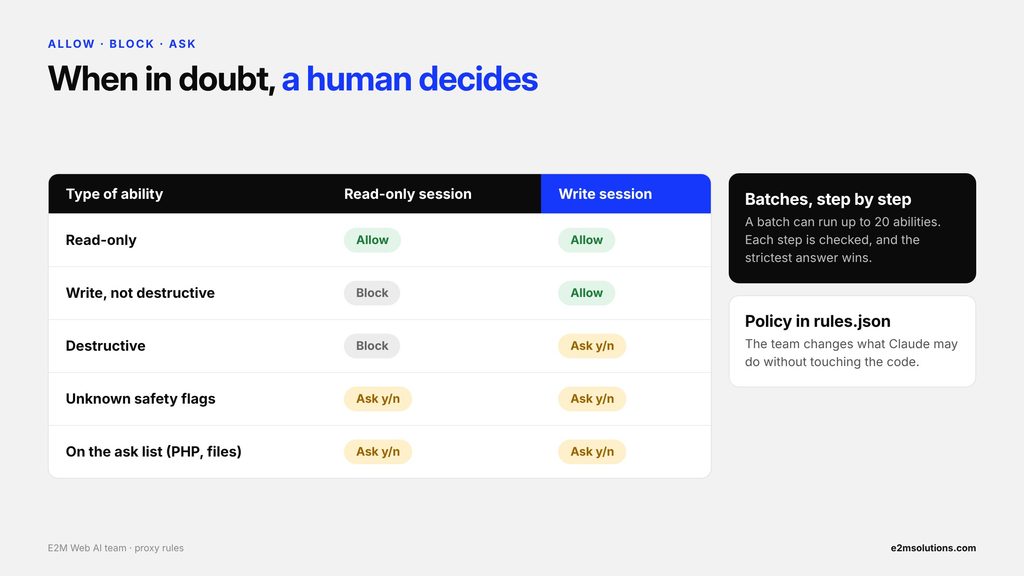
Proxy creates three possible outcomes:
- Allow: The request meets the session’s permission requirements and can be forwarded to DevConnect.
- Block: The operation isn’t permitted in the current session. The proxy returns an error without forwarding the request.
- Ask: The proxy pauses and requests developer confirmation before proceeding.
6.3 Policy in a Rules File, Not in the Code
E2M’s Web AI team moved the proxy’s permission policy out of the code and into a separate rules.json file. The team can change what Claude may do without touching the proxy itself, and the proxy refuses to start if the rules file is missing or invalid.
The rules are applied in this order:
- Deny list: Anything on the deny list is blocked. Wildcards work, such as all delete abilities.
- Unknown safety flags: If DevConnect gives no safety profile for an ability, the default answer is ask.
- Read-only session: Without write access, any ability that changes the site is blocked.
- Ask and allow lists: Abilities on the ask list always need a y/n, even if DevConnect marks them read-only. By default this includes PHP execution, file reads, writes and deletes, and reading site options.
- Destructive flag: Abilities DevConnect marks destructive need a y/n by default.
- Batches, step by step: A batch can run up to 20 abilities in one call. The proxy checks each step, and the strictest answer wins, so a risky ability can’t hide inside a batch.
6.4 Fail-Safe Handling: When the Proxy Cannot Verify an Ability
What happens if the proxy cannot retrieve an ability’s safety flags?
Rather than assuming the operation is safe, E2M’s proxy follows a fail-safe approach: it requests human approval.
This applies to both read-only and write-enabled sessions. The developer must explicitly confirm the operation before the proxy forwards it to DevConnect.
This behavior is particularly important when new abilities are introduced or their safety information cannot be retrieved. It prevents an unknown operation from being automatically treated as safe simply because the proxy cannot determine its risk level.
By using DevConnect’s declared safety flags and requiring approval when those flags are unavailable, E2M’s proxy adds a consistent permission checkpoint between Claude Code and WordPress.
7. How to Set Up a Secure Claude Code and WordPress Development Session
Setting up E2M’s proxy-based AI WordPress development workflow involves eight steps, from choosing a login method to closing the session and revoking access.
The setup runs locally on the developer’s machine. Once Claude Code connects to the proxy, developers can continue using their existing DEV Command agents and skills without changing their usual WordPress development workflow.
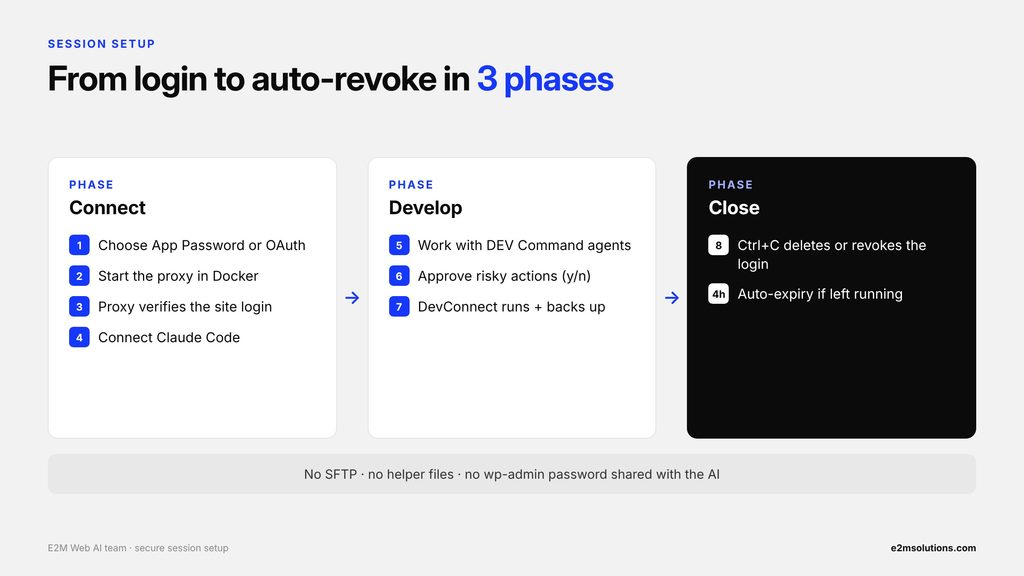
7.1 Choose a Login Method: Application Password or OAuth
- Choose how the proxy logs in. For an Application Password, go to Users → Profile → Application Passwords in the WordPress admin dashboard and create one for this session.
For OAuth, no password is needed: a logged-in WordPress administrator will approve access in the browser. Either way, the developer never shares their wp-admin login password with Claude Code.
7.2 Start the Local Proxy and Connect Claude Code
- Start the proxy. Run the proxy locally using Docker. With an Application Password, it asks for the site URL, username, and application password through hidden terminal prompts. With OAuth, it asks only for the site URL and prints an Allow link.
- Let the proxy validate the connection. For an Application Password, WordPress confirms the password. For OAuth, an administrator clicks Allow, and the proxy exchanges the one-time code and confirms the token belongs to an administrator. The proxy then confirms that the DevConnect MCP endpoint is responding. Once the connection is established, it generates and displays a session bearer token.
- Connect Claude Code to the proxy. The developer configures Claude Code to use the proxy’s local MCP endpoint and supplies the session token for authentication. DEV Command continues using its existing dev-command connection name, so its agents and skills can work through the proxy without requiring changes.
7.3 Develop, Approve Changes, and Close the Session
- Continue WordPress development as usual. The developer can use existing DEV Command agents to discover available abilities, inspect WordPress pages, and execute supported development tasks. The proxy relays the requests and handles the required security checks.
- Approve destructive operations when prompted. If a requested ability is classified as destructive, the proxy pauses execution and displays an approval prompt in the developer’s terminal. The developer can confirm with y or decline with n.
- Let DevConnect execute the WordPress operation. Once the proxy approves and forwards the request, DevConnect performs its own permission checks and executes the requested WordPress ability. Its existing backup and audit-log mechanisms remain part of the workflow.
- End the session and revoke access. When development work is complete, the developer presses Ctrl+C to stop the proxy. It deletes the application password or revokes the OAuth tokens, and the temporary Docker container is removed.
The proxy also enforces a four-hour session limit, providing an automatic expiry mechanism if a developer leaves a session running.
What the Setup Requires
The local proxy approach does not require SFTP access, temporary helper files, or the developer’s wp-admin login password. It uses either a session-specific application password or an administrator-approved OAuth token, which remains within the proxy rather than being passed to Claude Code.
This gives developers a controlled way to use Claude Code and E2M’s DEV Command for WordPress development while keeping website credentials isolated and applying security checks throughout the session.
Related: Top 20 AI Workflows for Digital Agencies to Automate in 2027 (With Hours Saved)
8. Why E2M Chose DevConnect’s WordPress Abilities Over a Generic REST API Approach
During development, E2M’s engineering team tested two approaches to connecting Claude Code with WordPress. The first used a standalone proxy with generic WordPress REST API operations and temporary builder-specific helper files. The second relayed requests through DevConnect’s existing WordPress Abilities.
The testing revealed an important distinction: generic REST operations weren’t sufficient for the specific Elementor widget-editing task. Reusing DevConnect’s existing builder-aware abilities provided a more effective way to perform the required page-builder operations.
8.1 First Attempt: Why the Generic REST API Approach Fell Short
The original architecture proposal used a standalone proxy that communicated with WordPress through an allow-list of core REST API endpoints. For page builders such as Elementor, Divi, and ACF, the approach also proposed temporary helper files uploaded through SFTP.
During the first test, Claude Code successfully connected to the proxy. However, the generic operations available to it, such as updating a page or replacing the entire Elementor layout, weren’t precise enough to add a single testimonial widget to an existing page, the kind of granular work that white label Elementor development depends on.
As a result, the specific Elementor task wasn’t completed.
The issue wasn’t simply connecting Claude Code to WordPress. The challenge was providing the AI agent with the right builder-specific capabilities to perform granular editing tasks.
8.2 Second Attempt: Relaying Requests Through DevConnect’s WordPress Abilities
For the second iteration, E2M changed the architecture.
Instead of creating another set of generic WordPress tools, the proxy relayed Claude Code’s MCP requests to DevConnect’s existing bridge and WordPress Abilities.
This allowed DEV Command to use the same builder-aware capabilities already available in E2M’s WordPress development workflow.
The result was a successful completion of the same Elementor testimonial widget task in approximately two to three attempts, using DEV Command’s existing agents.
The second approach also eliminated the need for SFTP access and temporary helper files on the WordPress website.
8.3 Original Proposal vs. E2M’s Final Proxy Implementation
The two iterations differed in several important areas:
| Area | Original proposal | Final implementation |
|---|---|---|
| Connection to WordPress | Core REST API through an allow-list | DevConnect bridge and WordPress Abilities through the proxy |
| Page-builder operations | Temporary builder-specific helper files | Existing DevConnect abilities |
| SFTP access | Required for helper-file deployment | Not required |
| Additional code on the website | Temporary helper files | No additional files in the successful test |
| Credentials | WordPress application password and SFTP credentials | WordPress application password held in proxy memory |
| Destructive-action checks | HTTP method and route-pattern checks | Ability-level safety flags declared by DevConnect |
| Backups and rollback | Not included in the original proposal | Uses DevConnect’s existing backup, audit-log, and rollback capabilities |
| DEV Command agents | New tools and integration changes proposed | Existing agents and skills remain unchanged |
The Key Lesson for AI-Powered WordPress Development
The main lesson from E2M’s testing is that connecting an AI agent to WordPress is only part of the challenge. The integration also needs to understand the capabilities of the website’s page builder.
Generic REST operations may be sufficient for some basic website tasks, but more granular Elementor editing requires builder-aware operations. It’s a pattern we expect to shape the future of AI in WordPress development.
Rather than rebuilding capabilities that DevConnect already provided, E2M integrated the proxy with its existing WordPress Abilities. This allowed the team to retain the familiar DEV Command workflow while adding another layer of control over credentials and potentially risky operations.
Also read: Elementor V4 + MCP: How AI Agents Are Changing WordPress Website Development
9. Checklist: How to Evaluate Any AI WordPress Development Workflow
Before allowing any AI tool to work on client WordPress websites, agencies should be able to answer “yes” to these six questions. They reflect the same standards E2M’s engineering team built into its proxy layer.
- ☐ Does the AI agent work without direct access to WordPress credentials?
- ☐ Do destructive actions require explicit human approval?
- ☐ Is a read-only mode available for inspection and audit tasks?
- ☐ Does the workflow avoid adding code, helper files, or SFTP access to the client’s website?
- ☐ Is access revoked automatically when each session ends?
- ☐ Is every change backed up and logged, with a way to roll back?
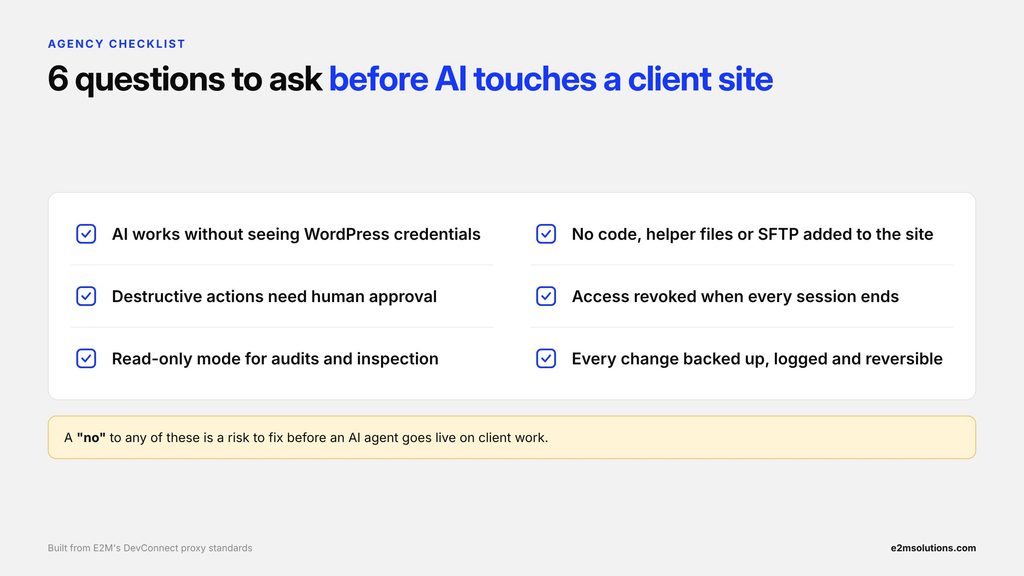
A “no” to any of these questions is a risk worth discussing with your team or development partner before an AI agent touches a client website.
10. Frequently Asked Questions About AI-Powered WordPress Development
AI agents can be used for WordPress development with appropriate security controls, but connecting them directly to client websites without managing permissions and credentials introduces risks.
E2M’s proxy-based approach adds controls around credential isolation, session permissions, and developer approval for destructive operations. It also works alongside DevConnect’s existing backup and audit-log capabilities. However, the architecture still requires further validation before production use.
No. In E2M’s local proxy implementation, the site login stays in the proxy’s memory, whether it’s an application password or an OAuth token. Claude Code receives only a local key for the proxy and never sees the credential.
Yes. The developer chooses an Application Password or OAuth when starting the proxy. With OAuth, only a logged-in WordPress administrator can approve access, tokens expire within an hour, and access is limited to DevConnect’s route. Both options are available today through the proxy.
The proxy requires developer approval for WordPress Abilities that DevConnect marks as destructive. If an ability is marked destructive, the developer must confirm the operation in the terminal before it proceeds.
Write operations are blocked in read-only sessions, and abilities with unknown safety flags also require human approval.
Batches are checked step by step, and higher-risk abilities such as PHP execution and file changes are on the proxy’s ask list by default, so they always need a developer’s y/n.
E2M’s tested proxy approach does not require SFTP access, temporary helper files, or additional code for each development session. DevConnect is the WordPress plugin that provides the existing bridge and WordPress Abilities.
The proxy runs separately in a Docker container on the developer’s machine.
Yes. In E2M’s local test, Claude Code successfully added a testimonial widget to an Elementor page through the proxy using DevConnect’s existing WordPress Abilities.
DevConnect is E2M’s WordPress plugin that exposes WordPress functionality through its bridge and WordPress Abilities. It supports operations such as building pages, editing Elementor widgets, and uploading media.
The engineering documentation describes approximately 200 WordPress Abilities, along with existing safeguards such as backups before writes, audit logging, rollback capabilities, and protected-post controls.
11. Make WordPress Development More Efficient with E2M
AI coding agents can accelerate WordPress development, but agencies need more than speed when working with client websites. They need controlled access, clear permission boundaries, and safeguards around important website operations.
E2M’s DevConnect proxy implementation demonstrates one way to bring these elements together. By combining Claude Code, DEV Command, DevConnect, and a local proxy, E2M’s engineering team has developed and locally tested an approach that adds credential isolation and approval controls to AI-assisted WordPress workflows.
E2M helps agencies scale their WordPress development delivery through white label web development services and white label AI solutions for agencies. If you’re looking for a development partner to support your agency’s client projects, let’s talk.
Ready to bring AI into WordPress delivery without risking client sites?