TL;DR
- AI isn’t replacing Shopify developers. It’s taking repetitive first-draft work off their plate so they can spend more time on architecture, integrations, and the calls that need a senior person.
- In our own testing, AI-generated Shopify sections built from clear Figma designs reached about 90% usefulness. Dawn-theme builds landed around 80%. Horizon dropped to about 40%.
- The biggest margin win isn’t in the coding. It’s earlier, in discovery, where AI helps us catch scope gaps before we’ve quoted a client anything.
- This isn’t just a Shopify developer story. We’ve found ways to bring AI into design, QA, and project management too.
- Nothing here removes QA or senior review. If anything, it made us more disciplined about both.
What we found: Isolated custom Shopify sections built from clear Figma designs reached roughly 90% usefulness on the first pass. Dawn theme-based sections landed around 80%. Horizon’s more complex architecture dropped to about 40%.
During early wireframing, AI helped us put together an initial page structure in as little as four hours, enough for a client to react to something real before we’d invested serious Shopify store or website design time.
Find Your Shopify Delivery Ceiling
A free 60-second quiz that shows exactly where your delivery model slows down — and what to fix before your next growth phase.
The Real Question: Can AI Actually Change How Shopify Agencies Deliver Work?
Yes, if you run a Shopify development agency, you already know the pressure points:
- Clients want more delivered, faster, without paying more for it.
- Every unscoped requirement is a margin risk waiting to happen.
- Senior developers get stuck doing repetitive first-draft work instead of the complex problems only they can solve.
- Competitors are already experimenting with AI, and you don’t want to be the one standing still.
We’ve felt every one of these ourselves. We’re E2M, a white-label service partner that’s spent the last 13+ years helping digital agencies deliver more without growing headcount. On the eCommerce Shopify side specifically, that means white label Shopify AI development: agencies keep the client relationship, and we work as their invisible backend web team, handling development, migration, theme, and app work behind the scenes, with every file and line of code belonging to the agency, not us.
That’s why, over the past several months, our senior Shopify development team tested tools like Claude, Cursor, and Figma MCP on real client store work, not demos.
We weren’t trying to replace anyone or automate whole projects. We wanted to find out, specifically, where AI can remove repetitive design and development work without putting the quality our clients expect at risk.
Here’s the plan we ended up testing against: four questions we asked about every stage of Shopify delivery.
- Faster Delivery: Can we deliver more Shopify work with the same team?
- Better Margins & Scoping: Can we cut down on underestimated work and repetitive development hours?
- Scalable Operations: Can AI support design, PM, and QA, not just coding?
- Higher-Value Projects: Can AI lower the cost of exploring custom apps, integrations, and complex builds?
The results were uneven, but usefully so: isolated custom sections from clear Figma designs came out roughly 90% useful on the first pass, Dawn-based development landed around 80%, and Horizon needed a lot more hands-on correction. That told us the goal was never “use AI on everything.” It was finding exactly where AI gives us leverage. Here’s what we found for each of the four areas.
How Can Shopify Agencies Use AI to Deliver Projects Faster?
The fastest, most obvious win has been closing the gap between an approved design and a working first build, without cutting the review that actually protects our work. A typical custom Shopify project runs through:
- Wireframes and design direction
- Figma designs
- Custom theme sections
- Responsive implementation
- Theme-editor configuration
- Testing and QA
- Client feedback
- Deployment
AI has helped us move through several of these stages faster, without skipping any of them.
Real Use Case: Figma to Shopify AI Development in Practice
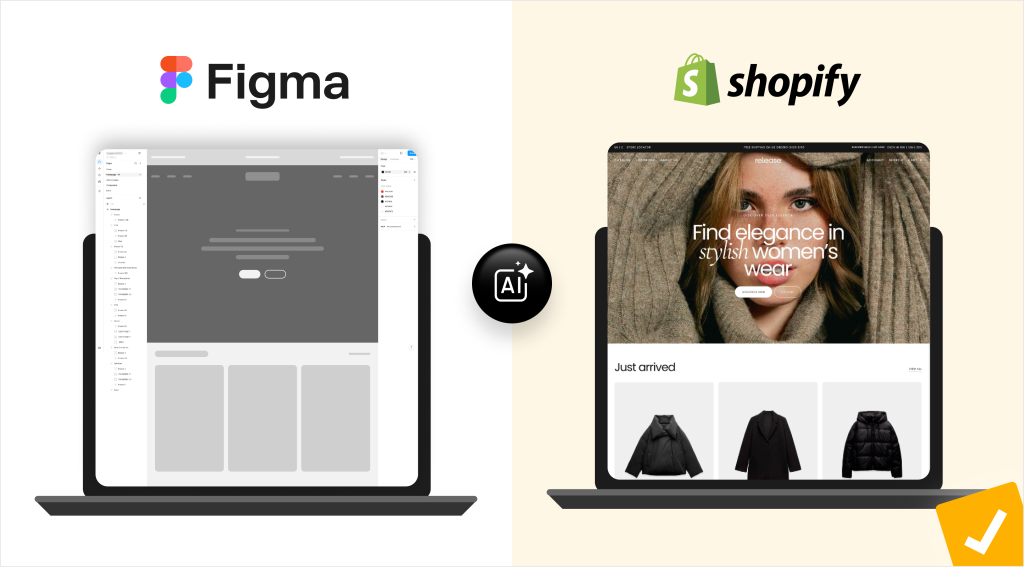
Of all the AI tools for Shopify agencies we tested, this workflow gave us the clearest results: connecting a Figma design straight into Claude using Figma MCP, then asking it to build individual sections, never a whole homepage at once. Breaking the design into smaller, clearly scoped pieces made the difference:
Figma Design → Claude + Figma MCP → Initial Shopify Section → Developer Review → QA → Project Manager Review → Agency Review → Agency's Client ReviewFor isolated sections with clear designs, the first AI-generated pass reached around 90% usefulness; Dawn-based sections came in around 80%. Our Shopify developers still had to check:
- Responsive behavior
- Theme-editor settings
- Accessibility
- Code quality and performance
- JavaScript behavior
- Compatibility with other sections and apps
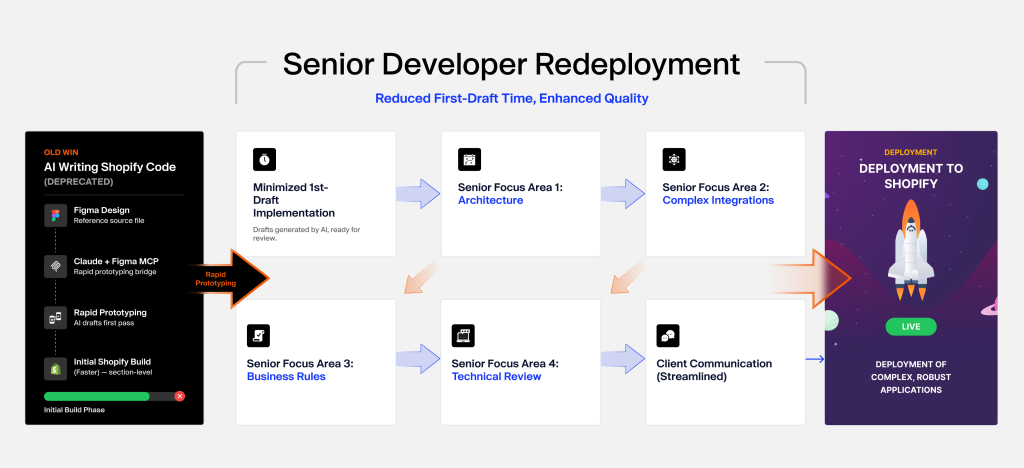
That review step hasn’t changed. What changed is how fast we got to something worth reviewing.
What This Actually Means If You Run an Agency
The win isn’t “AI can write Shopify code.” It’s that senior developers spend less time on first-draft implementation and more time on:
- Architecture
- Integrations
- Complex functionality
- Business rules and technical review
In one section, that barely registers. Across ten sections and a whole team, it adds up to real capacity, the same argument behind how white label Shopify development works for agencies, now with an AI layer underneath it.
Can AI Also Speed Up the Design Side?
Yes, more than we expected. AI helped us put together an initial wireframe in about four hours when a client hands us:
- Reference websites
- Brand guidelines
- Existing store examples
- Rough requirements, but no finished design yet
We use AI design tools to create interactive prototypes for this; the same acceleration is available from the merchant side through generative AI to improve a Shopify store.
Agency Takeaway: The fastest ROI from AI isn’t the code itself. It’s getting to a review-ready first draft sooner, so your senior Shopify developers spend their hours on judgment calls instead of typing.
Can AI Improve Shopify Project Margins and Scoping Accuracy?
This is where AI has surprised us most, more than the coding side. If you’ve run a Shopify agency for any length of time, you know the real threat to margin usually isn’t slow development. It’s scope that wasn’t nailed down. A project that looks like 60 hours at kickoff tends to grow once development starts, and every unanswered question is a chance for rework. Once you’ve quoted the client, clawing back that time is hard.
How AI-Assisted Discovery Catches Scope Gaps Before They Cost You
We use AI as a second reviewer during discovery, feeding it a client’s requirements, Figma designs, and Shopify plan details. Take something that sounds simple: “we need wholesale pricing for selected customers.” Before quoting that, we need to know:
- Is this store on Shopify Plus?
- Are there multiple wholesale customer groups?
- Should prices be hidden before login?
- Does pricing live in Shopify or an ERP?
- What happens during a store-wide promotion?
AI gets us to that question list fast; a PM or senior developer still decides what actually goes back to the client.
Turning Vague Requirements Into Acceptance Criteria We Can Build Against
We also use it to turn a one-line request, “build a custom product selector,” into criteria a developer and QA person can actually work from:
- Selector shows only on applicable products
- Selection is required before Add to Cart
- Selected value is stored on the order
- Works on mobile and desktop
- Stays configurable from Shopify admin
Everyone downstream- dev, QA, the client- ends up with a clearer picture of what’s included.
Why This Is the Real Agency Benefit
If AI helps us catch one real scope gap before a client signs off, that catch is often worth more than any time saved writing code. We’ve stopped thinking of AI as just a developer productivity tool. It’s turned into a risk-management tool for discovery, which is exactly where most Shopify agencies quietly bleed margin.
Agency Takeaway: Every scope gap AI catches before a quote goes out is margin you don’t have to fight to recover later. Discovery, not development speed, is where most Shopify agencies actually bleed profit.
How Can Shopify Agencies Actually Use AI Across Design, Dev, QA, and PM?
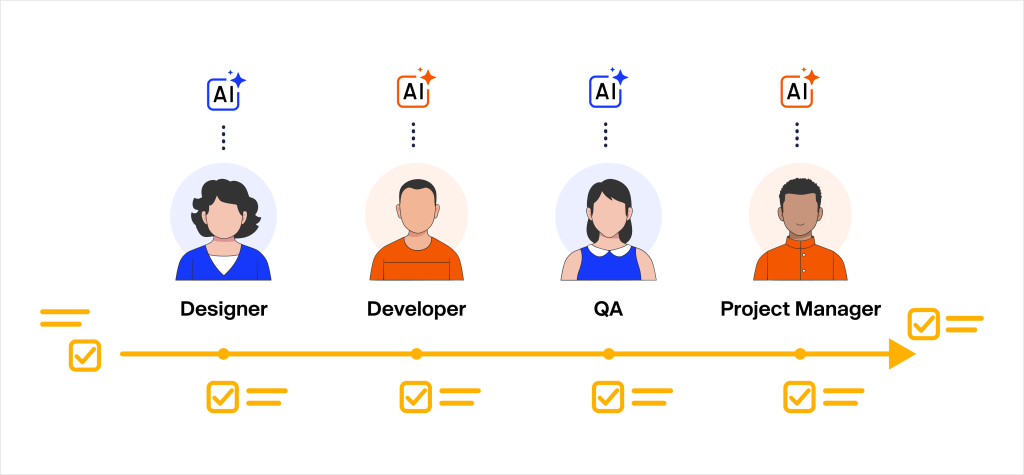
Most conversations about AI in agencies focus only on developers, and that’s a blind spot. A Shopify project moves through discovery, design, development, QA, project management, client review, and launch, and we’ve found ways to bring AI into nearly every stage.
eCommerce Design team. AI helps with initial wireframes, page structures, and pulling structure out of reference sites. The designer still owns the final visual experience, brand alignment, and every creative call. AI just gets them to a starting point faster.
Shopify Development team. AI helps with Figma-to-Shopify implementation, reusable components, boilerplate, debugging, and documentation, with the strongest results still coming from clear custom sections on Dawn.
Web QA team. Once a developer finishes a new section, AI is quick to flag test cases we might otherwise miss:
- Missing images
- Long headings
- Empty buttons
- Maximum content blocks
- Mobile and tablet layouts
- Invalid URLs
Our white label QA team still runs and verifies every one of these AI-assisted tools and themselves, alongside the real cross-browser and client testing that was always part of our process.
Project management. AI helps draft requirement summaries, clarification questions, acceptance criteria, developer handovers, client status updates, and deployment notes, cutting into the admin load that surrounds the actual development work.
Why This Adds Up More Than It Looks Like It Should
Saving two hours on one stage of one project won’t change your business.
But small savings across discovery, design, development, QA, and PM, repeated across dozens of projects a year, is where we’ve actually seen AI move the needle on capacity.
The more useful question isn’t “can we shrink the team?” It’s “can the same team take on more work?”
Agency Takeaway: AI adoption limited to developers caps your upside. The compounding win comes from touching every role on the delivery team, not just the one that writes code.
Can AI Help Agencies Win Higher-Value, More Complex Shopify Projects?
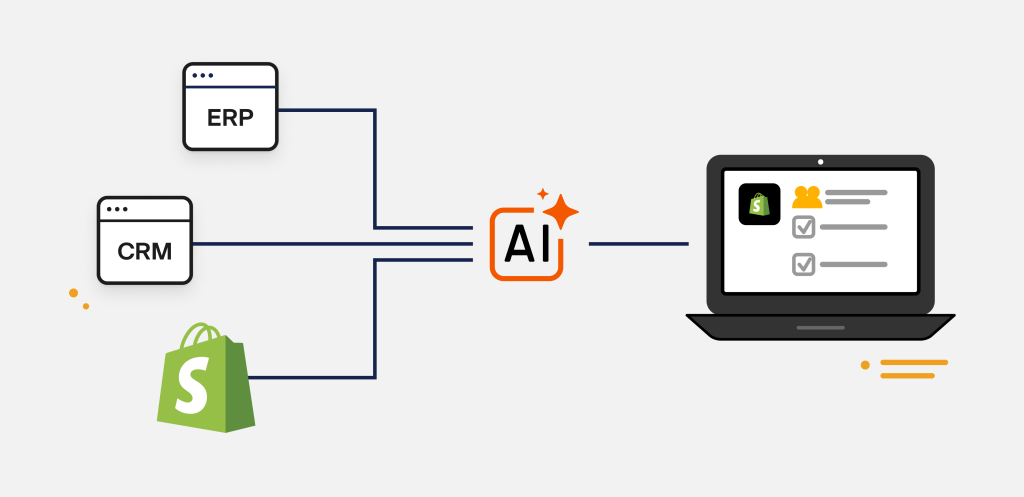
We think so, mainly because it lowers the cost of the technical discovery that usually stops agencies from pursuing complex work. The basic end of the Shopify market- installing themes, configuring apps, building standard pages- gets more crowded every year. The real upside sits in:
- ERP integrations
- CRM integrations
- Custom Shopify application development
- B2B workflows
- Shopify migrations from other platforms
- Inventory automation
- Product configurators
These projects pay well but carry real presales risk, since a senior developer often needs hours just to confirm feasibility before a proposal goes out.
AI-Assisted Technical Discovery for ERP, CRM, and Custom App Projects
Take a request like: “Can Shopify pull product specs and pricing from our ERP and show them on the storefront automatically?” Before estimating that, we need to know which system owns the data, which APIs are involved, whether metafields or metaobjects fit better, and what happens if a sync fails. We use AI directly in that investigation:
Client Requirement → AI-Assisted Requirement Analysis → API/Architecture Research → Rapid Proof of Concept → Senior Developer Validation → Accurate Scope and EstimateIt’s held up well for early app and proof-of-concept work: API exploration, app scaffolding, webhook logic, the same territory covered in more depth in our guide to AI agents for ecommerce agencies.
Reducing the Cost of Presales Engineering
A lot of agencies pass on complex projects because the technical digging has to happen before there’s any approved budget. AI lowers that cost. It doesn’t make the final architecture call, but it gets our senior developers there faster, which means we’re more willing to scope projects we’d have previously waved off as too risky. The upside isn’t just saved hours. It’s revenue from work we’d otherwise have turned down.
Agency Takeaway: Lowering the cost of presales investigation isn’t just an efficiency play. It’s a revenue play, the difference between quoting a complex project and quietly passing on it.
Where AI Falls Short: Dawn vs. Horizon vs. Global Shopify Theme Components
We’d be doing you a disservice if we only talked about where this worked.
AI doesn’t perform equally well across every Shopify theme task, and knowing where it struggles matters as much as knowing where it shines.
Dawn and Horizon are both theme built on Shopify’s Online Store 2.0 (Shopify 2.0) framework, but that shared foundation doesn’t mean AI handles them the same way. Dawn gave us roughly 80% usable output, largely because its structure is simple enough for AI to understand what it’s looking at. Horizon, with its more complex architecture, dropped to closer to 40% and needed real developer guidance most of the way through.
| Dawn | Horizon | |
|---|---|---|
| AI-generated usefulness (first pass) | ~80% usable | ~40% usable |
| Structure | Simple, well-documented, predictable | More complex theme architecture |
| Developer correction needed | Moderate: standard review | Significant: hands-on guidance most of the way through |
| Best-fit AI tier | AI-First to AI-Assisted | Developer-First for most components |
Headers and footers were tougher still, on both themes, because they touch:
- Navigation and mega menus
- Search
- Cart behavior
- Localization and market settings
- Customer accounts
- Theme-wide configuration
That’s a lot of interconnected surface area for AI to reason about without deep architectural context.
Why Horizon and Global Components Are Harder
The pattern isn’t random: AI does best on isolated, well-scoped pieces, and worst on global, interconnected ones that touch everything else in the store. That’s become our go-to filter for deciding where to point AI next.
The Model We Actually Use: AI-First, AI-Assisted, Developer-First
Rather than a blanket “use AI everywhere” rule, we settled on three tiers:
- AI-First: predictable work, isolated custom sections, boilerplate, documentation.
- AI-Assisted: bigger page builds, debugging, app development, changes to an existing theme.
- Developer-First: global theme architecture, complex navigation, sensitive integrations, anything high-risk.
Agency Takeaway: A blanket “use AI everywhere” policy is how agencies get burned. The agencies winning with this aren’t using more AI. They’re using it more precisely.
Not Sure Where Your Delivery Model Is Vulnerable?
Start the free Shopify Delivery Diagnostic and see exactly where a theme choice or workflow gap could be costing you margin.
AI Doesn’t Remove QA: It Changes What QA Focuses On
One risk we watched for closely: faster development tempting a team to cut corners on testing. AI-generated code can still introduce:
- CSS conflicts
- Responsive issues
- Accessibility gaps
- Incorrect Liquid logic
- JavaScript problems
- Performance regressions
- App compatibility problems
AI should shorten the time it takes to get to a first working build; it should never shorten the QA process around it. Our workflow hasn’t changed shape:
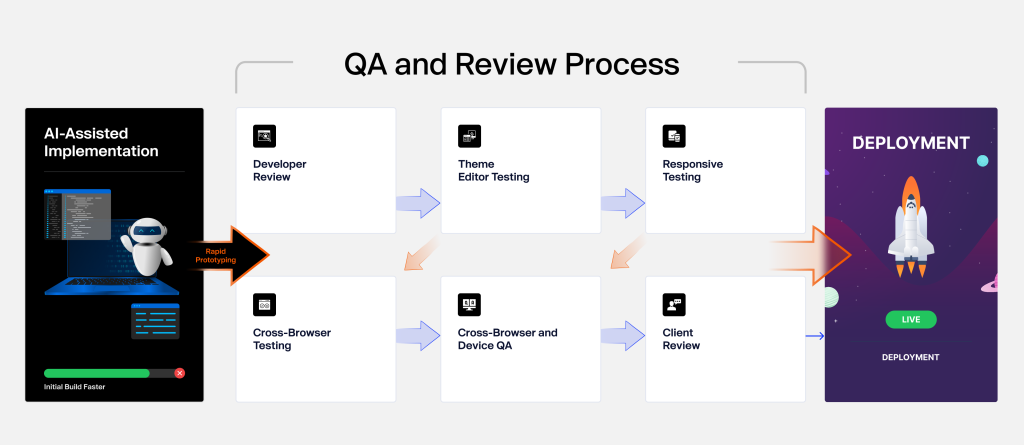
AI-Assisted Implementation → Developer Review → Theme Editor Testing → Responsive Testing → Cross-Browser and Device QA → Internal Approval → Client Review → DeploymentHowever the first draft got built, the agency is still responsible for what ships.
How Should eCommerce Agencies Start Using AI? A 3-Phase Roadmap
You don’t need to rebuild your whole delivery model overnight. Start with the low-risk stuff you can measure, then expand: the same rollout logic behind our broader agency AI delivery playbook, applied here specifically to Shopify work.
Phase 1: Productivity. Low-stakes places to build confidence:
- Requirement summaries and documentation
- QA scenarios
- Wireframes
- Debugging
- Simple custom sections
Phase 2: Delivery. Once Phase 1 is second nature, expand into:
- Figma-to-Shopify development
- Dawn-based custom sections
- Homepage implementation
- App boilerplate
- Technical discovery and proofs of concept
Phase 3: Standardization. The point where AI stops being something individual developers experiment with and becomes part of the agency’s actual delivery capability:
- Approved AI workflows and prompt templates
- Coding guidelines
- Project-specific AI context
- QA standards and output-quality benchmarks
What Should Agency Owners Actually Measure in Delivery?
Don’t measure AI adoption by “how much code did AI write.” That number tells you almost nothing about whether it’s helping your business. What we track instead:
- Delivery efficiency: hours from approved Figma to a QA-ready build, actual hours versus estimated, rework hours, how many feedback rounds a project takes.
- Profitability: project gross margin, how many senior developer hours a project actually consumed, non-billable discovery time.
- Quality: internal QA issues, client-reported issues, post-launch defects, accessibility and performance problems.
- Capacity: projects delivered per developer, billable utilization, projects delivered per month.
The goal was never to maximize AI usage for its own sake. It’s better economics, without giving up any of the quality your clients expect.
What Happens If You Wait, and What Success Looks Like for eCommerce Agency
If you sit this out:
- Competitors already testing AI pull ahead on both price and speed.
- Margin keeps leaking through unscoped estimates, project after project.
- Senior developers stay stuck on repetitive first-draft work instead of the problems that actually need them.
- Bigger, more technical projects keep going to agencies that can scope and validate them fast, not to you.
If you start now, even in a small way:
- Time from approved design to a QA-ready build gets shorter.
- Scope gaps get caught before they’re quoted, not after.
- The same team delivers more work without new hires.
- You have the confidence to pitch ERP integrations and other high-value projects you’d have previously passed on.
That’s the actual choice on the table, not “AI or no AI,” but whether you build this leverage into your delivery model before or after your competitors do.
Final Thoughts: The Future of Shopify Agency Delivery Is AI-Assisted, Not AI-Automated
AI is already changing how Shopify projects get delivered, but the bigger opportunity isn’t getting developers to write code faster. It’s building a genuinely better delivery system: faster projects, protected margins, more capacity across every role, and the confidence to go after higher-value work.
Our white label Shopify QA testing made one thing clear: AI is genuinely strong on clear Figma-driven sections and Dawn-based AI builds, and a lot weaker on complex theme architecture.
That’s why we don’t think full Shopify automation is where this goes. The winning model is AI-assisted delivery, backed by experienced designers, developers, QA specialists, and PMs who know where to point it.
Agencies that figure out where AI actually creates leverage, and build that in systematically, whether in-house or through a white label Shopify AI Development partner, will be better positioned to deliver faster and compete for the work that pays. For agencies weighing whether to build this in-house or lean on a white label Shopify agency partner, the testing above is a reasonable starting checklist either way.
FAQ
It’s mostly removing repetitive first-draft work so senior developers spend more time on architecture and business logic. It’s not replacing developers; it’s changing what they spend their hours on.
Feeding a Figma design into an AI tool (we use Figma MCP with Claude) to generate an initial Shopify section, which a developer then reviews before it ships. In our testing, this reached roughly 90% usefulness for well-scoped sections.
Dawn, by a wide margin: around 80% usable output thanks to its simpler structure. Horizon dropped to about 40% and needed a lot more manual correction.
Not the way it’s working today. It’s strong on isolated, well-documented tasks but struggles with global components like headers and navigation. Our review process hasn’t changed regardless of how the first draft got built.
Start small: documentation, QA scenarios, wireframes, simple sections. Then expand into full Figma-to-Shopify delivery, and eventually standardize with prompt templates the whole team uses.
Yes, one of the more underrated uses. It can act as a second reviewer during discovery, surfacing missing requirements before an estimate goes out. Catching one real scope gap early can protect more margin than any amount of AI-assisted coding.
Yes, mainly by lowering the cost of technical discovery. AI helps validate feasibility for ERP integrations, custom apps, and B2B workflows faster, which makes agencies more willing to scope projects they’d have previously passed on as too risky to investigate.
Not “how much code did AI write.” Track delivery efficiency (hours from approved design to QA-ready build), profitability (project margin, senior developer hours), quality (defects, client-reported issues), and capacity (projects delivered per developer per month).