Imagine your developer is in Cursor. Your client account manager has Claude open in a browser tab. Your client just asked why Sidekick couldn’t do the thing your developer spent three days building. And somewhere in a Slack thread, someone is asking which AI tool the agency should actually be using.
This is the conversation inside nearly every eCommerce agency right now.
The reason it keeps going in circles – Shopify Sidekick, Cursor, and Claude are not competing tools. They are built for completely different jobs, used by different people, at different stages of the work.
Pick the wrong one, and you’re paying a developer to do something Sidekick does for free or asking Sidekick to reach something it literally cannot see. Either way, a client deadline slips, a revision opens, and your margin takes the hit.
TL;DR
- Shopify Sidekick, Cursor, and Claude solve three completely different problems using them interchangeably wastes time and margin
- Sidekick handles merchant-side operations inside the Shopify admin. It has live store access; no external tool can replicate it
- Cursor is an IDE-first AI coding tool built for developers making fast, iterative edits with inline control and autocomplete
- Claude Code is a terminal-first autonomous agent built for complex, multi-file autonomous work that Cursor is too slow for
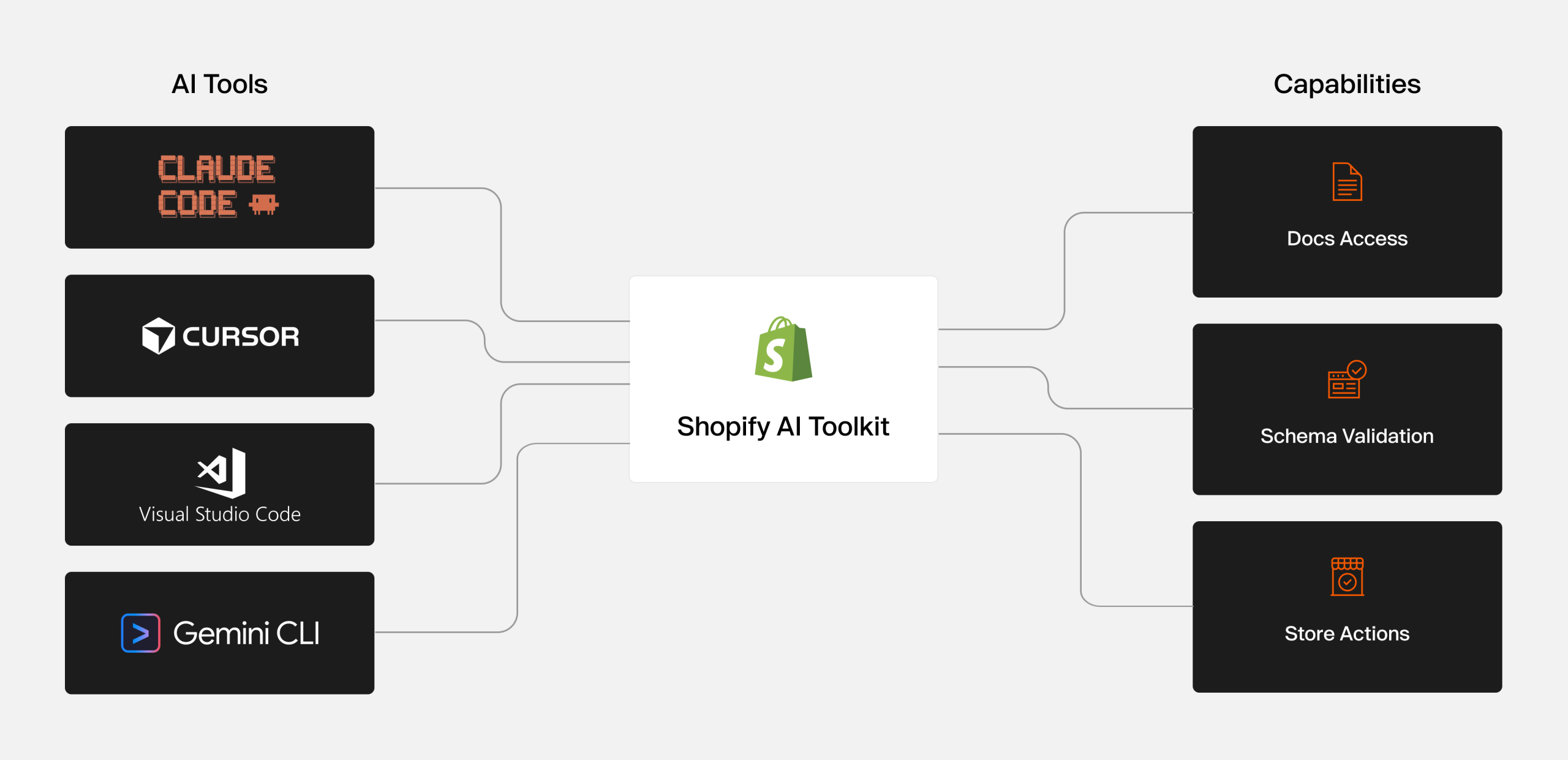
- AI Tools Claude Code and Cursor now support Shopify’s April 2026 AI Toolkit, but in completely different ways
- The agencies winning Shopify work aren’t choosing between these tools. They’re running all three in their right lane.
Written for: eCommerce agency owners, technical leads, and client account managers managing Shopify and eCommerce client delivery and figuring out where AI tools belong in the stack.
This AI Tool guide for eCommerce agencies is the clear-eyed breakdown of what each platform actually does in 2026, where it belongs in your Shopify delivery stack, and how to build the Shopify development workflow where all three work together instead of against each other.
1. The AI Tool Confusion Costing Agencies Time and Margin
This is the honest picture for eCommerce agencies in 2026.
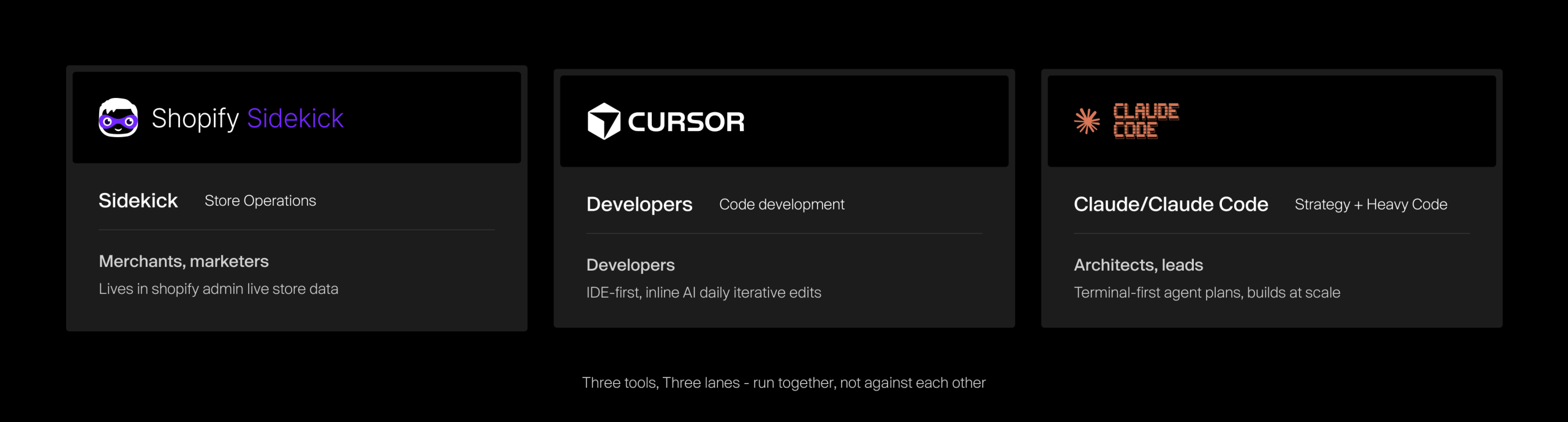
Shopify Sidekick lives entirely inside your Shopify admin. It reads live store data orders, inventory, revenue, customer records, and executes tasks on your approval. It cannot see anything outside Shopify.
Cursor is an AI-native code editor, a supercharged fork of VS Code where AI understands your entire codebase simultaneously. It is built for developers who live in an IDE and want AI embedded into every step: writing, editing, debugging, and reviewing in real time.
Claude Code takes a completely different approach. It is a terminal-first autonomous agent. Instead of assisting as you type, Claude Code accepts a task, reads your full codebase, writes and modifies files across multiple directories, runs commands, and delivers the work.
For complex multi-file refactors and large-scale migrations, some public benchmarks have shown materially lower token usage for Claude Code on complex multi-file tasks compared to Cursor’s interactive composer workflow. Results vary by task, model, and workflow, so treat any specific figures as directional rather than universal.
Claude (the broader model, not just Claude Code) handles the strategic layer cross-platform analysis, integration architecture, long-form content, internal documentation, and anything that requires reasoning across data from multiple systems simultaneously.
Agency Takeaway: The agencies winning Shopify and eCommerce store projects in 2026-27 have stopped asking which tool to choose and started building the stack that uses all three in the right lane. See how AI is changing Shopify agencies
2. What Is Shopify Sidekick?

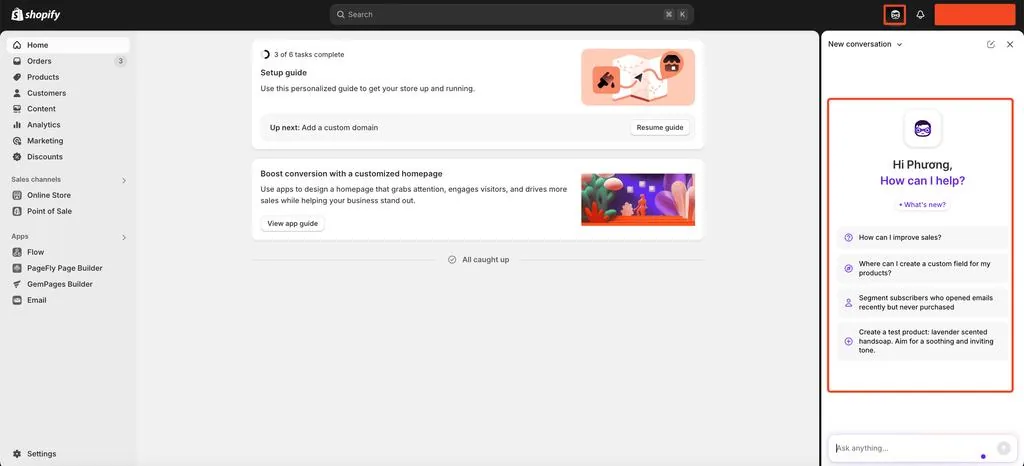
Shopify Sidekick is Shopify’s native AI assistant Chat, integrated directly inside the Shopify admin. Sidekick is accessible from your Shopify Home page and from any other page in your Shopify admin on desktop and mobile devices. It became generally available across all plans on January 15, 2026, and expanded significantly through the Winter and Summer 2026 Editions.
Technically, Sidekick runs on Claude Sonnet via Google Cloud’s Vertex AI, confirmed publicly by Shopify’s Director of Applied AI, Andrew McNamara, citing the balance of response quality and speed.
“The combination of Claude and Vertex AI helps us empower millions of merchants with our AI-enabled commerce assistant, Sidekick”
— Andrew McNamara, Director of Applied AI, Shopify
What Shopify Sidekick does, key Features & Capabilities:
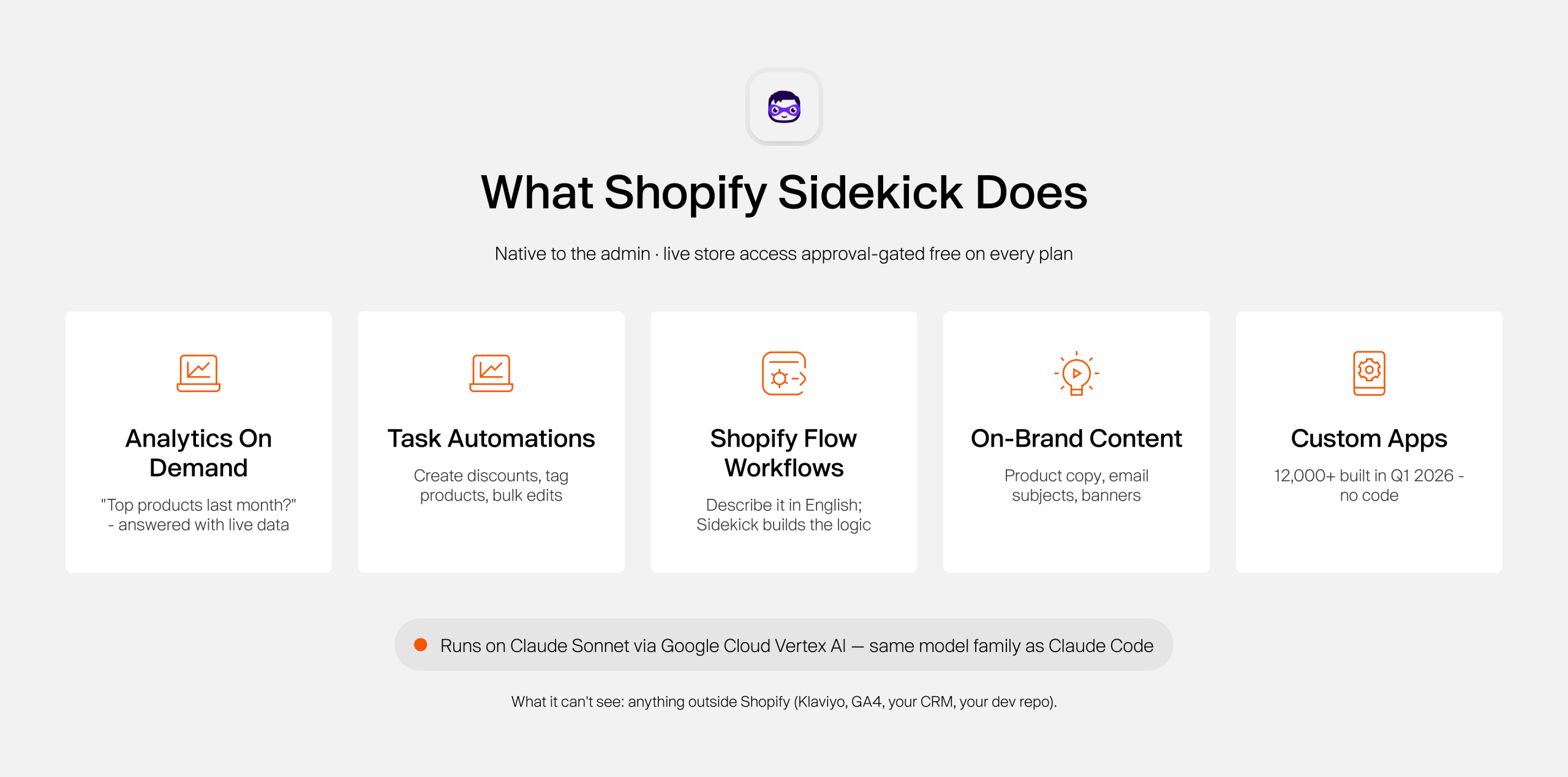
Sidekick operates through a chat sidebar accessible from any admin page.
It works like an ecommerce expert and gives you the ability to: It reads live store data products, orders, inventory, revenue, and executes tasks inside the admin with your approval before anything changes. That approval-gate matters when you’re managing client stores. Nothing ships without a sign-off.
Through the Winter 2026 Edition, Sidekick gained multi-step task execution and store-wide context. It can now:
- Pull analytics data on demand: “What were my top-selling products last month?” or “How has the conversion rate changed this quarter?” answered in plain language with live data request reports on sales trends, traffic, or find out why your metrics might have shifted.
- Execute task automations: “Create a 20% discount code for VIP customers expiring December 31” or “Tag all products in the winter collection as seasonal,” handled directly
- Build Shopify Flow workflows that describe an automation in plain English, and Sidekick builds the logic
- Generate store content & Design: Quick write product descriptions, email subject lines, format blog post, edit photos, make adjustments to your store’s theme and banner copy within your store’s brand context with simple commands.
- Third-Party Integrations: It works with App Intents to pull data from connected apps (like email marketing or customer support tools) and navigate you directly to the right page.
Additional features include saved prompts for recurring tasks, conversation memory, and a screen-sharing mode (early access) that walks users through admin tasks step by step.
Limitations of Shopify Sidekick
Sidekick’s strongest native context is Shopify admin data. It may interact with supported third-party apps after user approval, but it is not a full cross-platform BI or integration architecture tool.
Shopify explicitly recommends professional verification for tax and compliance questions. For anything requiring cross-platform analysis, custom code development, or complex technical architecture, Sidekick is not the right tool, and stretching it there wastes time.
The Reality: Sidekick has quietly absorbed the operational work that agencies used to charge Shopify Plus merchants for reporting, automations, and basic content. That work is now done in-house by clients.
3. Benefits of Using Cursor in Shopify Development
Cursor is an AI-native IDE built on VS Code where AI is embedded directly into the editor, not running alongside it. As a developer writes code, Cursor’s Tab autocomplete predicts entire logical blocks.
It reads your full repository simultaneously, so when you’re working across Liquid templates, JSON settings, JavaScript, and CSS, it understands how components connect and flags when a change in one file will break something in another.
The key distinction between Cursor and Claude Code comes down to workflow philosophy.
Cursor is built for developers who prefer to stay inside their editor and review AI suggestions in real time. A visual diff UI shows exactly what will change before anything changes. If your team spends most of their day on precise, iterative edits fixing a function, updating a component, or adding a feature, Cursor’s IDE-native flow is faster and more intuitive for that kind of work.
The Shopify AI Toolkit: What Changed in April 2026
On April 9, 2026, Shopify released the Shopify AI Toolkit, a free, open-source plugin (MIT license) that connects AI coding agents directly to Shopify’s developer documentation, API schemas, and store management capabilities via the Model Context Protocol (MCP).
Before this Shopify AI toolkit, developers using AI for Shopify code were validating against training data that could be months out of date. The toolkit closes that gap. Cursor setup takes under five minutes via Cursor Settings → Tools and MCP → New MCP server. From that point, Cursor has real-time access to:
- Live Shopify developer documentation
- GraphQL schema validation for Admin and Storefront APIs
- Liquid template validation
- A “store execute” capability for authenticated operations against a dev store
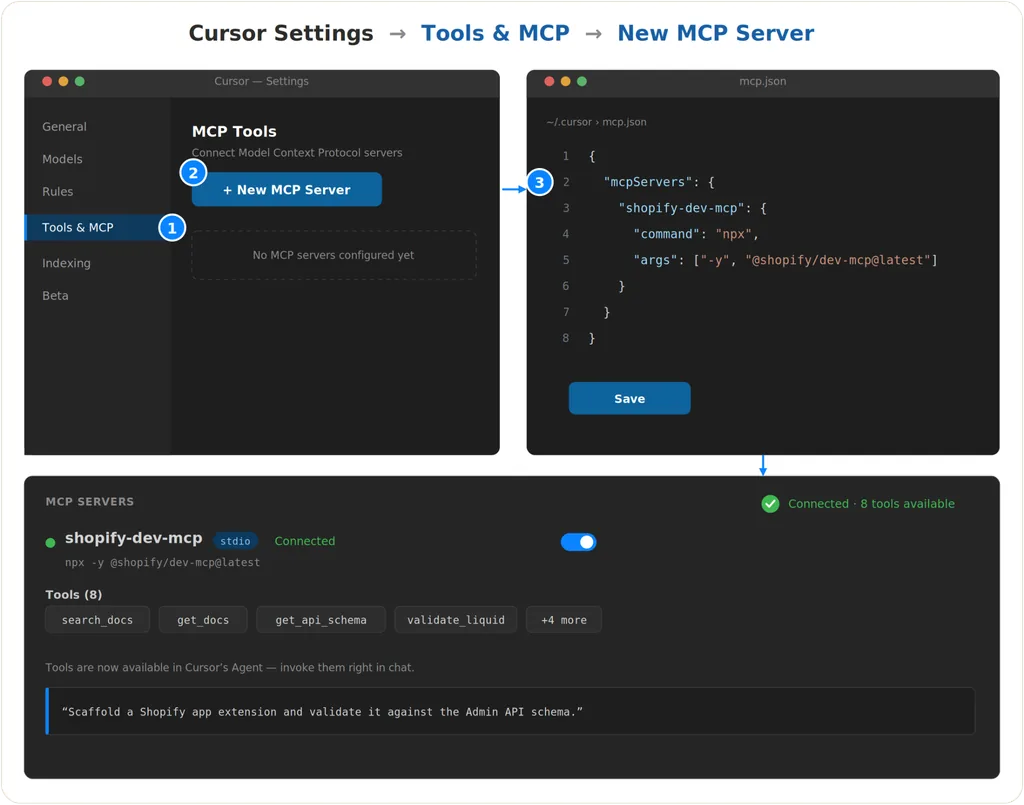
Teams using the Shopify AI Toolkit are reporting 40–60% reductions in development time for typical admin workflows. Shopify’s VP of Engineering, Farhan Thawar, estimates roughly 20% productivity gains across Shopify development with AI-assisted tooling.
Key Benefits for Shopify Development Teams:
- Theme and Liquid development.
Cursor understands how your theme’s components are wired together. For agencies inheriting a client’s existing theme or building on Shopify’s Online Store 2.0 framework, this full-repo awareness prevents the “fixed one thing, broke three others” problem that kills delivery timelines. - Custom app scaffolding.
Building Shopify apps involves significant boilerplate: authentication, webhook handling, API rate limiting, and data validation. Cursor accelerates this scaffolding while keeping new code consistent with patterns already in the project. - Legacy theme refactoring.
Inheriting a messy theme from a client’s previous agency? Cursor AI tool handles analysis, documentation, and modernization framework migrations, test generation, and restructuring with more consistent output than manually navigating unfamiliar code. Learn how agencies handle headless Shopify migrations for high-performance builds. - Parallel agent workflows.
Cursor 3 (April 2026) introduced a management console running up to 8 AI agents simultaneously on isolated Git branches. For agencies managing multiple client builds, this means parallel workstreams without context-switching merge whichever branches succeed.
When Cursor is the right choice:
- Use Cursor when your developer works primarily in an IDE
- Tasks are iterative edits, fixes, and feature additions
- You want inline visibility and control before changes apply
- You need fast tab completion as code is being written
One operational note: Cursor requires solid Git discipline for its agentic features. Standard mode routes code through US-based servers. The Business plan ($40/month per seat) adds privacy mode and admin controls for agencies with data-sensitive clients.
Agency Takeaway: Cursor is the daily driver. It is where your developers live. The Shopify AI Toolkit makes it significantly more accurate on first-pass Shopify code, which means fewer QA cycles and faster delivery.
4. Top Benefits of Using Claude Code in Shopify Development
Claude Code takes a completely different approach to AI-assisted development than Cursor.
Where Cursor embeds AI into the editor and assists as you type, Claude Code is a terminal-first autonomous agent. You assign it a task. It reads your full codebase, writes and modifies files across multiple directories, runs commands, and delivers the completed work without you having to guide each step.
For complex, multi-file Shopify work, a full theme refactor, a large-scale migration, and building a custom app architecture from scratch, Claude Code is 5.5x more token-efficient than Cursor on equivalent tasks and produces fewer errors on the first pass. The trade-off: there is no inline editing experience. You work in a terminal, not an IDE.
Most senior Shopify developers in 2026 run both. Cursor for daily iterative coding. Claude Code for autonomous heavy-lift work.
Claude Code installs alongside the Shopify AI Toolkit via a single terminal command:
claude mcp add --transport stdio shopify-dev-mcp -- npx -y @shopify/dev-mcp@latest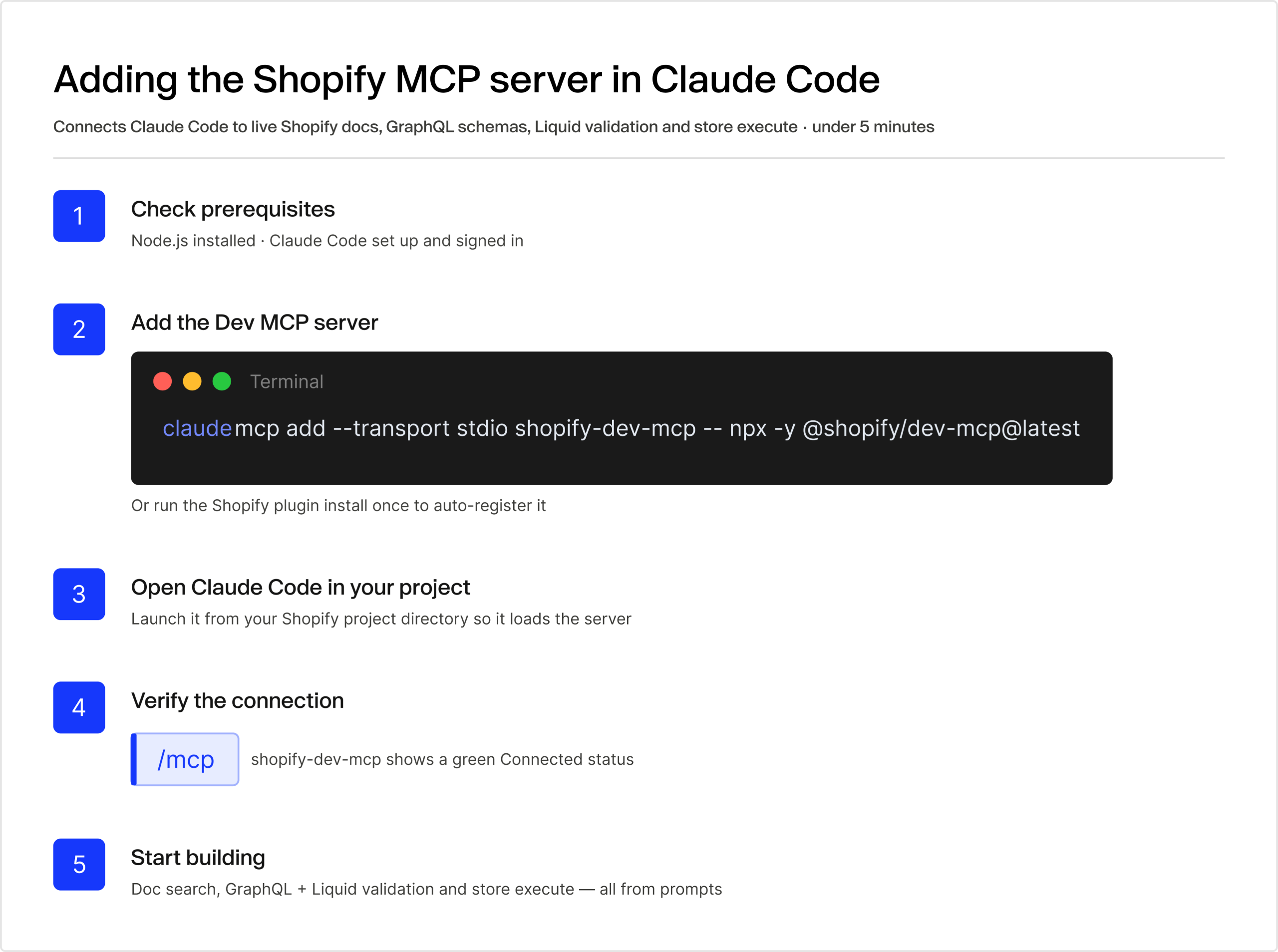
From that point, it has live access to Shopify’s documentation, GraphQL schemas, and Liquid validation, the same capabilities that Cursor gains through the toolkit, but in Claude Code’s autonomous, terminal-native workflow.
One more connection worth knowing: Shopify Sidekick itself runs on Claude Sonnet via Google Cloud’s Vertex AI. When your agency uses Claude Code for Shopify development, you are using the same model family powering the platform’s own AI, which is Shopify’s deliberate architecture bet on Anthropic’s models.
6 Key Benefits for Shopify development and agency teams with Claude Code:
- Large-scale autonomous tasks. Claude Code is built for work that requires reading and modifying files across an entire codebase in one session. Migrating a theme from an older framework, restructuring a custom Shopify app, auditing and refactoring dozens of Liquid files. Cursor’s interactive approach is slower and more manual here. Claude Code delegates it.
- Integration architecture and planning. Before writing a single line of ERP integration code, feed Claude the client’s system architecture, API documentation, and business requirements. It maps data flows, flags conflict points, identifies where Shopify’s native APIs fall short, and produces a technical spec the dev team builds from. Getting this right before writing code is where agencies prevent weeks of rework, particularly on headless Shopify builds or complex Shopify Plus projects.
- Developer onboarding and codebase explanation. When a developer joins mid-project or inherits an unfamiliar codebase, Claude Code walks through the system structure, explains non-obvious logic, and surfaces what is happening and why. One reported case: a junior developer shipped production features by day 2 after their team integrated Claude Code with the Shopify Dev MCP server.
- Code review across the full scope. For complex Liquid sections, custom checkout extensions, or multi-step app logic, Claude reviews across the entire problem, not just the open file, and catches issues before they reach production or QA.
- Content at scale. Claude (the broader model) handles long-form product descriptions, category page copy, blog articles, and email sequences across multiple Shopify clients with strong voice consistency. Neither Sidekick nor Cursor is built for multi-client content volume. See how agencies use generative AI to improve Shopify store offerings at the content layer.
- Cross-platform analysis. Claude is not siloed to any platform. Bring it data from Shopify, GA4, Klaviyo, and Semrush simultaneously and ask it to synthesize across all of it, the right tool for strategy, audits, and planning that spans multiple systems.
When Claude Code is the right call:
- The task involves multiple files, large refactors, or autonomous multi-step execution
- You prefer terminal-first workflows
- The project is backend-heavy, infrastructure-focused, or involves complex integrations
- You need architecture-level reasoning, not just inline editing speed
Agency Takeaway: Claude Code is the heavy-lift agent. When the work is too big, too interconnected, or too architectural for iterative IDE editing, Claude Code is where agencies stop losing hours to manual file-by-file navigation.
5. Search and Filtering: PDFs, FAQs, Videos, and AI Discoverability
There is a second layer to the AI tool conversation that most agencies are not factoring into their Shopify delivery yet, and it is becoming a client expectation fast.
As of 2026, AI-powered answer engines ChatGPT, Perplexity, Google AI Mode, Google AI Overviews, and Microsoft Copilot have become a meaningful eCommerce traffic source. Research from LLMrefs shows the overlap between top Google organic results and AI-cited sources has dropped below 20%, down from 70% previously. Ranking on page one of Google no longer guarantees visibility in AI answers.
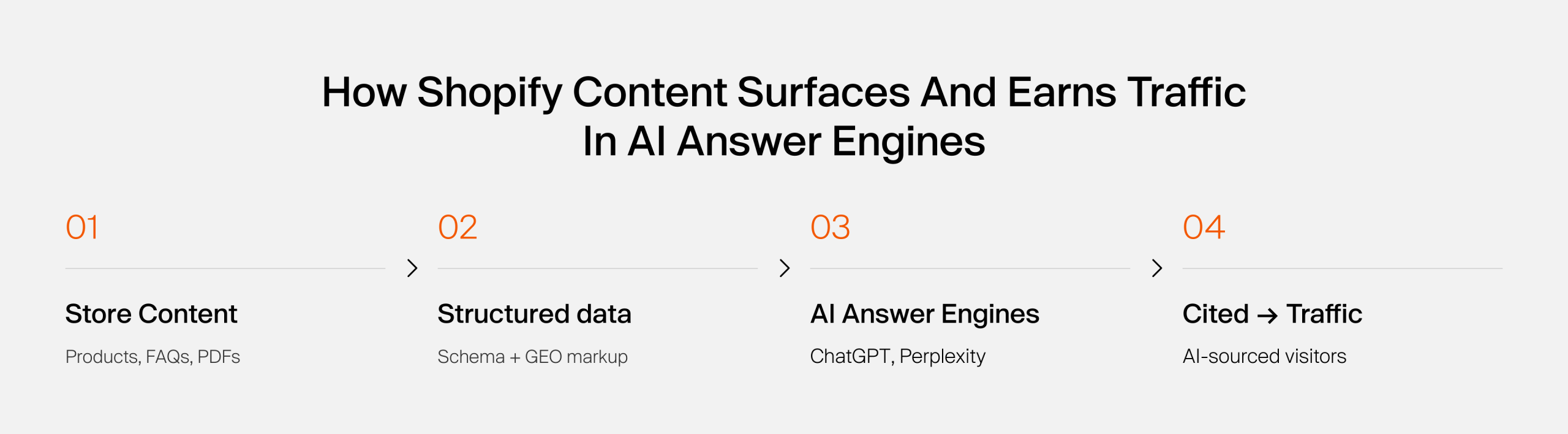
The discipline of optimizing for this is called Generative Engine Optimization (GEO). Key findings from GEO research (Carnegie Mellon, KDD 2024, corroborated by BrightEdge and Semrush):
- Schema markup (FAQ, HowTo, Product, Article) improves LLM discoverability by up to 67%
- Definition-first sentence structure correlates with higher AI citation rates
- Sites present on 4+ platforms are 2.8× more likely to appear in ChatGPT recommendations
- Information density, named entities, and statistics per paragraph are a stronger retrieval signal than keyword density
For Shopify clients with large product catalogs, technical documentation, instructional videos, or FAQ libraries, this changes how content needs to be built. Learn more about how to get your eCommerce Website, Store products discoverable on ChatGPT with our White Label eCommerce SEO Services.
Where Each Shopify Sidekick vs Cursor vs Claude, Tool fits:
- Shopify Sidekick handles content generation and basic metadata inside Shopify’s native system, including FAQ drafts, product descriptions, and metadata fields. Its scope stops at the platform boundary.
- Cursor handles implementation: structured data schemas in Liquid, custom filtering UI connected to product catalogs via Storefront API, and metaobject structures for technical content types.
- Claude handles strategy and production: auditing content structures, recommending schema markup (Product, TechArticle, HowTo, VideoObject, FAQPage), producing FAQ content built for AI answer engine retrieval, and creating the briefs that developers and content teams execute from.
The Reality: GEO is not a future consideration for Shopify agencies. Clients are already asking why their products don’t appear in AI search results. The agencies building structured data and AI-optimized content workflows now are ahead of the conversation, not behind it.
6. Recommended Architecture for Industrial and Manufacturing Brands
Industrial and manufacturing eCommerce brands bring a specific set of challenges: complex product taxonomies, high-volume technical documentation (datasheets, specification PDFs, compliance certificates), multi-channel B2B and B2C purchasing, and customers who research through non-standard paths.
Generic AI tool setups do not account for this.
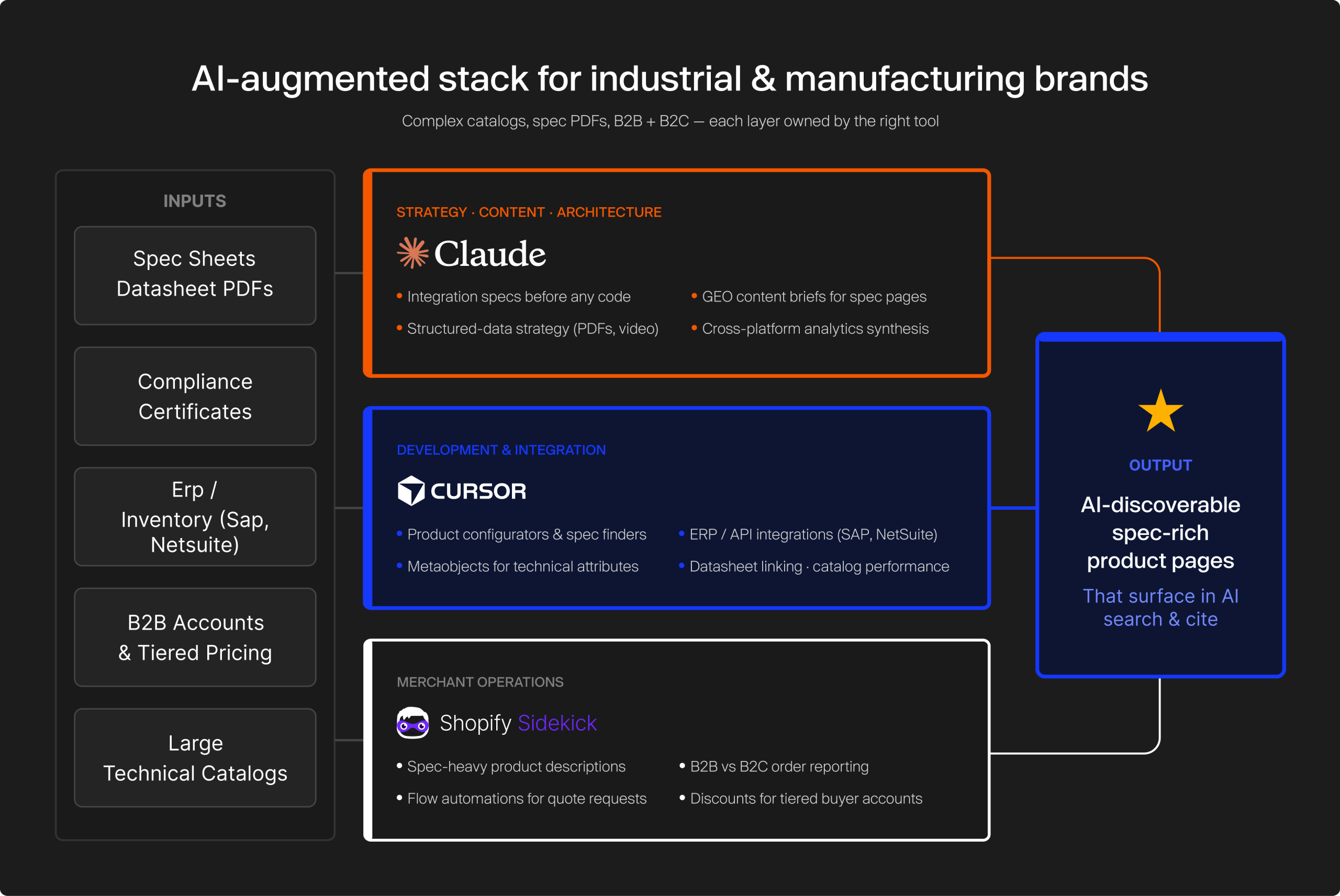
Here is a practical AI-augmented architecture that does.
Layer 1: Merchant operations → Shopify Sidekick
Spec-heavy product description generation, B2B vs. B2C order reporting, Flow automations for quote requests and custom pricing workflows, inventory status queries, and discount management for tiered buyer accounts.
Layer 2: Development and integration → Cursor + Shopify AI Toolkit
Custom product configurators and specification finders, ERP and inventory system integrations (SAP, NetSuite, custom backends), structured metaobject implementation for technical product attributes, PDF and datasheet linking in product pages, performance optimization for large catalog pages.
White label Shopify development teams with dedicated Shopify developers use this layer for enterprise-level Shopify Plus builds.
Layer 3: Strategy, content, and architecture → Claude
Integration planning and technical specs before development begins, content briefs for technical product pages optimized for both organic search and AI citation, structured data strategy for PDFs and video assets, cross-platform analytics synthesis, and internal documentation for implementation teams.
The key principle for ecommerce industrial brands: Technical content PDFs, spec sheets, instructional videos need structured data markup and AI-readable formatting to surface in AI-powered search. Claude plans it. Cursor builds it. Sidekick maintains content quality inside the admin once the infrastructure is in place.
7. Shopify Sidekick vs Cursor vs Claude: Side-by-Side Comparison
| Area | Shopify Sidekick | Cursor | Claude / Claude Code |
|---|---|---|---|
| Best for | Shopify store operations | Code development | Technical reasoning + autonomous coding |
| Primary users | Merchants, store managers, marketers | Developers | Developers, architects, technical leads |
| Works inside the Shopify admin | Yes, natively | No | No |
| Understands store data directly | Yes, live access | No, unless via AI Toolkit | No, unless provided context |
| Shopify AI Toolkit support | N/A (native platform tool) | Yes, full MCP support | Yes CLI install |
| Workflow style | Conversational, admin-embedded | IDE-first, inline AI | Terminal-first, autonomous agent |
| Theme / Liquid development | Limited | Strong | Strong with Claude Code |
| Custom app development | Limited/lightweight | Strong | Strong for architecture; pair with Cursor to build |
| ERP / API integration planning | Limited | Useful for implementation | Strong for architecture and logic |
| Content/product copy | Strong (within Shopify) | Limited | Strong best for multi-client volume |
| Technical SEO / GEO strategy | Limited | Not applicable | Strong |
| Codebase understanding | No | Strong (IDE context) | Strong (full repo, autonomous) |
| Underlying model | Claude Sonnet via Google Vertex AI | OpenAI / Anthropic (configurable) | Anthropic Claude |
| Cost | Free all Shopify plans | $20/mo Pro, $40/mo Business | $20/mo Pro |
| Best use case | “Help me manage and operate my Shopify store” | “Help me build and edit code faster” | “Help me reason, plan, and execute complex work” |
8. Which Tool Is Best Suited for the Agency’s Client eCommerce Development Needs, and When?
The answer is not one tool; it is all three, each matched to the right job. Shopify Sidekick is not a replacement for Cursor or Claude.
Cursor and Claude are not replacements for Shopify Sidekick.
Each tool reflects a division of labor that already exists inside every eCommerce agency. Merchants and account managers work at the store operations layer. Developers work at the code layer. Architects, strategists, and technical leads work at the planning and reasoning layer.
- Use Sidekick for merchant-side operations analytics, automations, content generation, and admin tasks. It is the safest native admin layer for merchants; developer tools can access Shopify only through configured, permissioned workflows. It is free on every Shopify plan. And it runs on Claude Sonnet under the hood.
- Use Cursor to build and modify Shopify code faster. With the AI Toolkit installed, it validates against live API schemas, reduces first-pass errors, and supports parallel agent workflows across multiple client builds.
- Use Claude Code for autonomous, multi-file, heavy-lift work, large refactors, complex integrations, and codebase migrations where Cursor’s iterative editing approach is too slow.
- Use Claude to plan, write, and synthesize integration architecture before a line of code is written, content at scale across multiple clients, a GEO strategy for AI search visibility, and cross-platform analysis that Sidekick cannot reach.
Before your next Shopify project kicks off, ask three questions:
- Which tasks in this project live inside the Shopify admin? → That’s Sidekick’s work.
- Which tasks involve building or modifying code? → That’s Cursor, or Claude Code for a larger scope.
- Which tasks require planning, architecture, cross-platform data, or content at volume? → That’s Claude.
Map your current workflows to those three questions. The gaps will show you exactly where to start.
The difference between agencies that stall and those that scale is not which AI tool they chose. It is whether their delivery infrastructure holds when one person is unavailable.
Scale Your eCommerce Project Delivery Without Building an In-House eCommerce Design and Development Team
E2M as white label eCommerce solutions provider with Shopify development services for agencies, theme customization, custom app builds, ERP integrations, Shopify Plus delivery, and technical Shopify SEO implementation, working as an invisible white label extension of your team.
Your agency delivers the eCommerce website project. Your client sees your agency brand. Our white label web team works with the exact tools covered in this guide: Cursor and Claude Code for implementation and architecture, the Shopify AI Toolkit for schema validated development, and Sidekick-informed workflows for merchant side delivery.
FAQs
Not natively. Cursor and Claude Code are developer tools that work with code and documentation, not live store data. However, since the April 2026 Shopify AI Toolkit release, both tools can connect to Shopify’s API schemas and documentation via the Model Context Protocol (MCP). This gives them live schema validation and documentation access, but not read/write access to a client’s live store. That capability remains exclusive to Shopify Sidekick.
Both use for Shopify Theme development, but for different types of work. Cursor is better for iterative, day-to-day theme development: inline edits, component updates, feature additions with real-time AI suggestions inside the IDE. Claude Code is better for larger autonomous tasks: full theme refactors, legacy codebase migrations, or multi-file restructuring where Cursor’s interactive approach is too slow. Most Shopify development teams in 2026 run both tools, routing work to each based on task complexity.
The Shopify AI Toolkit is a free, open-source plugin released by Shopify on April 9, 2026. It connects AI coding agents, including Cursor and Claude Code, directly to Shopify’s developer documentation, API schemas, and store management capabilities via the Model Context Protocol. For agency development teams, it means AI-generated Shopify code is validated against live schemas rather than potentially outdated training data fewer first-pass errors, faster QA, and faster delivery. Teams using it report 40–60% reductions in development time for typical admin workflows.
Claude (the broader model, not just Claude Code) is the strategic and content layer of the agency AI stack. It handles cross-platform analysis by synthesizing data from Shopify, GA4, Klaviyo, and other systems simultaneously. It produces long-form content product pages, blog articles, and email sequences with a consistent brand voice across multiple clients. It plans integration architecture before development begins. And it converts discovery notes, client briefs, and meeting transcripts into clean internal documentation. These are all tasks that Sidekick cannot perform, and Cursor is not designed for.
E2M supports the full range of white label Shopify development services delivery for agency partners with work from custom theme development, Headless Shopify, Shopify Plus builds, custom app development, Sidekick, ERP and API integrations, Shopify payment integration, web platform migrations (Magento, WooCommerce, BigCommerce to Shopify), Core Web Vitals optimization, and ongoing maintenance and support. All work is delivered under your agency’s brand. Your clients never see E2M’s name.