

A practical guide to WordPress 7.0 features, agency impact, and upgrade strategy — written for agency owners and their teams.
WordPress 7.0 Beta 1 arrived on February 20, 2026, and it introduces several meaningful improvements across the editor, admin interface, and developer tools.
This isn’t just another incremental update. WordPress 7.0 focuses on collaboration, responsive design flexibility, media performance, and developer infrastructure, all areas that significantly impact how agencies build and manage websites.
The final release is expected on April 9, 2026, making now the ideal time for agencies and development teams to review upcoming changes, test compatibility, and prepare client sites for a smooth upgrade.
In this guide, we’ll walk through the most important updates in WordPress 7.0 Beta 1, explain what they mean for agencies, and outline how to prepare for the upcoming release.
Table of Contents
- Why Agency Leaders Should Care
- Key Features in WordPress 7.0 Beta 1
- Real-Time Collaboration in the Block Editor
- A Cleaner, More Modern Admin Experience
- Responsive Block Controls Built into the Editor
- Custom CSS for Individual Blocks
- Two New Core Blocks: Breadcrumbs and Icons
- Improvements to Existing Core Blocks
- Font Library Available Across All WordPress Themes
- Smarter Media Handling and Image Optimization
- Developer-Focused Improvements
- What WordPress 7.0 Means for Agencies
- How Agencies Should Prepare for WordPress 7.0
- WordPress 7.0 vs WordPress 6.x: What’s Actually Different?
- Common WordPress Upgrade Challenges for Agencies
- Testing WordPress 7.0 Before the Final Release
- Final Thoughts
Why Agency Leaders Should Care
AGENCY LEADERS: STRATEGIC NOTE
Every major WordPress release introduces compatibility risks — especially for sites with custom blocks, legacy metabox plugins, or heavily customized editor setups. The agencies that prepare early absorb these changes without client disruption. Those who don’t end up troubleshooting on live production sites under pressure.
WordPress 7.0 affects agencies differently than it affects individual site owners. Your team has to think across dozens sometimes hundreds of client sites. That means compatibility testing, custom development review, client communication, and upgrade sequencing all land on your plate at once.
The good news: the changes in 7.0 are well-scoped, and agencies that act now have a clean runway before the April 9 launch. This guide breaks down what’s changing, what it means for your delivery team, and how to prepare.
Agency leaders: Email this article to your operations or development team.
“Before E2M, I spent most of my time fixing problems — poor communication, inconsistent quality. After switching, everything changed. We use E2M for web design, development, and SEO, and my team jokes they’re our best employee because they’re that consistent and reliable. Now I have time to actually grow the business.”
“We came to E2M because creative was flying, but development was falling behind. Now they’re just part of our team, working in our project management software, communicating daily, handling what we can’t. We can’t go out and hire a full team of WordPress and web specialists.”
Key Features in WordPress 7.0 Beta 1
1. Real-Time Collaboration in the Block Editor
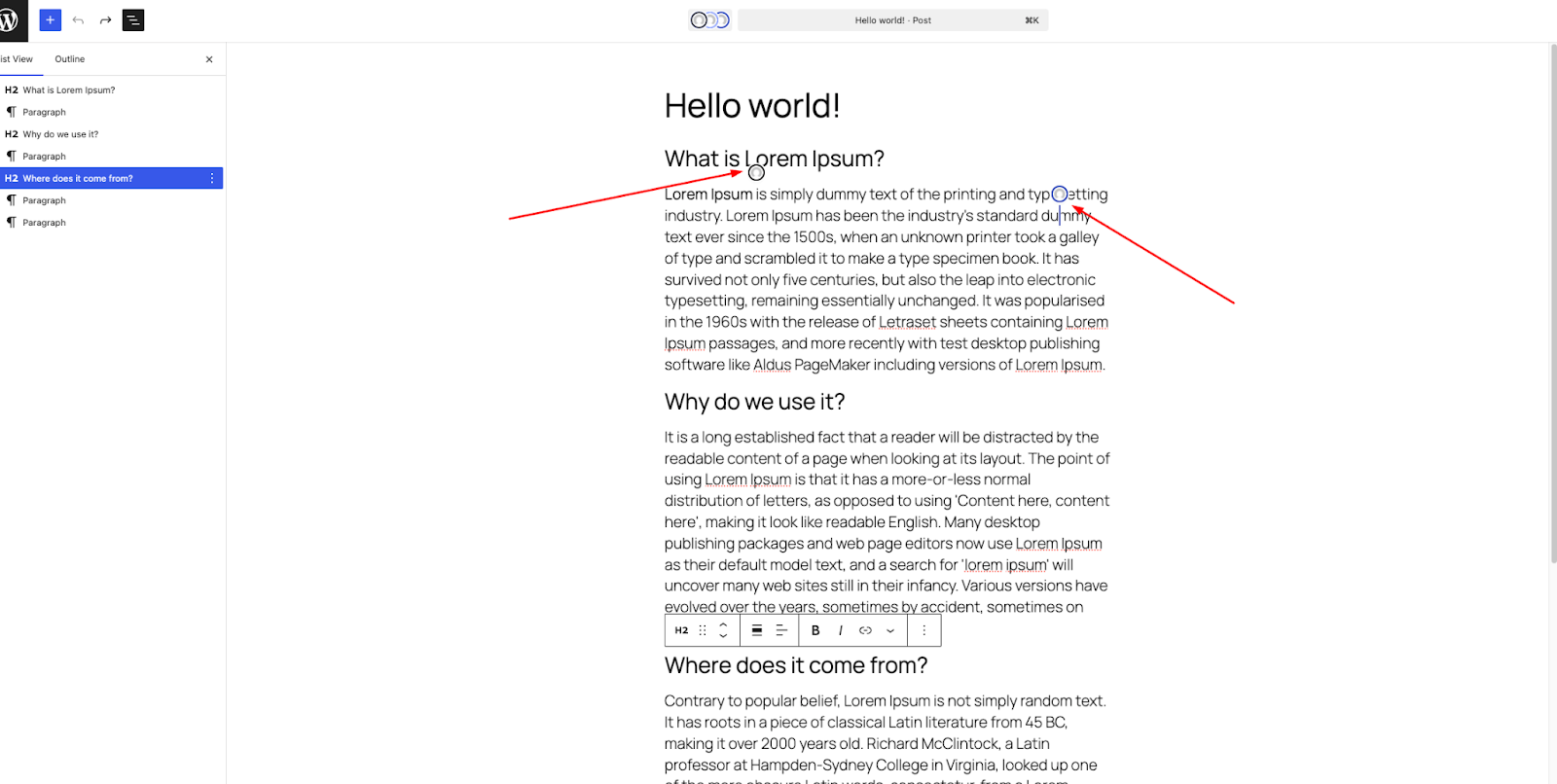
One of the most noticeable improvements in WordPress 7.0 is the introduction of real-time collaboration inside the block editor.
Multiple users can now edit the same post simultaneously. Instead of waiting for another editor to exit the document, teams can collaborate in real time while seeing live updates and cursor positions.
If a connection drops, the editor also supports offline editing, syncing changes once the user reconnects.
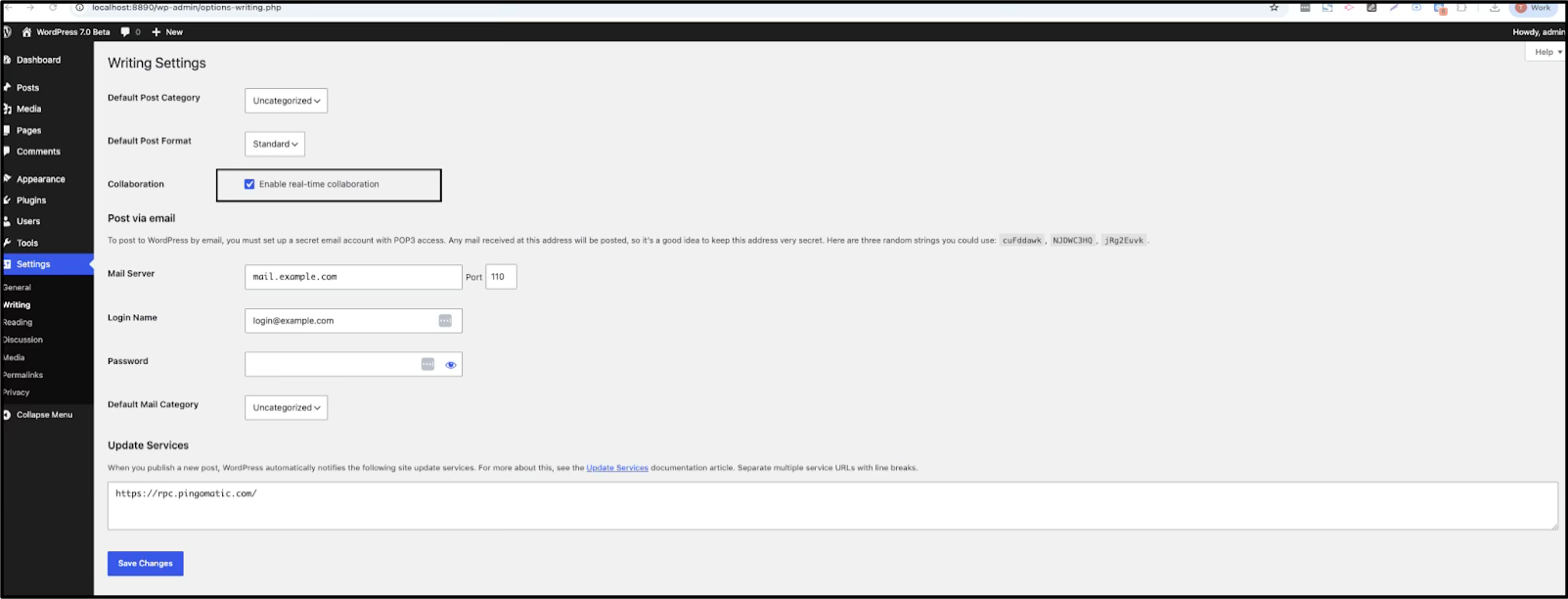
Real-time collaboration can be enabled from:
Settings → Writing → Collaboration → Enable real-time collaboration.
AGENCY IMPACT
For editorial teams managing high-volume content workflows, this removes one of the most persistent friction points: waiting for another editor to close a post. Multi-author news sites, content agencies, and client blogs with contributor networks benefit most.
Join the Agency Growth Hub for frameworks, playbooks, and systems used by scaling agencies.
A few important considerations:
- Collaboration works best with the Block Editor
- The Classic block does not support live syncing
- Some legacy metabox plugins may not fully synchronize
2. A Cleaner, More Modern Admin Experience
WordPress 7.0 introduces a refreshed dashboard interface designed to improve usability without dramatically changing the familiar layout.
The admin interface now features:
-
- improved spacing
- smoother transitions
- clearer visual hierarchy
- reduced visual clutter
While subtle, these changes improve everyday workflows for teams managing large WordPress environments.
Better Revision Comparison
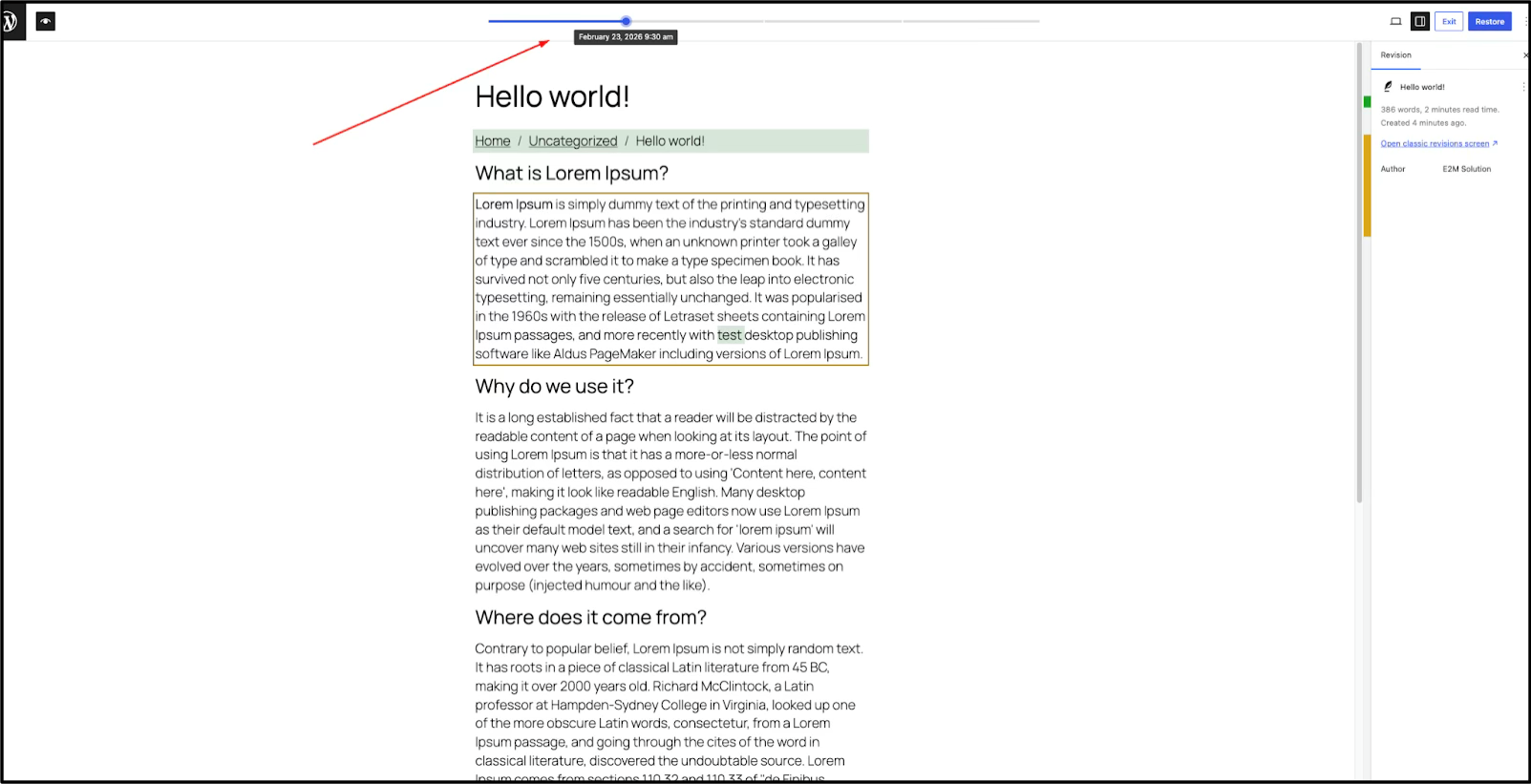
Another useful upgrade is the improved revision comparison tool, which allows editors to compare revisions side by side directly within the editor.
For content-heavy sites and editorial teams, this makes reviewing changes far easier.
See how you can leverage E2M’s WordPress delivery team
3. Responsive Block Controls Built into the Editor
Responsive control is now built directly into the editor.
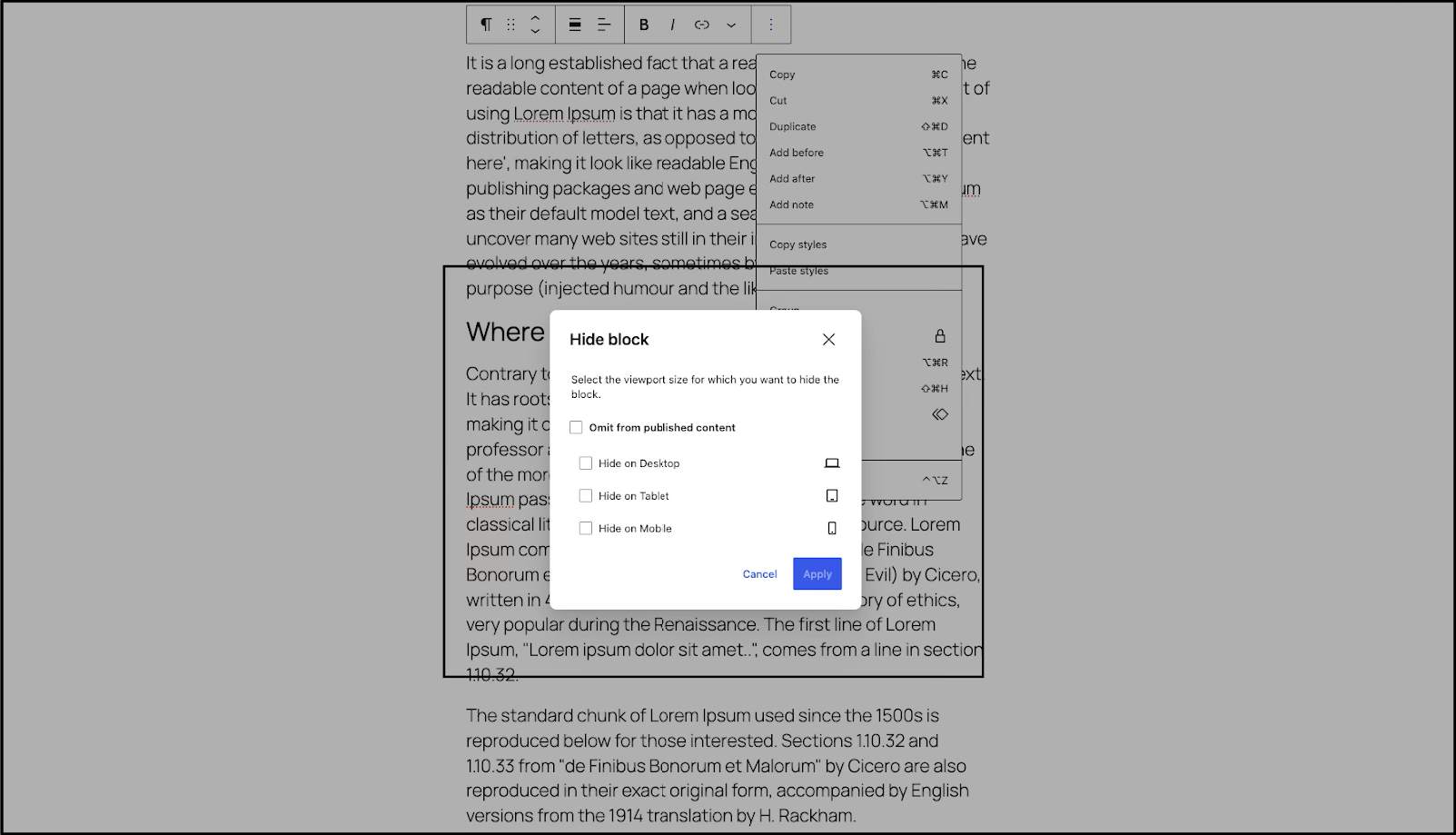
Designers can now hide or show individual blocks based on screen size without writing custom CSS or installing additional plugins.
Supported viewport options include:
- Mobile
- Tablet
- Desktop
How to use it:
- Select a supported block (for example, Paragraph or Group).
- Click the three dots (⋮) on the block toolbar.
- Choose Hide (or Show).
- Select the viewports where the block should be hidden.
- Confirm your settings
The block remains in your content but won’t display on selected screen sizes on the front end.
This allows designers to customize layouts for different devices without creating separate page structures or additional CSS rules.
For designers and agencies, this feature provides greater flexibility when creating responsive layouts directly inside the editor.
4. Custom CSS for Individual Blocks
Another practical addition is the ability to apply custom CSS directly to individual blocks.
This can be accessed via:
Block Settings → Advanced → Additional CSS
It’s perfect for small adjustments without touching theme files. That said, for larger or repeated styling, global styles or proper CSS structure is still the smarter long-term approach.
This feature allows developers and designers to apply quick styling adjustments without modifying theme files or global styles.
While larger styling changes should still be handled through structured CSS, this option is useful for smaller layout adjustments and rapid experimentation.
5. Two New Core Blocks: Breadcrumbs and Icons
WordPress 7.0 Beta 1 introduces two new core blocks designed to improve navigation and visual design.
Breadcrumbs Block
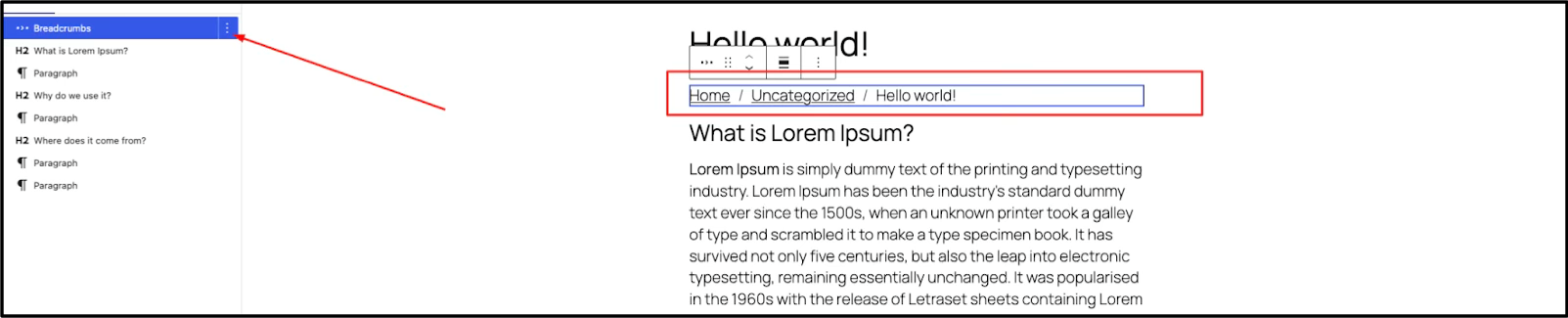
The Breadcrumbs block automatically displays page hierarchy and navigation paths.
This helps users understand where they are within the site structure and can also support SEO by improving internal navigation.
Icons Block
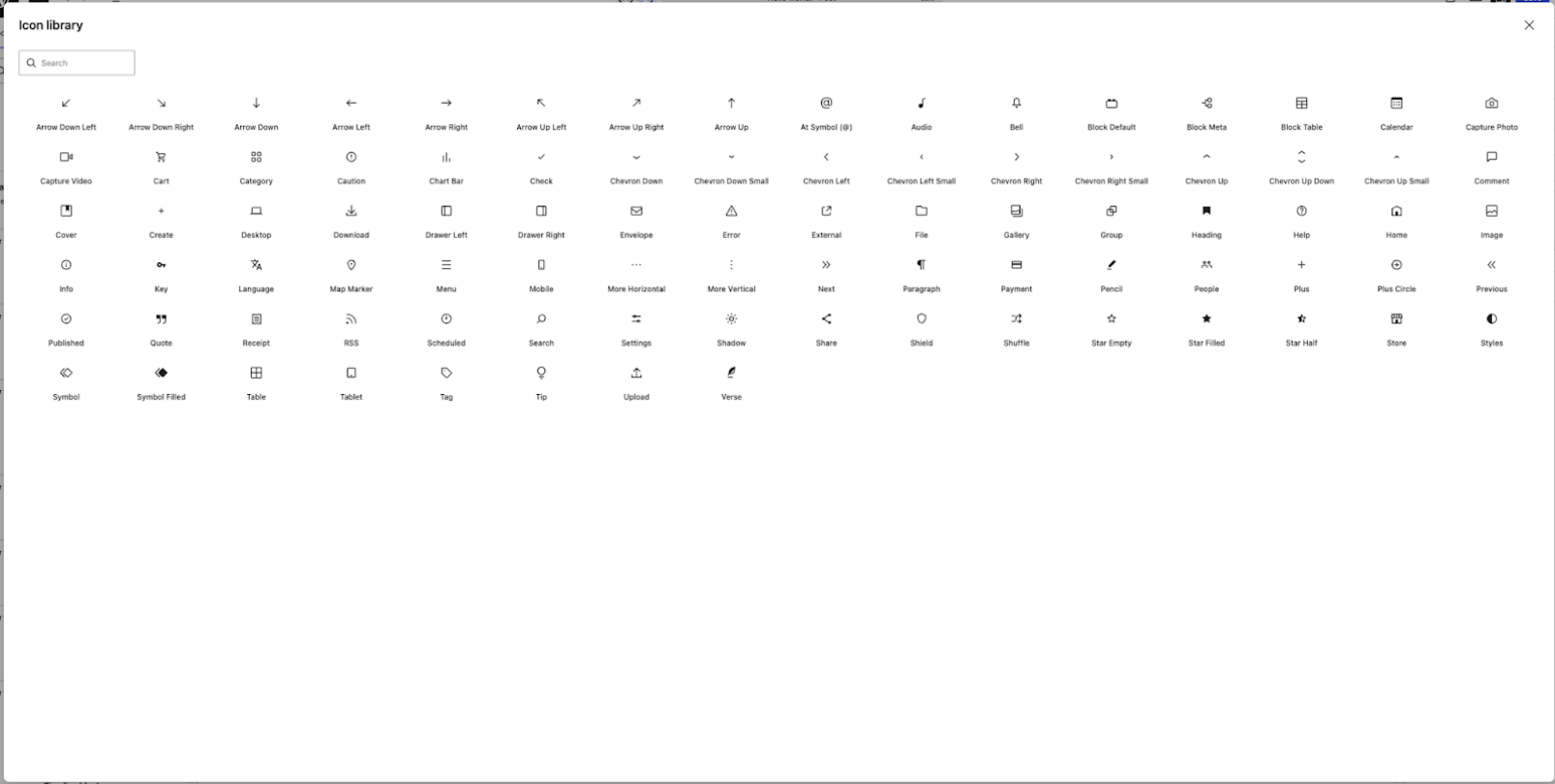
The new Icons block allows users to insert SVG icons directly within the editor without requiring third-party plugins.
This makes it easier to design feature lists, UI components, and visual elements across pages.
For agencies, this reduces plugin footprint, which directly benefits site performance, security exposure, and maintenance overhead.
See how you can leverage E2M’s WordPress delivery team
6. Improvements to Existing Core Blocks
Several existing blocks received practical upgrades:
- Cover Blocknow supports video backgrounds, not just images.
- Grid Blockhandles responsiveness much better out of the box.
- Gallery Blockincludes a built-in lightbox.
- Heading Blocklets you choose the heading level when inserting it.
- Navigation Blockgives better control over mobile overlays and breakpoints.
These improvements to daily design workflows reduce the need for custom workarounds.
7. Font Library Available Across All WordPress Themes
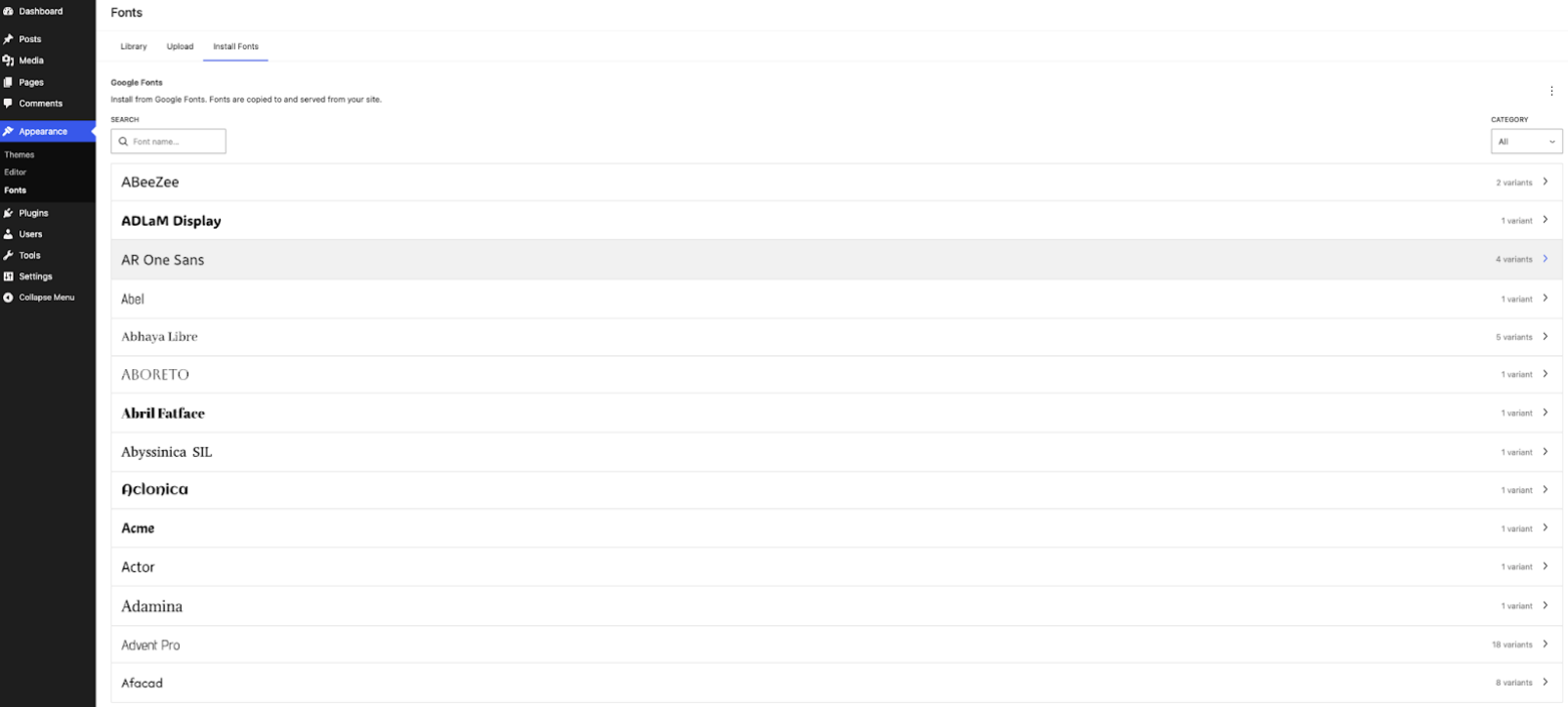
The Font Library, previously limited to certain themes, is now available across all WordPress themes.
Users can install and manage fonts directly from:
Appearance → Fonts
This simplifies font management and removes the need for theme-specific font integrations.
8. Smarter Media Handling and Image Optimization
WordPress 7.0 also improves media performance.
Images are now resized and compressed directly in the browser before upload, reducing server load and improving upload speeds.
Benefits include:
- faster uploads
- smaller file sizes
- reduced server processing
- improved support for modern formats like WebP and AVIF
For media-heavy websites and high-traffic platforms, this change improves performance and scalability.
9. Developer-Focused Improvements
WordPress 7.0 also includes several important updates for developers building custom blocks, plugins, and advanced integrations.
- Always-Iframed Post Editor:The editor now runs inside an iframe. Scripts referencing the global document object need to be reviewed and updated.
- Web Client AI API:WordPress introduces a standardized Web Client AI API layer, allowing plugins and themes to integrate AI providers. No AI provider is included by default, but the architecture opens the door for AI-powered features across the ecosystem.
- Enhanced Block Bindings:Custom dynamic blocks now support full block bindings, expanding possibilities for data-driven content.
- Anchor Support on Dynamic Blocks:Dynamic blocks can properly store and render anchor attributes.
- PHP-Only Block Registration:Blocks and patterns can be registered entirely via PHP, reducing JavaScript dependency in certain build setups.
For developers and agencies building custom WordPress architectures, these changes simplify development workflows and improve maintainability.
What WordPress 7.0 Means for Agencies
Feature releases like WordPress 7.0 affect agencies differently than they affect individual site owners. Agency teams have to think about compatibility across dozens or hundreds of client sites, custom development investments, client communication, and upgrade sequencing.
| Feature | Agency Impact |
| Real-Time Collaboration | Eliminates editor lockout for multi-author editorial clients. Opens opportunities to position sites as modern content platforms. |
| Responsive Block Controls | Reduces workaround plugin dependencies. Clients will start expecting responsive control from the editor — agencies should reset those expectations proactively. |
| AI Client API | Opens new white label service opportunities: AI content tools, automated workflows, and plugin-level AI features built on a standardized API. |
| Always-Iframed Editor | Any agency with custom scripts referencing documents must audit and update before upgrading client sites. |
| Native Breadcrumbs + Icons | Reduces plugin footprint across client sites — meaningful for performance audits and maintenance retainers. |
| Image Optimization | Reduces reliance on third-party optimization plugins for basic use cases. Review whether client stacks can be simplified. |
STRATEGIC NOTE For Agency Leaders
WordPress 7.0 is not just a usability update — it’s a platform signal. The AI Client API and enhanced block bindings indicate where WordPress development is heading. Agencies that build expertise now will be better positioned to deliver AI-integrated WordPress solutions as client demand accelerates.
See how this could work for your agency,
Book a call with E2M’s WordPress delivery team →
How Agencies Should Prepare for WordPress 7.0
Major WordPress releases require structured preparation, especially for agencies managing client sites with Elementor, Oxygen Builder custom themes, advanced plugins, or legacy editor setups. A rushed upgrade on a production site is one of the most avoidable sources of client escalations
WordPress 7.0 Beta Pre-Upgrade Testing Checklist For
- Set up a staging environment that mirrors the production site
- Install WordPress 7.0 Beta on staging (not production)
- Run full plugin compatibility audit — flag anything with known iframe or document object dependencies
- Test all custom blocks for visual and functional regressions
- Review any scripts referencing the global document object — update for iframe compatibility
- Validate responsive block settings across mobile, tablet, and desktop
- Audit media workflows — confirm image upload and compression behave as expected
- Document all issues and prioritize fixes before the April 9 release date
Join the Agency Growth Hub
Playbooks, frameworks, and insights for scaling agencies — built by people who’ve done it.
“I never thought I’d recommend a white-label partner — until I met the E2M team. We’ve used them for WordPress hosting and AI for over two and a half years, and I’ve never heard one bad thing from anyone. Most of our membership uses them now. That says everything”
“We use E2M for WordPress, Shopify, SEO, and AI SEO. The flexibility to scale without hiring every time work spikes is huge. But what keeps us coming back is simpler than that, they listen, they work, and they don’t have egos. That’s rare in this White Label industry.“
WordPress 7.0 vs WordPress 6.x: What’s Actually Different?
While WordPress 6.x introduced major improvements to the block editor and full-site editing, WordPress 7.0 builds on that foundation with stronger collaboration tools, more flexible responsive design controls, and expanded developer capabilities.
Here’s a quick comparison of the most notable features differences.
| Feature | WordPress 6.x | WordPress 7.0 |
| Real-Time Collaboration | Not available | Multiple users can edit posts simultaneously |
| Responsive Block Controls | Limited responsive handling | Blocks can be hidden or shown by device (mobile, tablet, desktop) |
| Admin Interface | Traditional dashboard styling | Cleaner admin UI with smoother transitions |
| Visual Revision Comparison | Basic revision tools | Side-by-side visual revision comparison inside the editor |
| New Core Blocks | Limited additions | New Breadcrumbs and Icons blocks |
| Media Handling | Server-side image processing | Client-side media processing for faster uploads |
| Font Library | Available in select themes | Available across all WordPress themes |
| AI Integration | No core AI framework | Web Client AI API for AI integrations |
| Developer Tools | Gutenberg APIs and block editor tools | Expanded APIs, block bindings, and PHP-only block registration |
For agencies managing multiple client sites, the shift from WordPress 6.x to 7.0 is less about dramatic visual changes and more about workflow improvements and future platform capabilities.
Common WordPress Upgrade Challenges for Agencies
Even well-maintained WordPress sites can encounter issues during major version upgrades. Agencies managing multiple client environments need to anticipate the most common failure points:
- Plugin conflicts with updated core APIs — especially plugins that reference deprecated functions or internal editor structures
- Custom block regressions — blocks built against older Gutenberg APIs may not render correctly in the new editor
- Script compatibility — the always-iframed editor in 7.0 is a breaking change for any JavaScript relying on direct document object access
- Theme-level CSS conflicts — responsive styling assumptions in custom themes may conflict with the new block-level responsive controls
- Workflow disruption — real-time collaboration and revised metabox behavior can surprise content teams not briefed on the changes
Without structured pre-upgrade testing across staging environments, these issues surface on live client sites, which is exactly the scenario agencies need to avoid.
How E2M Supports Agencies with WordPress Development
E2M works exclusively with agencies as a white label WordPress development partner. Our team handles the technical work that keeps agency delivery on track, without adding headcount or internal overhead.
What We Handle for Agency Partners
- WordPress version upgrades and compatibility testing across client environments
- Custom block development, updates, and migration to current Gutenberg APIs
- Plugin compatibility auditing and remediation before major releases
- Theme optimization and custom CSS architecture reviews
- Performance tuning, image optimization, Core Web Vitals, and caching configuration
- WordPress Website SEO services with the plug-and-play AI SEO team
- Staging environment setup, deployment workflows, and rollback planning
Agencies that plan WordPress 7.0 upgrades early have a clear advantage: they can test now, fix issues before the final release, and deliver smooth transitions for clients. Those who wait tend to absorb the compatibility issues after launch, with less time, more pressure, and the risk of production incidents.
Ready to start planning your WordPress 7.0 upgrade strategy?
Talk to E2M about white label WordPress development support and maintenance, pre-upgrade testing, custom block updates, plugin compatibility, and deployment. We work within your workflow and under your brand.
Testing WordPress 7.0 Before the Final Release
Since WordPress 7.0 is currently in beta, it should never be installed on a live production website.
Beta versions are intended for testing and may contain bugs, compatibility issues, or unfinished features.
Instead, agencies and developers should test the release in a safe environment before planning any upgrades.
Recommended Testing Environments
You can evaluate WordPress 7.0 Beta using one of the following setups:
- Local development environment– Ideal for safely testing themes, plugins, and custom functionality.
- Staging environment– Allows you to replicate a live site and test upgrades without impacting users.
- WordPress Playground– A browser-based environment for quickly experimenting with new features.
- WordPress Beta Tester plugin– Lets you easily install beta or development versions within a test site.
Testing early helps identify potential conflicts before the final release.
When WordPress 7.0 officially launches in April, agencies should run a complete compatibility check before updating production sites, especially if the website uses:
- Custom blocks
- Advanced editor customizations
- Legacy metabox-based plugins
- Custom themes or integrations
Taking time to test upgrades ensures a smoother transition and prevents unexpected issues on client websites.
Final Thoughts
WordPress 7.0 is shaping up to be a well-balanced release that improves collaboration, enhances responsive design tools, strengthens media performance, and expands developer infrastructure capabilities.
While many of the changes may appear subtle at first glance, they significantly improve everyday workflows for agencies and development teams.
With the final release approaching, now is the best time to test compatibility, review custom implementations, and prepare your WordPress environment for the upgrade.
Agencies that plan early will be able to adopt these improvements quickly—and deliver even better experiences for their clients.
If your team needs WordPress development support for the upgrade cycle, E2M’s white label dev and design team can handle the technical execution while you stay focused on client strategy and growth.
See how this could work for your agency,
Book a call with E2M’s WordPress delivery team →



Ajay specializes in WordPress automation, headless architectures, and multisite management. He has helped agencies streamline workflows, automate repetitive tasks, and scale WordPress operations efficiently, enabling them to focus on growth and client success.
His technical expertise spans HTML5, CSS3, jQuery, PHP, and platforms including WordPress, Magento, and Opencart. Passionate about innovation, he blends creativity with cutting-edge technology to deliver seamless digital experiences. Outside work, he enjoys traveling, reading, and exploring emerging tech trends.