

TL;DR
- Agencies adopt GoHighLevel for centralized CRM, funnels, and automation that improve speed and margins.
- GoHighLevel leaves SEO unprotected by default, with no built-in enforcement for URLs, metadata, schema, or canonicals.
- Routine page edits in GHL can change URLs or create duplicates, causing loss of accumulated search authority.
- Organic performance on GHL depends on disciplined technical SEO execution rather than platform features.
- Agencies that add structured SEO governance turn GHL from a conversion tool into a sustainable growth channel.
Table of Contents
- 1. Introduction: GoHighLevel and SEO Performance
- 2. Our GHL Technical SEO Audit Findings
- 3. Is GoHighLevel Good for SEO? Understanding the Platform’s Limitations
- 4. Why GoHighLevel Websites Need Professional SEO Services
- 5. Critical GoHighLevel SEO Issues (And How to Fix Them)
- 5.1 URLs Need Manual Oversight
- 5.2 How to Fix GoHighLevel Sitemap Issues and URL Volatility
- 5.3 Missing Metadata Enforcement
- 5.4 How to Edit SEO Metadata in GoHighLevel
- 5.5 Manual Schema Injection
- 5.6 How to Add Schema Markup to GoHighLevel
- 5.7 Authority and Canonical Tags
- 5.8 How to Set Canonical Tags
- 5.9 Optimized XML Sitemaps in GHL
- 5.10 How to Fix GoHighLevel Sitemap Issues
- 5.11 Internal Link Integrity
- 5.12 Mastering Robots.txt Controls
- 5.13 How to Edit Robots.txt in GHL
- 6. White Label SEO Partner for Marketing Agencies
- 7. Productizing Agency SEO Services
- 8. GHL SEO Launch Checklist
- 9. SEO Platform Comparison: WordPress vs GHL vs Wix
- 10. Final Agency Takeaway
Introduction: GoHighLevel and SEO Performance
GoHighLevel makes it easier to run marketing from one place. Funnels, CRM, automation, and websites live inside a single system, which cuts down tool overload, speeds up execution, and improves how agencies operate day to day.
But efficiency doesn’t automatically translate into visibility. SEO issues can still creep in at the page level, even when everything looks fine on the surface.
Pages publish, funnels go live, traffic runs, yet search engines don’t always read those pages the way you expect.
Page experience and technical structure now play a direct role in both rankings and conversions. Even small performance gains matter. According to a study conducted by Deloitte, a 0.1-second improvement in loading speed increased conversions for retail brands by 8.4%.
GoHighLevel gives teams full freedom to build, but it doesn’t enforce SEO rules the way platforms like WordPress or Shopify do with tools such as Yoast.
Pages can go live without clean URLs, proper metadata, or clear signals for search engines.
If those backend details aren’t managed deliberately, organic growth slows early, no matter how good the funnel looks on the front end.
Our GHL Technical SEO Audit Findings
Over the past several weeks, my SEO team audited live GoHighLevel websites across service industries, ecommerce-adjacent businesses, and local brands.
We conducted technical crawls, reviewed Google Search Console data, analyzed index coverage, and assessed how these sites are interpreted by modern AI systems.
A clear pattern showed from our analysis: GoHighLevel sites managed casually often struggle with SEO, while sites managed with structured processes and strong governance consistently perform better.
This GHL SEO guide explains why this happens and what agencies need to understand before offering SEO services for GoHighLevel websites.
If this sounds like what you’re seeing across client sites, talk to our team about GHL SEO support.
Is GoHighLevel Good for SEO? Understanding the Platform’s Limitations
Why GoHighLevel Websites Need Professional SEO Services
GHL excels at turning existing traffic into leads, but it isn’t designed to generate organic traffic on its own.
To transform a GHL site into a growth engine, you must apply professional SEO:
- Platform Limitations: GHL does not natively enforce stable URLs, schema, or canonical tags. These require an expert hand.
- Sustainability: Organic SEO provides a “forever” flow of traffic without a recurring ad bill.
- AI Search Interpretation: Modern tools like ChatGPT and Google AI Overviews rely on structured data. If your site is “messy,” AI will skip you.
- Competitive Edge: Most GHL users rely solely on paid traffic. Optimizing for SEO lets you outrank competitors who are ignoring organic reach.
Critical GoHighLevel SEO Issues (And How to Fix Them)
URLs Need Manual Oversight
The biggest risk in GHL SEO is “URL Drift.”
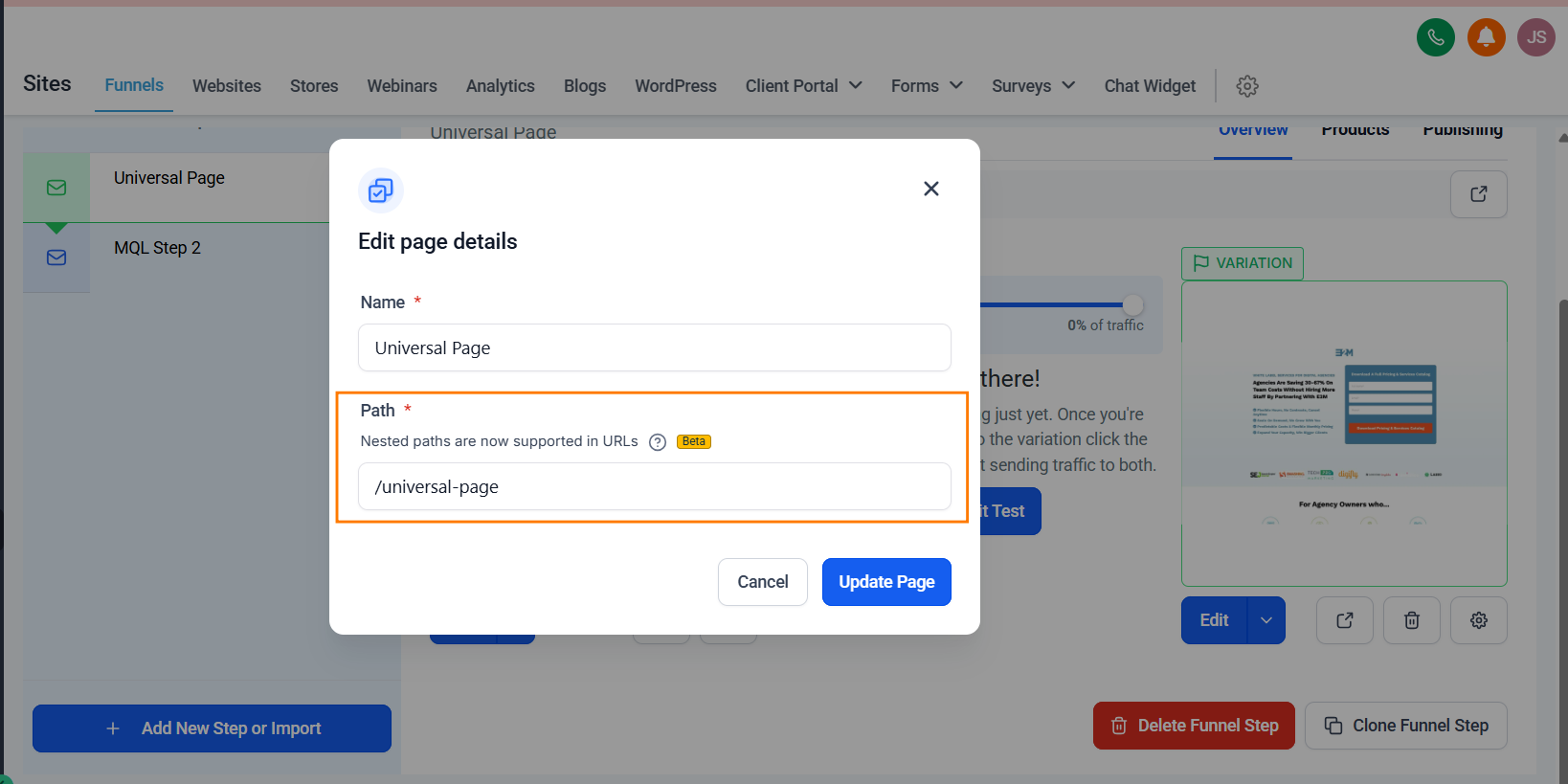
By default, GHL ties the URL path directly to the page name and numbers.
If a team member renames a page for a promotion (e.g., changing “Summer Services” to “Winter Services”), the URL changes instantly.
Why is my GoHighLevel site not ranking on Google? Often, it’s because URL changes have destroyed your link equity.
When a URL changes without a redirect, you lose every bit of “link equity” and authority that page has built.
Even worse, if you create a duplicate page, GHL adds numeric suffixes like /service-1 or /service-2. This splits your ranking power across multiple weak pages instead of one strong one.
The Solution:
- Lock the Path: Manually set a custom URL path in the page settings.
- Permanent Assets: Treat every live URL as a permanent asset that should never be changed without an external 301 redirect.
- Nested Paths: Utilize GHL’s support for nested URL paths to create a logical hierarchy (e.g., /services/plumbing).
How to Fix GoHighLevel Sitemap Issues and URL Volatility
URL stability is the foundation of organic ranking. In GHL, you must manually “lock” your paths to prevent the system from auto-generating junk URLs like /home-1.
Step-by-Step:
- Open the Builder: Navigate to Sites > Funnels (or Websites) and select your project.
- Select the Page: Click on the specific page or funnel step you want to edit.
- Find Publishing Settings: Click the Publishing tab at the top of the step editor.
- Lock the Path: Locate the Step Path field. Type your clean, keyword-rich URL (e.g., best-seo-services) and click Update Step.
- Redirecting Old URLs: If you must change a live URL, go to Settings > URL Redirects and map the old path to the new one to preserve link equity.
Does GoHighLevel support 301 redirects? Yes, but you must configure them manually in the domain settings.
Missing Metadata Enforcement
Metadata is the “billboard” for your website in search results.
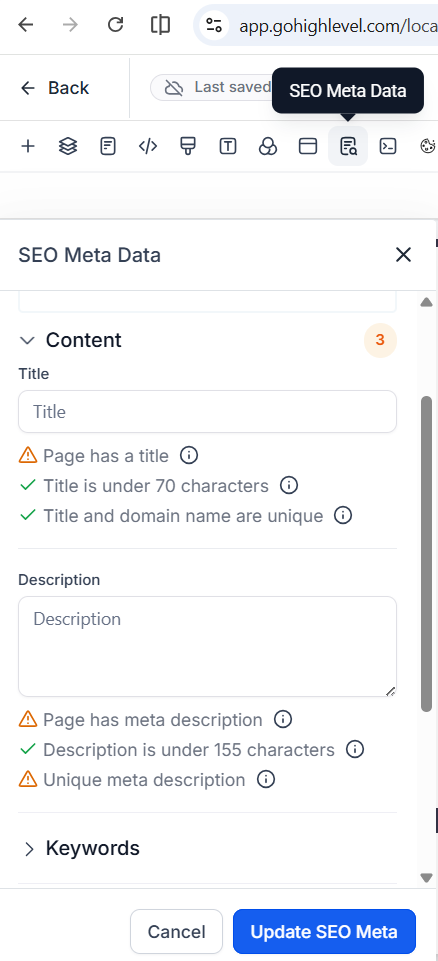
GHL provides fields for SEO titles and descriptions, but it offers zero real-time feedback.
In our audits, we frequently find GHL sites with “Home – Page 1” as the title and no meta description at all.
This results in poor click-through rates and confused search crawlers.
Furthermore, GHL lacks native support for Open Graph (OG) tags and Twitter Cards.
Without these, when your clients share their funnel links on social media, the preview looks broken or generic, hurting brand trust.
The Solution:
You must treat metadata as mandatory infrastructure. Every indexable page needs a unique, keyword-rich title and a compelling description.
Since GHL won’t “nudge” you to do it, you need a checklist for every new page launch.
How to Edit SEO Metadata in GoHighLevel
Since GHL doesn’t have an automated plugin like Yoast, you must manually enter and update metadata for every single page to appear correctly in search results.
Step-by-Step:
- Enter the Editor: Open your page in the GHL Page Builder.
- Open SEO Settings: In the top menu bar, click on Settings and select SEO Meta Data.
- Fill the Fields:
- Title: Keep it under 70 characters.
- Description: Use a compelling CTA under 155 characters.
- Social Image: Upload a 1200x630px image for “Open Graph” previews on Facebook/LinkedIn.
- Update: Click Update SEO Meta and then Save the page.
Manual Schema Insertion
How do I add schema markup to GoHighLevel? This is one of the most common questions from agencies offering white label SEO for GoHighLevel.
Schema (Structured Data) is how you tell Google exactly what a business does, where it is located, and what people think of it (reviews).
GHL has no native schema builder. This means if you want your client to appear in the “Local Map Pack” or show up with FAQ snippets in search, you have to do the heavy lifting.
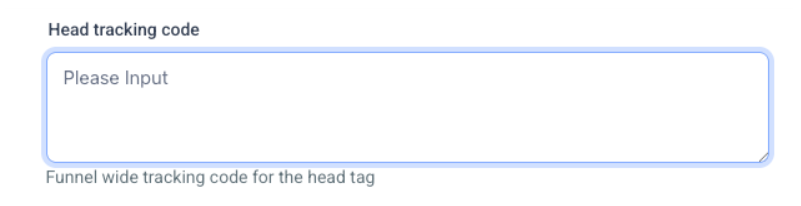
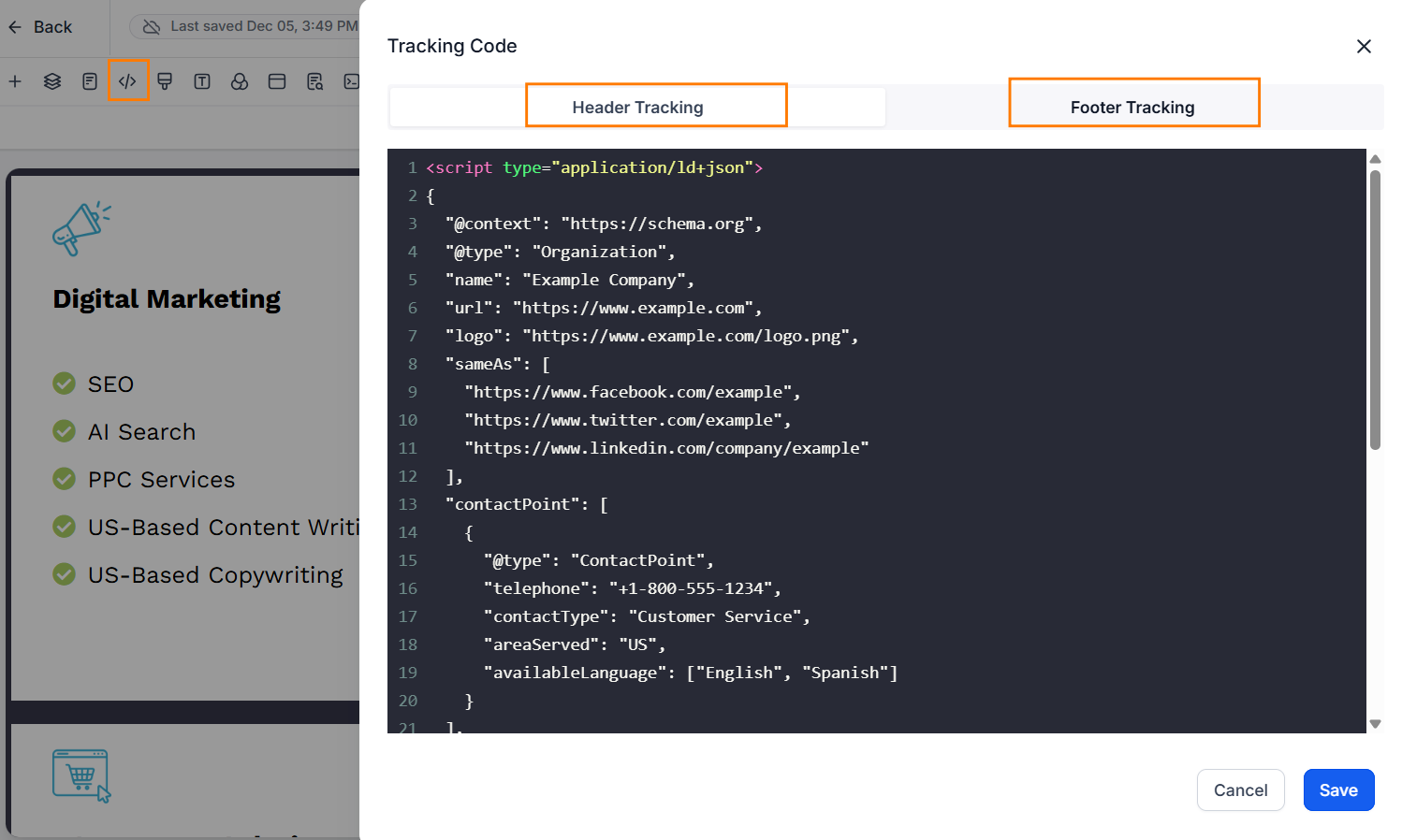
You must manually write JSON-LD code and inject it into the Header Tracking section of the page.
Without a schema, your high-quality content looks like “plain text” to a search engine. With it, you turn your GHL pages into rich, interactive search results that command attention.
How to Add Schema Markup to GoHighLevel
Step-by-Step:
- Generate Your Code: Use a free tool like technicalseo Schema Generator to create your JSON-LD code.
- Open Page Tracking: In the GHL Page Builder, go to Settings > Tracking Code.
- Inject the Script: Paste your JSON-LD code into the Header Tracking Code box.
- Publish: Click Save and then Publish. Note: Changes won’t show on the live site until you hit Publish.
Authority and Canonical Tags
A “Canonical Tag” is a signal that tells Google: “I know there are other versions of this page, but this one is the master copy.”
In GHL, blog posts and funnel steps often create duplicate content footprints.
If you don’t define a canonical URL, search engines get confused about which page to rank.
This leads to “keyword cannibalization,” where your own pages fight each other for the same spot, and both end up losing.
The Solution:
For every high-value page, you must manually define the Canonical URL in the SEO Meta Data settings.
This ensures all “ranking power” from various links is consolidated into a single, authoritative URL.
How to Set Canonical Tags
Step-by-Step (Websites/Funnels):
- Go to the SEO Meta Data settings (same as the metadata step above).
- Scroll to the bottom of the popup to find the Canonical Link field.
- Paste the full URL (including https://) of the primary page.
- For Blogs: Navigate to Sites > Blogs, click the three dots on a post, and select Canonical Links to set the authoritative source.
Optimized XML Sitemaps in GHL
GHL automatically creates a sitemap, but it’s often filled with “junk.” It frequently includes:
- Internal thank-you pages
- Form-fill confirmation steps
- Privacy policy pages that don’t need to rank
When a sitemap is cluttered, Google wastes its “crawl budget” on useless pages and might miss your actual money-making service pages.
A clean sitemap acts as a map for Google, highlighting only the content that drives revenue.
You must manually curate what gets indexed and what stays hidden.
How to Fix GoHighLevel Sitemap Issues
This is done at the domain level to control how search engines crawl your entire site.
Step-by-Step:
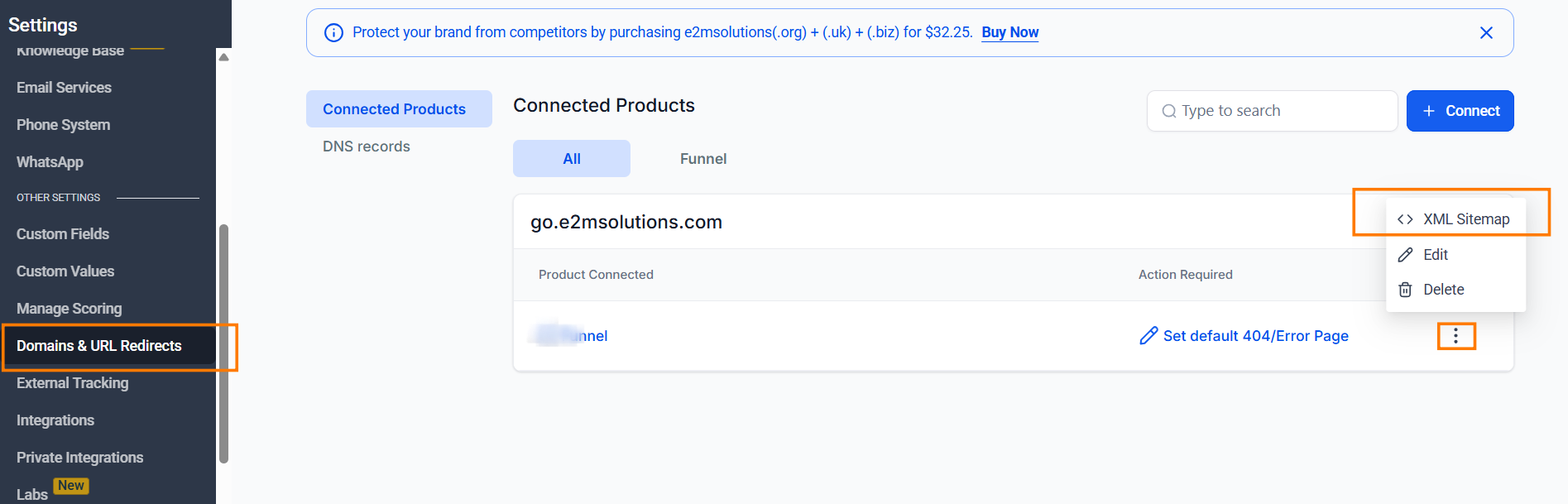
- Go to Domain Settings: Navigate to Settings > Domains.
- Access Management: Click the three dots (Manage) next to your domain.
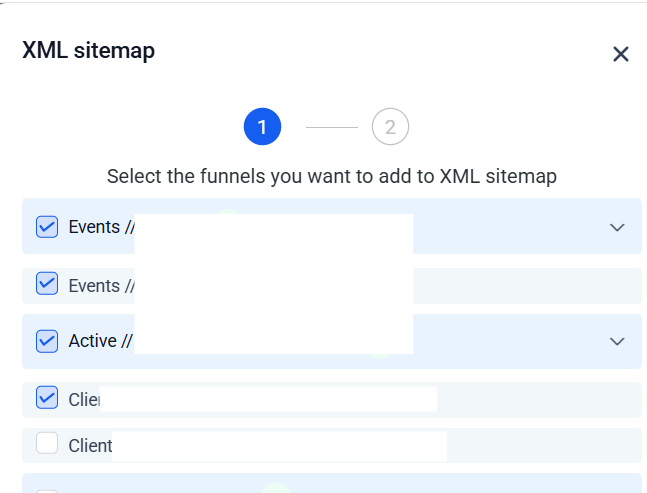
- Generate Sitemap: In the same management area, find XML Sitemap. Select the pages you want to include and click Generate.
- Submit to GSC: Copy the sitemap URL (domain.com/sitemap.xml) and paste it into your Google Search Console.
Internal Link Integrity
Internal links are the “connective tissue” of your website.
They tell Google which pages are the most important.
The problem in GHL is that the platform doesn’t offer a broken-link report.
If you delete a funnel step or change a page path, every internal link pointing to that page breaks silently.
This kills the “flow” of authority and creates a poor user experience. Successful GHL SEO requires regular manual audits to ensure your internal link structure remains intact and your “Topical Authority” remains strong.
Mastering Robots.txt Controls
The robots.txt file is the “gatekeeper” of your website.
It tells search engine crawlers which parts of the site they are allowed to visit and which they should ignore. In traditional CMS platforms, this file is often automated or hidden.
In GoHighLevel, you have the power to edit it, but with that power comes the risk of accidentally “de-indexing” your entire site.
By default, GHL creates a basic robots file, but it often lacks the specific instructions needed to protect your “Crawl Budget.”
Why You Must Customize It:
- Block Low-Value Pages: You don’t want Google wasting time crawling your internal “Thank You” pages, test funnels, or privacy policy drafts.
- Protect Client Data: Use it to discourage bots from accessing sensitive lead-gen folders.
- Sitemap Discovery: It is best practice to include your Sitemap URL at the bottom of the robots.txt file to ensure Google finds it immediately.
How to Edit Robots.txt in GHL
Unlike WordPress, where you might use a plugin, GHL handles this at the Domain Level:
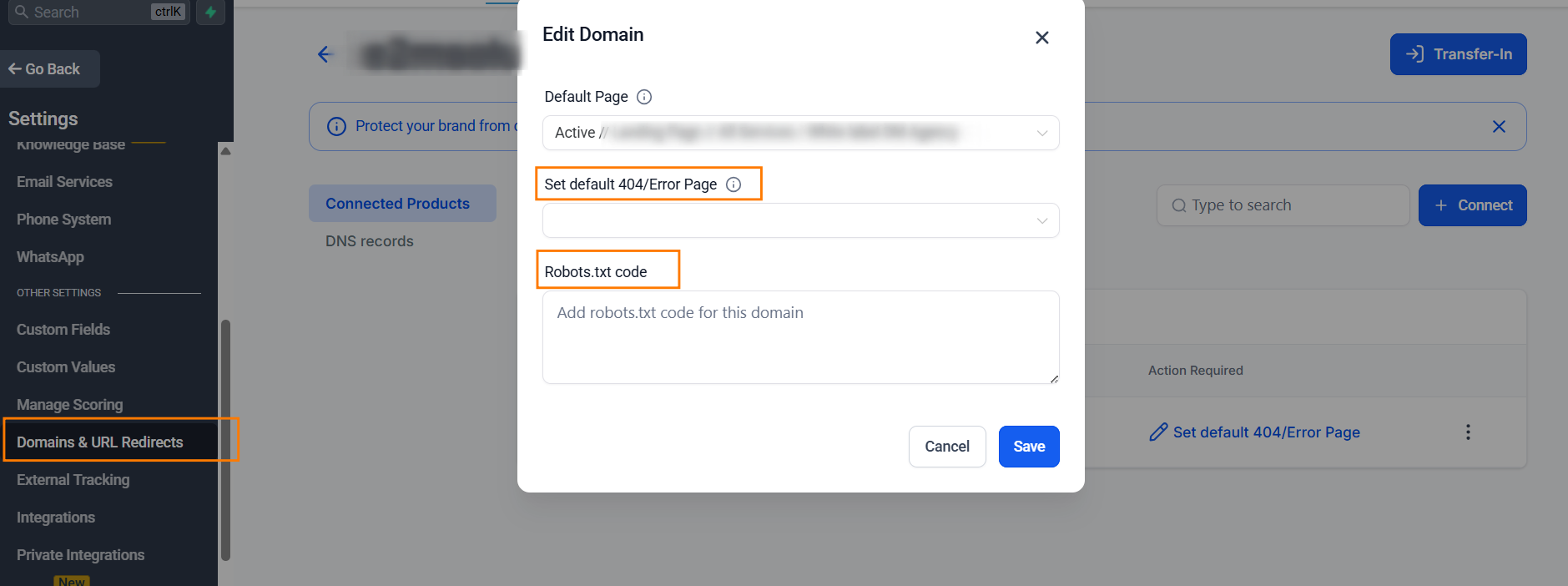
- Navigate to Settings > Domains.
- Find your domain and click the three dots (Manage).
- Look for the Robots.txt or XML Sitemap settings (the location can vary slightly depending on your GHL version, but it is always tied to the Domain settings).
- Paste your custom directives and save.
White Label SEO Partner for GHL Marketing Agencies
Productizing Agency SEO Services
The secret to scaling GHL SEO isn’t just “doing the work”; it’s selling the governance.
Smart agencies don’t just promise rankings; they promise a structured system that protects the client’s digital footprint.
You should position your SEO service as the “Technical Guardrail” that GHL lacks.
This elevates your agency from a service provider to a strategic partner that ensures long-term site stability and organic visibility.
GHL SEO Launch Checklist
- Custom URL: Manually set and lock the URL path.
- SEO Title: Keyword-frontloaded
- Meta Description: High-intent CTA
- Header Hierarchy: One H1 per page; logical H2/H3 flow.
- Image Alt Text: Descriptive keywords for all images.
- Canonical Tag: Set the primary URL for the page.
- Schema Markup: Inject JSON-LD in the header.
- Sitemap Cleanup: Exclude utility/thank-you pages.
- robots.txt: Ensure important pages are crawlable; block non-SEO URLs (funnels, thank-you pages, utilities)
- Page Speed Optimization: Compress images, reduce heavy scripts, and monitor Core Web Vitals
Managing this checklist across multiple clients gets heavy fast.→ Book a call to see how we handle this as a white label SEO partner
SEO Platform Comparison: WordPress vs GHL vs Wix
| Feature | WordPress (with Plugins) | GoHighLevel (GHL) | Wix |
|---|---|---|---|
| URL Control | Excellent. Locked by default; easy to customize. | Volatile. Tied to page names and numbers; can change silently. | Good. Offers custom slugs but has some path restrictions. |
| SEO Guidance | High. Plugins like Yoast/RankMath give real-time scores. | None. Manual entry only; no feedback or “red/green” lights. | Moderate. Built-in “SEO Wiz” checklist for beginners. |
| Schema Markup | Automated. Plugins generate JSON-LD for you. | Manual. Must be hand-coded and injected into headers. | Semi-Automated. Basic schema is built-in; custom is possible. |
| Sitemap Control | Full. Can include/exclude any page with a click. | Automatic. Includes “junk” pages; harder to filter. | Basic. Automatically generated; limited manual control. |
| Site Speed | Variable. Depends on hosting and bloat. | Excellent. Fast, CDN-hosted infrastructure. | Good. Consistent, but often heavy on JavaScript. |
| Canonical Tags | Automatic. Handled by SEO plugins. | Manual. Must be defined per page or authority is split. | Automatic. Handled by Wix settings. |
| Technical Ownership | Full. You own the database and the code. | Locked. You are renting a specialized ecosystem. | Locked. Proprietary closed-source system. |
| Best Use Case | Content-heavy blogs and complex SEO sites. | Lead gen, funnels, and CRM-integrated brands. | Simple business sites and DIY portfolios. |
Key Takeaway for Agencies
Can I use Yoast or RankMath on GoHighLevel? No. WordPress is the “Gold Standard” for technical SEO because it protects you from yourself with plugins like Yoast and RankMath.
GoHighLevel is the “Speed King” for conversions, but it requires an SEO specialist to manually build the walls that WordPress builds automatically.
Wix is a middle ground but lacks the advanced CRM and automation power that makes GHL so valuable for agencies.
Final Agency Takeaway
GoHighLevel is a Ferrari of conversion, but SEO is the road it drives on.
If the road is broken, the car won’t go anywhere. Organic search rewards discipline, consistency, and technical precision.
By enforcing the SEO standards that the platform leaves optional, you can deliver measurable, long-term results for your clients.
Ready to scale?
If your Web agency is using GHL for funnels and automation for Clients but wants organic growth to be reliable, not fragile, this is the gap we help close.
E2M Solutions supports agencies with white label SEO for GoHighLevel, focused on URL stability, indexing control, schema, and long-term site governance.
You stay client-facing. We handle the SEO technical foundation behind the scenes.



Vishal studied at Federation University Australia and has managed multi-million-dollar campaigns and actively participates in global industry events, including BrightonSEO and MavCon Live. His expertise spans technical SEO, content marketing, PPC optimization, and agency partnership development.
Outside of work, he enjoys traveling, playing cricket, and exploring new trends.